
AI tools can generate an entire SaaS frontend in an afternoon. A coding assistant can scaffold a Laravel API with auth, CRUD, and tests in hours instead of days. The barrier to building has never been lower.
And that's exactly why most MVPs still fail.
The bottleneck was never code — it was validation. In 2026, AI makes building so fast that founders skip the most important phase entirely: the first two weeks where you don't write a single line of code. They ship untested products faster than ever. The failure rate hasn't changed — it's just accelerated.
After shipping dozens of MVPs across SaaS, e-learning, and marketplace products at Treesha Infotech, here's the process we follow. AI has compressed our development sprints significantly, but the validation and strategy phases are exactly the same length they were five years ago — because no AI tool can interview your customers for you.
In This Article
What an MVP Actually Is (and Isn't)
An MVP is the smallest product you can build to test whether your core business assumption is true.
It is not:
- A prototype — prototypes demonstrate ideas. MVPs generate real user behavior data.
- A beta — betas are feature-complete products being polished. MVPs are deliberately incomplete.
- Version 1.0 of your final product — your final product will look nothing like your MVP if you're doing it right.
- A landing page with a "coming soon" button — that tests interest, not viability. An MVP tests whether people will actually use and pay for your solution.
The "viable" part matters. An MVP has to work well enough that a real user can accomplish the core task and give you meaningful feedback. Broken, confusing, or half-built doesn't generate learning — it generates abandonment.
Good MVPs vs Over-Built MVPs
Good MVP: An invoicing SaaS that lets freelancers create an invoice, send it via email, and mark it as paid. Three screens. One user flow. Enough to learn whether freelancers will switch from their current tool.
Over-built MVP: The same invoicing SaaS but with recurring invoices, expense tracking, tax calculations, multi-currency, client portals, Stripe integration, QuickBooks sync, and a mobile app. That's not an MVP — that's a 12-month product roadmap crammed into a "first version."
Before You Write Code: The 2-Week Validation Sprint
This is the phase that 80% of founders skip — and the reason 42% of startups fail because there's no market need for their product. AI makes this phase tempting to skip ("I can build it in a weekend, why bother researching?"). Resist that impulse.
Week 1: Problem Validation
Talk to 5-10 potential users. Not friends. Not family. People who have the problem you're solving and are actively spending time or money working around it.
Ask:
- "How do you currently handle [problem]?" — reveals their existing workflow
- "What's the most frustrating part?" — identifies the pain you're solving
- "How much time/money do you spend on this?" — validates willingness to pay
- "If I could fix [specific thing], would you try it?" — tests demand
Don't ask: "Would you use an app that does X?" — people say yes to be polite. It means nothing.
Where AI helps in Week 1: Use AI to research competitors (ask it to analyze feature sets, pricing models, and gaps in existing solutions), summarize user interview transcripts, and identify patterns across conversations. AI is excellent at synthesis — feeding it five interview transcripts and asking "what are the common pain points?" gives you a head start on analysis. But the conversations themselves must be human-to-human. No AI tool can read body language or follow up on an unexpected answer.
Week 2: Assumption Mapping & Feature Scoping
Take what you learned and define:
1. Your core assumption — one sentence. "Freelancers will pay a monthly fee for an invoicing tool that sends professional invoices in under 2 minutes." 2. The one metric that proves it — "10% of trial users convert to paid within 30 days." 3. The feature list — everything you could build. We'll cut this down in the prioritization step. 4. Technical feasibility — can this be built in 8-10 weeks with the chosen stack?
Where AI helps in Week 2: Feed your feature list into an AI tool and ask it to map each feature against your core assumption. "Does this feature help test whether freelancers will pay for faster invoicing?" AI won't make the final cut, but it forces you to articulate why each feature exists — and flags the ones where you can't.
How AI Changes the MVP Process in 2026
Before walking through the timeline, let's be clear about what AI tools actually change — and what they don't.
What AI Accelerates
UI generation. Tools like v0 by Vercel can generate production-quality React components from a text prompt. A dashboard layout that took a designer 2 days now takes an afternoon of prompting and refinement. This compresses the design-to-code gap significantly.
Backend scaffolding. AI coding assistants (Claude Code, Cursor, GitHub Copilot) can generate Laravel API routes, controllers, migrations, and tests from descriptions. CRUD operations that took a day now take an hour. Authentication, file uploads, email notifications — the boilerplate is handled.
Testing. AI can generate test suites from your existing code. Not perfect, but it gets you 70% coverage quickly, and you refine from there.
Documentation. API docs, deployment guides, README files — AI handles these in minutes instead of hours.
What AI Does NOT Change
Validation. No AI tool can sit in a coffee shop with your potential customer and ask "how do you currently solve this problem?" User interviews, assumption mapping, and problem validation are human work. They take the same 2 weeks they always did.
Product decisions. AI can build features fast. It cannot tell you which features to build. The MoSCoW prioritization, the scope-cutting conversations, the "does this test our core assumption?" filter — that's founder judgment.
User testing. Watching real humans struggle with your prototype reveals things no AI analysis can. This phase doesn't compress.
Launch strategy. Landing pages, onboarding flows, analytics setup, and go-to-market planning require strategic thinking, not code generation.
The Net Effect on Timeline
| Phase | Before AI | With AI (2026) | Change |
|---|---|---|---|
| Discovery & Validation | 2 weeks | 2 weeks | No change |
| Design | 2 weeks | 1-2 weeks | AI generates UI faster |
| Development | 5-6 weeks | 3-4 weeks | Biggest compression |
| Testing & Polish | 2-3 weeks | 1-2 weeks | AI-generated tests help |
| Launch Prep | 1 week | 1 week | No change |
| Total | 12-14 weeks | 8-11 weeks | ~30% faster |
The development phase compresses the most — roughly 40-50% faster with AI assistance. But the total timeline only shrinks about 30% because the human-dependent phases (validation, user testing, launch strategy) don't change.
The Timeline: Week by Week
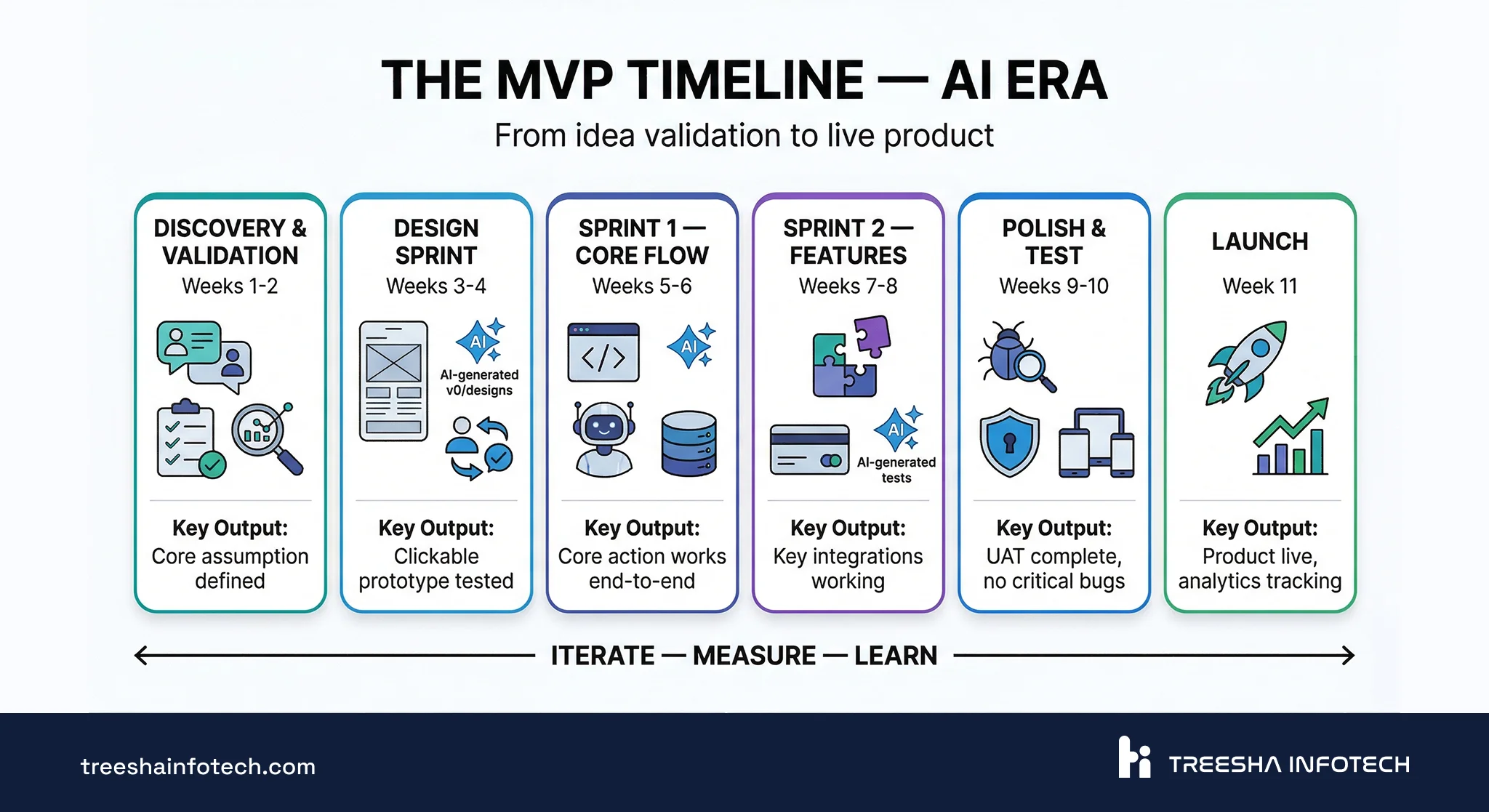
| Phase | Weeks | What Gets Done | Exit Criteria |
|---|---|---|---|
| Discovery & Validation | 1-2 | User interviews, assumption mapping, feature prioritization, technical feasibility | Core assumption defined, feature list prioritized, tech stack chosen |
| Design Sprint | 3-4 | Wireframes, core user flows, AI-assisted UI generation, clickable prototype | Prototype tested with 3-5 users, major UX issues resolved |
| Development — Sprint 1 | 5-6 | Auth, data model, one complete user flow (AI-assisted scaffolding) | User can sign up and complete the core action |
| Development — Sprint 2 | 7-8 | Second flow, integrations, AI-generated test coverage | Core features functional, integrations working |
| Testing & Polish | 9-10 | QA, security, performance, UAT with 3-5 real users | No critical bugs, UAT feedback incorporated |
| Launch Prep & Deploy | 11 | Production environment, monitoring, landing page, onboarding, analytics | Product is live, analytics tracking confirmed |
Each phase has clear exit criteria. You don't move to the next phase until the current one is done. This prevents the most common MVP problem: starting development before validation is complete.
What Happens in Each Development Sprint
Sprint 1 (Weeks 5-6): Build the one flow that proves your core assumption works. For the invoicing example: sign up → create invoice → send via email. AI handles the scaffolding — migrations, models, controllers, basic UI components. The team focuses on business logic, edge cases, and the UX details AI can't get right.
Sprint 2 (Weeks 7-8): Build the supporting flows. Payment integration, dashboard, settings, the second most important user journey. AI generates test suites alongside the code. Every sprint ends with a working demo the founder can click through.
Testing & Polish (Weeks 9-10): Connect everything together. Error handling, empty states, loading indicators, responsive tweaks, security review. AI-generated tests catch regressions while the team focuses on user acceptance testing with real people.
Every sprint ends with a demo. Not a status meeting — a working product the founder can use. If the sprint didn't produce something clickable, something went wrong.
Choosing Your Tech Stack
The tech stack should match your product type. Here's what we actually build with and recommend based on years of production experience:
Python/Django, Ruby on Rails, and full-stack Next.js with Supabase or Convex are also strong AI-era MVP stacks — AI coding assistants generate quality code for all of them. We recommend Laravel + Next.js because it's what we've shipped with for 11+ years, not because the alternatives can't do the job. Pick what your team can move fastest in.
SaaS / Web Application MVP
| Layer | Technology | Why |
|---|---|---|
| Backend API | Laravel | Handles complex business logic, authentication, queues, and background jobs out of the box. Mature ecosystem with packages for almost everything. |
| Frontend | Next.js | Server-side rendering for SEO, fast page loads, React ecosystem for UI components. |
| Database | PostgreSQL | Reliable, scalable, supports JSON columns for flexible schemas during early iteration. |
| Backend hosting | Laravel Cloud, or any VPS/cloud (AWS, GCP, DigitalOcean) | Laravel Cloud for the simplest deployment path. VPS for more control. |
| Frontend hosting | Vercel | Built for Next.js. Automatic deployments, edge network, zero config. |
This is our default stack for web application development. It scales from MVP to millions of users without a rewrite. We covered the backend in depth in our Laravel API Best Practices guide, and the frontend choice in Next.js vs Laravel.
E-learning Platform
Start with Moodle. It gives you SCORM, xAPI, LTI, certificates, gradebook, multi-tenancy, and reporting out of the box. Customized with themes, plugins, and IOMAD for multi-tenant setups — this covers 90% of e-learning MVP requirements without writing a single line of application code.
Only go full custom (Laravel + Next.js) if Moodle fundamentally can't meet your core requirement — for example, a gamified learning app with a completely non-traditional UX that doesn't map to Moodle's course-based model.
We've covered Moodle in detail: How Moodle Powers Enterprise E-Learning and Moodle Customization Guide.
Mobile-first Product
Flutter for cross-platform (iOS + Android from one codebase) or native development (Swift for iOS, Kotlin for Android) when platform-specific UX is critical — paired with a Laravel API backend.
Flutter gives you near-native performance with a single codebase, which is ideal for MVP speed. Go native when the product depends heavily on device-specific features like camera processing, AR, complex animations, or deep OS integration.
Content / Marketing Platform
Next.js + headless CMS (WordPress or Sanity) hosted on Vercel. Static generation for speed and SEO, CMS dashboard for non-technical content editors. Great for media sites, blogs, documentation platforms, and marketing-heavy products.
API-first / B2B Product
Laravel + PostgreSQL + Redis. When the product IS the API — B2B data platforms, integration services, developer tools. Laravel's API resources, rate limiting, and queue system handle this neatly. Host on Laravel Cloud or any VPS/cloud provider.
Feature Prioritization: MoSCoW in Practice
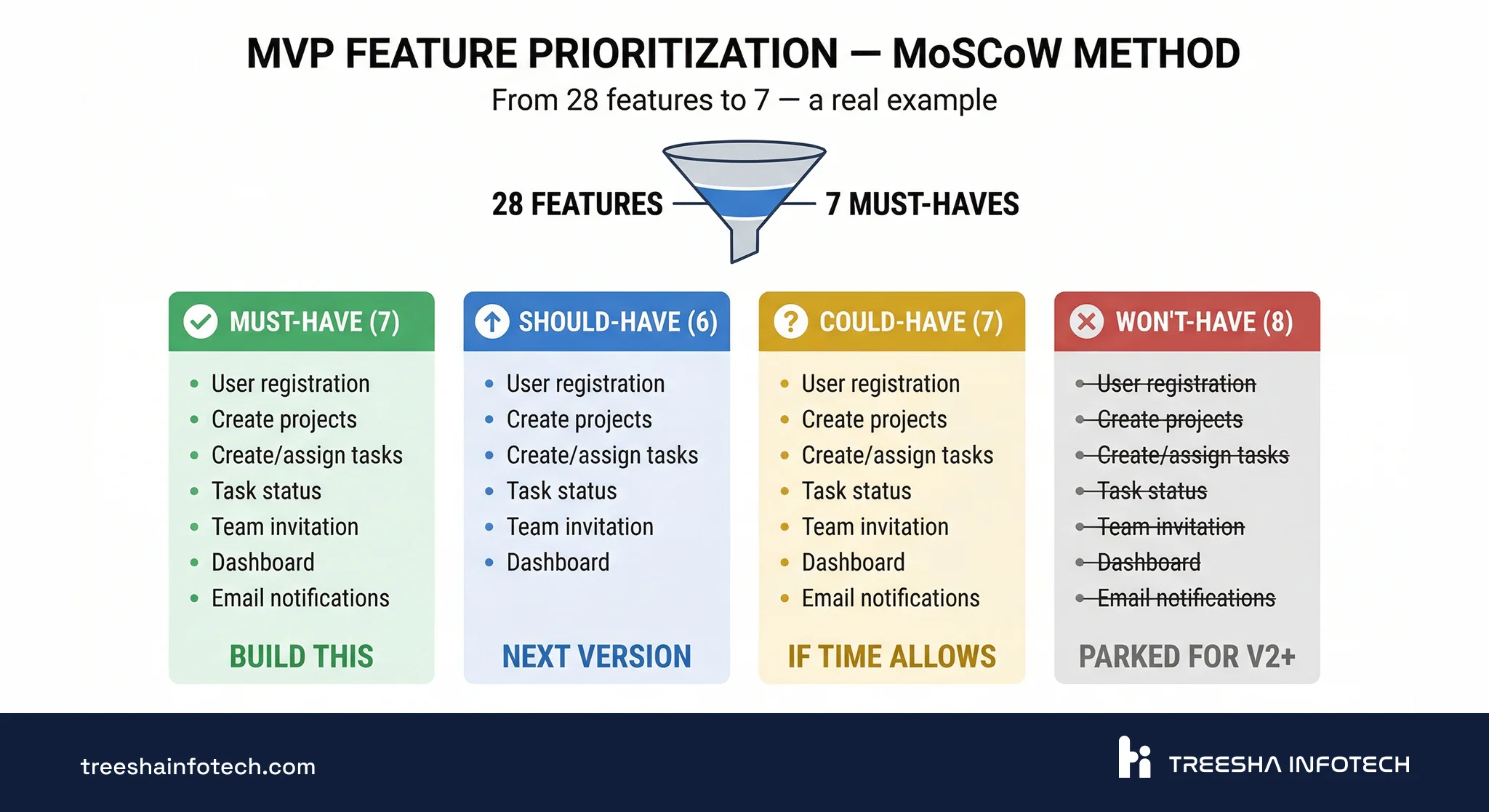
Every founder starts with too many features. The MoSCoW method forces the hard conversation early — before scope creep eats your timeline and budget.
The Four Categories
- Must-Have — without this, the MVP can't test the core assumption. If you cut it, the product doesn't work.
- Should-Have — important, makes the product significantly better, but the MVP could launch without it.
- Could-Have — nice to have. Include only if there's time left in the sprint.
- Won't-Have (this time) — explicitly parked for v2. Writing it down prevents the "but we could just add..." conversation later.
Real Example: Project Management SaaS
A founder came to us with this initial feature list (28 features). Here's how we prioritized:
Must-Have (7 features):
- User registration and login
- Create/edit projects
- Create/assign tasks within projects
- Task status (to-do, in progress, done)
- Team member invitation
- Basic dashboard showing active projects
- Email notifications for task assignments
Should-Have (6 features):
- File attachments on tasks
- Due dates and calendar view
- Comments on tasks
- Search and filter
- User roles (admin, member)
- Activity log
Could-Have (7 features):
- Time tracking
- Kanban board view
- Mobile-responsive design (beyond basic)
- Reporting and charts
- Recurring tasks
- Subtasks
- Dark mode
Won't-Have this time (8 features):
- Integrations (Slack, GitHub, Jira)
- Custom workflows
- Gantt charts
- Client portal
- Billing and invoicing
- Templates
- API for third-party developers
- Native mobile app
We went from 28 features to 7. The MVP launched in 11 weeks. Within 30 days, they had enough user data to know which "Should-Have" features to build next — and which ones users never asked for.
AI tip for prioritization: Before the MoSCoW session, use AI to analyze 5-10 competing products. Ask it to list every feature each competitor offers and identify which features appear in all of them (table stakes) versus which are unique differentiators. This gives the prioritization conversation a data-backed starting point instead of gut feelings.
Design That's Fast, Not Fancy
Your MVP needs a design sprint, not a design phase. In 2026, AI tools have compressed this phase significantly.
Week 3: Wireframes for core screens only. Start with the user flow: "How does someone go from sign up to completing the core action in the fewest steps?" Use Figma or even describe your screens to an AI tool — v0 by Vercel can generate production-quality React UI components from a text description. A dashboard layout that took a designer two full days now takes an afternoon of prompting, reviewing, and refining.
Week 4: UI design for the 5-8 key screens. Use AI-generated components as a starting point, then customize with Tailwind CSS for a clean, professional look. Build a clickable prototype in Figma or directly in code (AI makes the gap between "design" and "working code" almost disappear for standard UI patterns).
Test with 3-5 users. Not a formal usability study — just put the prototype in front of real people and watch where they get confused. Fix the obvious problems before development starts. This step is irreplaceable — no AI tool can watch a user struggle with your navigation and understand why.
What to Skip in the MVP Design Phase
- A full design system with documented components — that's for v2
- Custom illustrations and icons — use an existing icon library (Lucide, Heroicons)
- Animations and transitions — add polish later
- Responsive design for every screen size — focus on the primary device your users will use
- Style guides and brand guidelines — a logo, two colors, and one font is enough
- Pixel-perfect custom designs when AI-generated components look professional enough
The goal is "looks professional and doesn't confuse anyone" — not "wins a design award." AI tools have made "professional enough" much faster to achieve.
Development: AI-Assisted Sprints With Demos
MVP development follows agile sprints, but stripped of the bureaucracy that makes enterprise agile slow — and turbocharged with AI tools.
How We Run MVP Sprints in 2026
Sprint planning (2 hours): Pick the features for this sprint from the Must-Have list. Define what "done" means for each one. No story points — just "can a user do this thing by sprint end?"
Daily check-in (15 minutes): What's done, what's blocked. Not a status report — a blocker-clearing session.
AI-assisted development: During each sprint, AI coding assistants handle the predictable work — generating migrations, scaffolding CRUD operations, writing boilerplate tests, creating API documentation. The development team focuses on what AI can't do well: business logic decisions, UX refinements, integration debugging, and security review.
Sprint demo (1 hour): At the end of every two weeks, the founder clicks through the working product. Not a slide deck. Not a video recording. A live product they can interact with. Feedback goes directly into the next sprint.
Sprint-by-Sprint Deliverables
Sprint 1: Authentication + data model + one complete flow. AI scaffolds the auth system, models, and controllers. The team builds the business logic and core UX. The founder can sign up, do the core action, and see the result.
Sprint 2: Second flow + key integrations. Payment processing, email delivery, the second most important user journey. AI generates test coverage alongside new code. The product now handles 80% of the core use case.
Polish sprint (often merged into Sprint 2 thanks to AI acceleration): Edge cases, error handling, empty states, loading indicators, responsive tweaks. The product goes from "works for the demo" to "works for real users."
What AI Changes in Daily Development
| Task | Before AI | With AI (2026) |
|---|---|---|
| Database migrations + models | Write manually (1-2 hours) | Generate from schema description (15 min + review) |
| CRUD controllers + routes | Write manually (2-3 hours per resource) | Generate + customize (30 min per resource) |
| Frontend components | Build from scratch (4-8 hours per screen) | Generate with v0/AI, then refine (1-2 hours per screen) |
| Unit/feature tests | Often skipped "for later" | Generated alongside code (adds 20 min, saves hours in QA) |
| API documentation | Written after launch (or never) | Generated from code automatically |
The pattern: AI handles the 70% that's predictable. Your team focuses on the 30% that requires judgment. Total development time compresses by 40-50%, but the quality of that 30% matters more than ever — because the easy parts are no longer the bottleneck.
The Launch Is Not the Finish Line
Most MVP articles end at "deploy." That's where the real work starts.
What to Measure in the First 30 Days
| Metric | What It Tells You | Target |
|---|---|---|
| Activation rate | % of signups who complete the core action | 25%+ |
| Day-1 retention | % of users who return the next day | 15%+ |
| Day-7 retention | % of users who return after a week | 10%+ |
| Core action completion | % of sessions where the user does the main thing | 40%+ |
| NPS (Net Promoter Score) | Would users recommend this? Survey 20+ users | 30+ |
| Time to value | How long from signup to "aha moment" | Under 5 minutes |
Set up analytics before launch — not after. PostHog (open-source), Mixpanel, or even Vercel Analytics with custom events. You need data from day one.
AI-assisted analysis: Feed your analytics data and user feedback into AI tools weekly. "Here are 50 support tickets from the first two weeks — what are the top 5 recurring issues?" or "Here's our usage data — which features have the lowest engagement?" AI excels at pattern detection across messy qualitative data. It won't make the iterate/pivot/kill decision for you, but it surfaces the signals faster than manual analysis.
The 30-Day Decision Framework
Based on your metrics, you'll make one of three decisions:
Iterate — core assumption validated, users are engaging, but specific parts of the experience need improvement. This is the best outcome. Build the Should-Have features based on what users actually request.
Pivot — users sign up but don't engage with the core feature, or they use the product in a way you didn't expect. The problem is real, but your solution isn't right. Adjust the approach, not the mission.
Kill — no traction after 30 days of active promotion. Users don't sign up, don't return, or don't find value. This is painful but saves you from spending 12 more months on something that won't work. The MVP did its job — it told you the truth early.
Build vs Outsource: The Honest Comparison
AI has shifted this calculus. A 3-person team with AI tools in 2026 produces what a 6-person team did in 2023. This means smaller, more senior teams — whether in-house, freelance, or agency — deliver more per dollar.
| Factor | In-House Team | Freelancer | Agency |
|---|---|---|---|
| Time to start | 2-3 months (hiring) | 1-2 weeks | 1-2 weeks |
| Development speed | Slower start, ramps up over time | Variable — depends on individual | Fastest — team is already assembled |
| AI leverage | High if team adopts AI tools | Variable — some use AI, some don't | High — agencies using AI ship 40-50% faster |
| Process & structure | You define it | Usually none | Established (sprints, QA, demos) |
| Code quality | Depends on who you hire | Unpredictable | Consistent if the agency is good |
| Knowledge retention | Full — team stays | Low — freelancer moves on | Medium — requires handoff planning |
| Ongoing cost | High (salaries + benefits + tools) | Low per hour, unpredictable total | Higher per hour, predictable total |
| Best for | Post-MVP iteration and scaling | Small, well-defined tasks | Getting to launch fast with quality |
The AI-Era Shift: Smaller Teams, Higher Output
Before AI, an MVP typically required a backend developer, a frontend developer, a designer, and a QA tester — minimum four people. In 2026, a senior full-stack developer with AI assistance can handle the backend and frontend, a designer using AI tools can produce UI twice as fast, and AI-generated tests reduce the QA bottleneck. The minimum viable team is now 2-3 people instead of 4-5.
This changes the outsourcing decision. A small, senior agency team with strong AI workflows often outperforms a larger traditional team — you're paying for fewer hours at higher quality. When evaluating agencies, ask how they use AI in their development process. If the answer is "we don't," they're operating at 2023 speed.
Agencies aren't always the right answer. If your product needs deep, domain-specific knowledge that has to stay in-house — regulated industries, proprietary algorithms, long-term iteration where every feature depends on understanding the business — an agency handoff is painful no matter how well you plan it. In-house is a long-term win when the business IS the software.
The hybrid model that works best: An agency builds the MVP while you hire your first 1-2 developers. The agency delivers a working product with AI-accelerated sprints. Your internal team shadows the final sprints, takes ownership at launch, and handles iteration from there.
This gives you speed (agency + AI) without the knowledge-transfer risk (internal team learns during the build). We've done this handoff successfully multiple times — the key is involving the internal team from sprint 3 onward, not surprising them with a codebase after launch.
The 9 Mistakes That Kill MVPs
These come from real projects we've seen or been hired to rescue.
1. Building for 6 months without talking to a single user. The founder assumed they knew the problem because they experienced it personally. Six months and significant investment later, nobody else shared that problem at the same scale.
2. "Minimum" means 40 features because every stakeholder added one. The board member wanted analytics. The marketing lead wanted a referral system. The CTO wanted a microservices architecture. The MVP became a full product and launched 8 months late.
3. Picking a complex tech stack that slows iteration. Kubernetes, microservices, event sourcing, and a custom design system — for an MVP with 50 users. The infrastructure was built for 10 million users. They never reached 100.
4. No analytics — launching completely blind. The MVP launched. People signed up. But nobody tracked what they did after signup. Three months later, the team still couldn't answer "do users actually use the core feature?"
5. Treating the MVP as the final product. The team polished every pixel, wrote comprehensive documentation, and built an admin panel before a single user saw the product. Launch was delayed by 3 months for features nobody would have noticed were missing.
6. Over-investing in design before validating the problem. Four weeks of design iterations on a product where the core user flow wasn't validated. Beautiful mockups for a product nobody wanted.
7. No post-launch iteration plan. The MVP launched. The team celebrated. Then nothing happened. No metrics review, no user interviews, no feature prioritization for v2. The product stagnated.
8. No knowledge transfer from the development team. An agency built the MVP and moved on. The founder couldn't make basic changes without rehiring them. No documentation, no deployment guide, no code walkthrough. The founder was locked into a vendor relationship they didn't want.
9. Using AI to build faster instead of to validate better. A founder used AI tools to build a full product in 3 weeks — then discovered nobody wanted it. The speed of AI is a trap if you skip validation. The right move: use AI to build a basic prototype in week 1, put it in front of users in week 2, and only commit to full development after you have real feedback.
Need help building your MVP or rescuing one that's stalled? Get a free quote or schedule a call with our team. We've been shipping products for over 11 years — from first commit to funded.
Related reading:
- Laravel API Development: Best Practices for 2026
- Next.js vs Laravel: Which Framework to Choose?
- What is Staff Augmentation? A Complete Guide
Frequently Asked Questions
How long does it take to build an MVP in 2026?
How much does MVP development cost in 2026?
What tech stack is best for a SaaS MVP in 2026?
Should I build an MVP in-house or outsource it?
Ready to start your project?
Tell us about your requirements and we'll get back with a clear plan within 24 hours. No sales pitch, just an honest conversation.

Co-founded Treesha Infotech and leads all technology decisions across the company. Full-stack architect with deep expertise in Laravel, Next.js, AI integrations, cloud infrastructure, and SaaS platform development. Ritesh drives engineering standards, code quality, and product innovation across every project the team delivers.