
Most Laravel APIs we audit share the same five problems. The framework isn't the issue — it's what teams skip when shipping under pressure.
- Controllers that do everything
- Raw model dumps instead of shaped responses
- Inconsistent error formats that return HTML to a mobile app
- No versioning until a breaking change ships to production
- Auth setup copied from a three-year-old tutorial
These aren't junior mistakes. They happen on teams with experienced developers who are moving fast and cutting corners they assume they'll fix later. They rarely do.
This guide covers what we've learned shipping Laravel APIs across dozens of projects over 11+ years at Treesha Infotech. Not theory — patterns from our web development practice that survive production, handle scale, and don't make your frontend team want to quit.
In This Article
What Changed for Laravel APIs in 2026
If you're still thinking of Laravel APIs in terms of Laravel 10 or 11, you're working with an outdated mental model. Laravel 12 and 13 shipped features specifically aimed at API developers.
| Feature | Laravel 11 | Laravel 12 | Laravel 13 |
|---|---|---|---|
| JSON:API Resources | Third-party packages | Third-party packages | First-party, built-in |
| API Versioning | Manual route prefixes | Improved tooling | Native version management |
| Rate Limiting | RateLimiter facade | More flexible rules | Role-based, per-payload rules |
| Vector Search | Not available | Not available | Native pgvector integration |
| PHP Attributes | Limited | Expanding | 50+ attributes for models, jobs, controllers |
| AI SDK | Not available | Beta | Stable, production-ready |
The most impactful change for API work is JSON:API Resources in Laravel 13. You no longer need spatie/laravel-json-api or cloudcreativity/laravel-json-api for spec-compliant responses:
1php artisan make:resource ProjectResource --jsonapi1class ProjectResource extends JsonApiResource
2{
3 public function type(): string
4 {
5 return 'projects';
6 }
7
8 public function attributes(Request $request): array
9 {
10 return [
11 'name' => $this->name,
12 'status' => $this->status,
13 'started_at' => $this->started_at->toIso8601String(),
14 ];
15 }
16
17 public function relationships(Request $request): array
18 {
19 return [
20 'client' => ClientResource::make($this->client),
21 'tasks' => TaskResource::collection($this->tasks),
22 ];
23 }
24}This handles relationship inclusion (?include=tasks,client), sparse fieldsets (?fields[projects]=name,status), and the correct Content-Type header automatically.
Mid-2026 Update: Route Metadata, Pooler Support & Schema Unions
The framework didn't sit still after this guide first went live. Laravel's June releases (v13.13 through v13.17) shipped three additions worth folding into your API playbook.
Route metadata (v13.17) is the one we've already put to work. You can now attach arbitrary structured data to a route — or a whole group, with values cascading down — and read it back with dot notation. For APIs, that finally gives deprecation signaling a proper home:
1// routes/api.php — flag the entire v1 surface, one place
2Route::prefix('v1')
3    ->metadata(['api' => ['deprecated' => true, 'sunset' => '2027-01-01']])
4    ->group(function () {
5        Route::apiResource('projects', V1\ProjectController::class);
6 });1// Middleware — reads the flag for every v1 route, no route-name lookup tables
2if ($request->route()->getMetadata('api.deprecated', false)) {
3 $response->headers->set('Sunset', $request->route()->getMetadata('api.sunset'));
4}Before this, teams kept deprecation flags in a parallel config array keyed by route name — which silently drifted out of sync every time a route was renamed. Metadata travels with the route definition and survives route:cache. In practice: we use it for deprecation headers as above, but it works equally well for per-endpoint OpenAPI annotations or feature flags.
Postgres transaction pooler support (v13.17) matters if your API runs behind PgBouncer-style pooling — which is exactly what serverless Postgres providers like Neon and Supabase give you. The framework now plays cleanly with transaction-mode pooling, so high-connection-count API deployments stop fighting their connection layer.
JSON Schema union support (v13.14–v13.17) — the deserializer gained array, anyOf, and multi-type union handling. Invisible for classic CRUD, but if your API returns structured output from the AI SDK, these releases are why polymorphic response schemas now deserialize reliably.
We covered the full June wave — including Laravel Cloud's Scale to Zero — in What's New in Laravel — June 2026.
For a deeper dive into all Laravel 13 features, see our complete Laravel 13 breakdown.
Authentication: The Decision You'll Live With
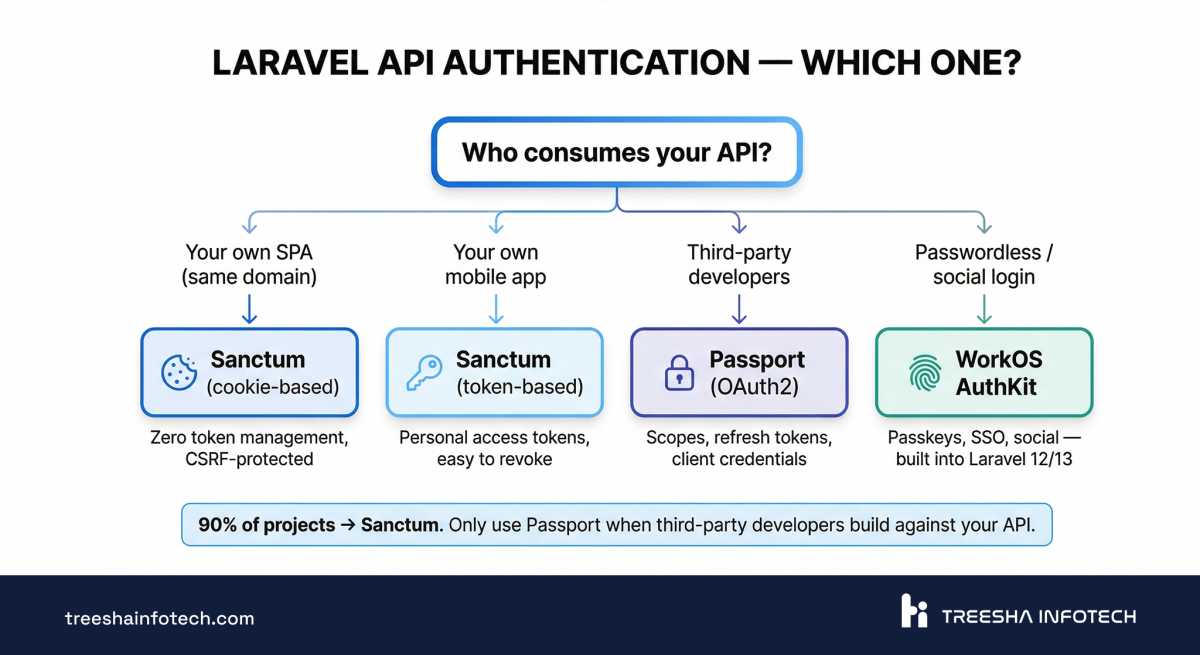
Authentication choice is the single decision that's hardest to change later. Get it right upfront.
| Scenario | Use | Why |
|---|---|---|
| First-party SPA (same domain) | Sanctum (cookie-based) | Zero token management, CSRF-protected, session-based |
| First-party mobile app | Sanctum (token-based) | Lightweight, personal access tokens, easy to revoke |
| Third-party developers consuming your API | Passport | Full OAuth2 server — scopes, refresh tokens, client credentials |
| Passwordless / social login | WorkOS AuthKit | Passkeys, SSO, social — built into Laravel 12/13 starter kits |
| Internal microservice-to-service | Signed requests or API keys | No user context needed, just verify the caller |
For 90% of projects, the answer is Sanctum. The confusion we see most often: teams installing Passport because they assume they need OAuth2, when what they actually need is token-based auth for their own mobile app. Passport adds complexity — token refresh flows, scope management, client registration — that you don't need unless third-party developers are building against your API.
Sanctum SPA Setup (The Most Common Pattern)
1// config/sanctum.php
2'stateful' => explode(',', env(
3    'SANCTUM_STATEFUL_DOMAINS',
4    'localhost,localhost:3000,127.0.0.1,your-spa.com'
5)),
6
7// routes/api.php
8Route::middleware('auth:sanctum')->group(function () {
9    Route::apiResource('projects', ProjectController::class);
10    Route::apiResource('tasks', TaskController::class);
11});
For the SPA, the login flow is:
1// 1. Get CSRF cookie
2await fetch('/sanctum/csrf-cookie', { credentials: 'include' });
3
4// 2. Login
5await fetch('/login', {
6    method: 'POST',
7    credentials: 'include',
8    headers: { 'Content-Type': 'application/json' },
9    body: JSON.stringify({ email, password }),
10});
11
12// 3. All subsequent requests are authenticated via session cookie
13const projects = await fetch('/api/projects', { credentials: 'include' });
No tokens in localStorage. No Authorization headers. The session cookie handles everything, and CSRF protection is automatic.
API Resources — Stop Dumping Raw Models
This is the most underused feature in Laravel API development. The number of production APIs we've seen returning raw Model::toArray() or Model::toJson() is alarming.
The problem with raw model dumps:
1// Don't do this
2public function show(Project $project)
3{
4    return $project->load('client', 'tasks');
5}
This exposes every column — including internal_notes, deleted_at, timestamps the frontend doesn't need, and relationship structures that might contain sensitive data. It also means your API contract changes every time you add a column to the database.
The Right Way: API Resources
1php artisan make:resource ProjectResource1class ProjectResource extends JsonResource
2{
3 public function toArray(Request $request): array
4 {
5 return [
6 'id' => $this->id,
7 'name' => $this->name,
8 'status' => $this->status,
9 'budget_remaining' => $this->when(
10 $request->user()->isAdmin(),
11 $this->budget_remaining
12 ),
13 'client' => new ClientResource($this->whenLoaded('client')),
14 'task_count' => $this->whenCounted('tasks'),
15 'created_at' => $this->created_at->toIso8601String(),
16 ];
17 }
18}1// Controller
2public function show(Project $project)
3{
4 return new ProjectResource(
5 $project->loadCount('tasks')->load('client')
6 );
7}Key patterns:
$this->when()— conditionally include fields based on permissions$this->whenLoaded()— only include relationships that were eager-loaded (prevents N+1)$this->whenCounted()— include counts without loading entire relationships- ISO 8601 dates — always serialize dates as strings, not Carbon objects
Collections With Metadata
For list endpoints, use resource collections with additional metadata:
1class ProjectCollection extends ResourceCollection
2{
3    public function toArray(Request $request): array
4    {
5        return [
6            'data' => $this->collection,
7            'meta' => [
8                'total_active' => $this->collection->where('status', 'active')->count(),
9                'filters_applied' => $request->query(),
10            ],
11        ];
12    }
13}1// Controller
2public function index(Request $request)
3{
4 $projects = Project::query()
5 ->when($request->status, fn ($q, $status) => $q->where('status', $status))
6 ->with('client')
7 ->withCount('tasks')
8 ->paginate(25);
9
10 return new ProjectCollection($projects);
11}Wrapping All Responses Consistently
Enforce a consistent { "data": ... } envelope across every endpoint. API Resources do this by default for collections. For single resources, Laravel wraps them automatically when you return a JsonResource. If you need custom wrapping or want to add top-level meta to every response, override JsonResource::$wrap:
1// AppServiceProvider
2JsonResource::withoutWrapping(); // if you want to control it per-resource
Your API contract is now explicit. Adding a column to the database doesn't accidentally expose it. Frontend developers get a predictable, documented shape. Every endpoint returns the same structure — no guessing required.
Validation That Doesn't Live in Controllers
Inline validation in controllers is the first shortcut teams take and the last one they clean up:
1// This works — but it doesn't scale
2public function store(Request $request)
3{
4    $validated = $request->validate([
5        'name' => 'required|string|max:255',
6        'email' => 'required|email|unique:users',
7        'role' => 'required|in:admin,editor,viewer',
8    ]);
9    // ... 30 more lines
10}
By the time you have conditional rules, authorization checks, and custom error messages, that controller is 80 lines and impossible to test in isolation.
Form Requests
1php artisan make:request StoreProjectRequest1class StoreProjectRequest extends FormRequest
2{
3 public function authorize(): bool
4 {
5 return $this->user()->can('create', Project::class);
6 }
7
8 public function rules(): array
9 {
10 return [
11 'name' => ['required', 'string', 'max:255'],
12 'client_id' => ['required', 'exists:clients,id'],
13 'budget' => ['nullable', 'numeric', 'min:0'],
14 'tags' => ['sometimes', 'array', 'max:10'],
15 'tags.*' => ['string', 'max:50'],
16 'deadline' => ['nullable', 'date', 'after:today'],
17 ];
18 }
19
20 public function messages(): array
21 {
22 return [
23 'client_id.exists' => 'The selected client does not exist.',
24 'deadline.after' => 'The deadline must be a future date.',
25 ];
26 }
27}1// Controller — clean and focused
2public function store(StoreProjectRequest $request)
3{
4 $project = Project::create($request->validated());
5
6 return new ProjectResource($project);
7}The controller is now 4 lines. Validation is testable independently. Authorization is declared, not buried in middleware chains.
Custom Rule Objects
For validation logic that's more complex than a one-liner, extract it into a reusable rule:
1php artisan make:rule ValidProjectDeadline1class ValidProjectDeadline implements ValidationRule
2{
3 public function __construct(
4 private ?string $startDate = null
5 ) {}
6
7 public function validate(string $attribute, mixed $value, Closure $fail): void
8 {
9 $deadline = Carbon::parse($value);
10
11 if ($deadline->isPast()) {
12 $fail('The deadline must be a future date.');
13 }
14
15 if ($this->startDate && $deadline->lte(Carbon::parse($this->startDate))) {
16 $fail('The deadline must be after the project start date.');
17 }
18
19 if ($deadline->diffInMonths(now()) > 24) {
20 $fail('The deadline cannot be more than 2 years in the future.');
21 }
22 }
23}1// Usage in Form Request
2'deadline' => ['nullable', 'date', new ValidProjectDeadline($this->input('start_date'))],Custom rules keep validation logic DRY across multiple Form Requests. They're testable in isolation and self-documenting — the class name tells you exactly what it validates.
Keep Controllers Thin: DTOs and Action Classes
Once validation moves to Form Requests, the next question is: where does the business logic go? Not in the controller.
The pattern we follow on every project: Controller → DTO → Action → Response. The controller receives the request, the DTO structures the data, the Action executes the business logic, and the controller returns the response.
Data Transfer Objects (DTOs)
$request->validated() returns an associative array. That's fine for simple CRUD. But when you're passing data through multiple layers — a service, an event, a queue job — an untyped array becomes a liability. You lose IDE autocompletion, static analysis, and any guarantee about the shape of the data.
A DTO gives you a typed container:
1readonly class CreateProjectData
2{
3    public function __construct(
4        public string $name,
5        public string $clientId,
6        public ?float $budget,
7        public ?string $deadline,
8        public array $tags = [],
9    ) {}
10
11    public static function fromRequest(StoreProjectRequest $request): self
12    {
13        $data = $request->validated();
14        return new self(
15            name: $data['name'],
16            clientId: $data['client_id'],
17            budget: $data['budget'] ?? null,
18            deadline: $data['deadline'] ?? null,
19            tags: $data['tags'] ?? [],
20        );
21    }
22}
Now everything downstream receives a typed object instead of a mystery array. Your IDE knows every property. Static analysis tools catch bugs before runtime. And if the request shape changes, you update one fromRequest() method — not every function that touches the data.
Action Classes
An Action class encapsulates a single business operation. One class, one job, one execute() method:
1class CreateProjectAction
2{
3    public function execute(CreateProjectData $data): Project
4    {
5        $project = Project::create([
6            'name' => $data->name,
7            'client_id' => $data->clientId,
8            'budget' => $data->budget,
9            'deadline' => $data->deadline,
10        ]);
11
12        if (!empty($data->tags)) {
13            $project->tags()->attach($data->tags);
14        }
15
16        ProjectCreated::dispatch($project);
17
18        return $project;
19    }
20}
The Controller Becomes a Router
With Form Requests, DTOs, and Actions in place, the controller does nothing but wire them together:
1public function store(StoreProjectRequest $request, CreateProjectAction $action)
2{
3    $data = CreateProjectData::fromRequest($request);
4    $project = $action->execute($data);
5
6    return new ProjectResource($project);
7}
Four lines. No validation (Form Request handles it). No business logic (Action handles it). No untyped arrays (DTO handles it). The controller's only job is receiving the HTTP request and returning the HTTP response.
Why this matters: Actions are reusable. The same CreateProjectAction can be called from a controller, a console command, a queue job, or a test — with the same DTO, the same validation, the same behavior. When business logic lives in a controller, you can't reuse it without duplicating code.
Model::create($request->validated()), the overhead isn't worth it. Introduce DTOs and Actions when: the operation has side effects (events, notifications, external APIs), the same logic is called from multiple entry points, or the data passes through more than one layer.Error Responses: Stop Returning HTML to Your Mobile App
The single most common complaint from frontend developers working with Laravel APIs: "I got an HTML error page instead of JSON."
This happens because Laravel's default exception handler renders HTML when the request doesn't include Accept: application/json. Your browser sends that header. Postman sends it. Your React app might not.
The Fix
In bootstrap/app.php, force JSON responses for your API routes:
1->withExceptions(function (Exceptions $exceptions) {
2    $exceptions->shouldRenderJsonWhen(function (Request $request) {
3        return $request->is('api/*') || $request->expectsJson();
4    });
5})
Consistent Error Envelope
Every error response should follow the same shape:
1// app/Exceptions/ApiException.php
2class ApiException extends HttpException
3{
4    public function __construct(
5        string $message,
6        int $status = 400,
7        public ?string $code = null,
8        public ?array $details = null,
9    ) {
10        parent::__construct($status, $message);
11    }
12
13    public function render(): JsonResponse
14    {
15        return response()->json([
16            'error' => [
17                'message' => $this->getMessage(),
18                'code' => $this->code,
19                'details' => $this->details,
20            ],
21        ], $this->getStatusCode());
22    }
23}1// Usage
2throw new ApiException(
3 message: 'Project deadline cannot be before the start date.',
4 status: 422,
5 code: 'INVALID_DEADLINE',
6);1{
2 "error": {
3 "message": "Project deadline cannot be before the start date.",
4 "code": "INVALID_DEADLINE",
5 "details": null
6 }
7}Your frontend team can now write one error handler instead of checking for both error.message, message, and random HTML blobs.
Handling Validation Errors Cleanly
Laravel's default validation error response looks like this:
1{
2    "message": "The name field is required.",
3    "errors": {
4        "name": ["The name field is required."],
5        "email": ["The email has already been taken."]
6    }
7}
This format is usable but inconsistent with your custom error envelope. Normalize it by customizing the validation exception rendering:
1->withExceptions(function (Exceptions $exceptions) {
2    $exceptions->render(function (ValidationException $e, Request $request) {
3        if ($request->is('api/*') || $request->expectsJson()) {
4            return response()->json([
5                'error' => [
6                    'message' => 'Validation failed.',
7                    'code' => 'VALIDATION_ERROR',
8                    'details' => $e->errors(),
9                ],
10            ], 422);
11        }
12    });
13})
Now every error — validation, business logic, server — follows the same { "error": { "message", "code", "details" } } shape. Your frontend needs exactly one error handler.
404s for Missing API Resources
By default, Laravel throws a ModelNotFoundException when route model binding fails, which renders as HTML. Force it to return JSON:
1$exceptions->render(function (ModelNotFoundException $e, Request $request) {
2    if ($request->is('api/*') || $request->expectsJson()) {
3        $model = class_basename($e->getModel());
4        return response()->json([
5            'error' => [
6                'message' => "{$model} not found.",
7                'code' => 'RESOURCE_NOT_FOUND',
8                'details' => null,
9            ],
10        ], 404);
11    }
12});
Instead of a generic 404 HTML page, your API returns { "error": { "message": "Project not found.", "code": "RESOURCE_NOT_FOUND" } }. The frontend can display a meaningful message.
APP_DEBUG=true in production. We've audited codebases where the production API returns full stack traces, SQL queries, and environment variables in error responses. Always verify APP_DEBUG=false on production — and set APP_ENV=production so Laravel uses production exception rendering even if debug is false.Pagination at Scale: When Offset Breaks
Laravel's default pagination uses offset-based queries:
1// Offset pagination — default
2$projects = Project::paginate(25);
3// SQL: SELECT * FROM projects LIMIT 25 OFFSET 250
This works fine until your table grows past ~50K rows. Here's why it breaks:
1-- Page 1: fast
2SELECT * FROM projects ORDER BY id LIMIT 25 OFFSET 0;
3
4-- Page 100: the database reads and discards 2,475 rows to reach your offset
5SELECT * FROM projects ORDER BY id LIMIT 25 OFFSET 2475;
6
7-- Page 1000: reads and discards 24,975 rows. On a table with millions of rows,
8-- this query takes seconds instead of milliseconds.
9SELECT * FROM projects ORDER BY id LIMIT 25 OFFSET 24975;
The database can't skip to row 24,975 — it has to scan through every preceding row. The higher the page number, the slower the query. On tables with millions of rows, requesting page 500+ can take multiple seconds.
Cursor Pagination
For large datasets or infinite-scroll UIs, switch to cursor-based pagination:
1$projects = Project::orderBy('id')->cursorPaginate(25);1{
2 "data": [...],
3 "meta": {
4 "path": "/api/projects",
5 "per_page": 25,
6 "next_cursor": "eyJpZCI6MjUsIl9wb2ludHNUb05leHRJdGVtcyI6dHJ1ZX0",
7 "prev_cursor": null
8 }
9}| Use Case | Offset | Cursor |
|---|---|---|
| Datasets under 10K rows | Fast, simple | Unnecessary complexity |
| Datasets over 50K rows | Slows down at high page numbers | Constant performance |
| "Jump to page 47" | Supported | Not possible |
| Infinite scroll / mobile | Works but wasteful | Ideal |
| Real-time feeds (new items arriving) | Can show duplicates | Stable |
Our rule: start with offset pagination. Switch to cursor when you have evidence that offset is a bottleneck — not before. Premature cursor pagination adds frontend complexity (no page numbers) for no benefit.
Rate Limiting That Protects Without Blocking
The default throttle:60,1 (60 requests per minute per IP) is a starting point, not a production config.
Named Rate Limiters
1// bootstrap/app.php or AppServiceProvider
2RateLimiter::for('api', function (Request $request) {
3    return $request->user()
4        ? Limit::perMinute(120)->by($request->user()->id)
5        : Limit::perMinute(30)->by($request->ip());
6});
7
8RateLimiter::for('uploads', function (Request $request) {
9    return Limit::perHour(20)->by($request->user()?->id ?: $request->ip());
10});
11
12RateLimiter::for('auth', function (Request $request) {
13    return Limit::perMinute(5)->by($request->ip());
14});1// routes/api.php
2Route::middleware(['throttle:api'])->group(function () {
3 Route::apiResource('projects', ProjectController::class);
4});
5
6Route::middleware(['throttle:uploads'])->post('/upload', UploadController::class);
7Route::middleware(['throttle:auth'])->post('/login', LoginController::class);Expose Rate Limit Headers
Frontends need to know when they're approaching limits — not just when they hit them:
1X-RateLimit-Limit: 120
2X-RateLimit-Remaining: 87
3Retry-After: 43
Laravel sends these automatically when you use the throttle middleware. Make sure your frontend reads them and shows warnings before users get blocked.
API Versioning: Three Approaches, One Recommendation
| Approach | Example | DX | Debugging | Maintenance |
|---|---|---|---|---|
| URL Prefix | /api/v1/projects | Simple, obvious | Easy — version visible in every request | Can lead to code duplication |
| Header-Based | Accept: application/vnd.app.v2+json | Elegant but hidden | Harder — need to inspect headers | Clean route files |
| Namespace + Controller Inheritance | V2 extends V1, override changed methods | Clean | Moderate | Best for incremental changes |
Our recommendation: URL prefix with controller inheritance. This is the pattern we use across our API development and integration projects.
1// routes/api.php
2Route::prefix('v1')->group(function () {
3    Route::apiResource('projects', V1\ProjectController::class);
4});
5
6Route::prefix('v2')->group(function () {
7    Route::apiResource('projects', V2\ProjectController::class);
8});1// app/Http/Controllers/Api/V2/ProjectController.php
2class ProjectController extends V1\ProjectController
3{
4 // Only override what changed
5 public function index(Request $request)
6 {
7 // V2 adds filtering support
8 $query = Project::query();
9
10 if ($request->has('status')) {
11 $query->where('status', $request->input('status'));
12 }
13
14 return ProjectResource::collection($query->paginate(25));
15 }
16
17 // show(), store(), update(), destroy() inherit from V1
18}V2 extends V1 and only overrides the methods that changed. Every other endpoint behaves identically. No code duplication.
Testing Beyond Postman
"It works in Postman" is not a test suite. Postman checks one request at a time, by hand, with no assertions on response structure, no auth edge cases, and no regression detection.
Pest HTTP Tests
1it('returns a paginated list of projects for authenticated users', function () {
2    $user = User::factory()->create();
3    Project::factory(30)->create();
4
5    $response = $this->actingAs($user)
6        ->getJson('/api/v1/projects');
7
8    $response
9        ->assertOk()
10        ->assertJsonStructure([
11            'data' => [
12                '*' => ['id', 'name', 'status', 'created_at'],
13            ],
14            'meta' => ['current_page', 'per_page', 'total'],
15        ])
16        ->assertJsonCount(25, 'data')
17        ->assertJsonMissing(['password', 'internal_notes']);
18});
19
20it('requires authentication', function () {
21    $this->getJson('/api/v1/projects')
22        ->assertUnauthorized();
23});
24
25it('validates required fields on project creation', function () {
26    $user = User::factory()->create();
27
28    $this->actingAs($user)
29        ->postJson('/api/v1/projects', [])
30        ->assertUnprocessable()
31        ->assertJsonValidationErrors(['name', 'client_id']);
32});
33
34it('prevents non-admins from deleting projects', function () {
35    $user = User::factory()->create(['role' => 'viewer']);
36    $project = Project::factory()->create();
37
38    $this->actingAs($user)
39        ->deleteJson("/api/v1/projects/{$project->id}")
40        ->assertForbidden();
41});
What these tests assert:
- Response structure — not just "200 OK", but the exact JSON shape frontends depend on
- Pagination metadata — correct page sizes, totals
- Data absence — sensitive fields like
passwordandinternal_notesare never leaked - Auth enforcement — unauthenticated requests are rejected
- Validation — missing fields return 422 with specific error keys
- Authorization — role-based access is enforced
Run these on every PR. If a test fails, you know you broke the API contract before your frontend team finds out.
Performance: Octane, Caching & the Node.js Question
Let's address the elephant in the room: raw throughput benchmarks.
| Framework | Requests/sec (synthetic) | Requests/sec (real-world with DB) |
|---|---|---|
| Node.js (Express) | ~1,000,000 | ~15,000 - 25,000 |
| Laravel (PHP-FPM) | ~200,000 | ~8,000 - 12,000 |
| Laravel Octane (Swoole) | ~500,000 | ~12,000 - 18,000 |
| FastAPI (Python) | ~300,000 | ~10,000 - 15,000 |
The raw throughput gap is real but misleading. Once you add database queries, JSON serialization, validation, and middleware, the gap between frameworks shrinks to 15-30%. The bottleneck moves from the framework to the database, external APIs, and network I/O.
Pick based on team strength, not benchmarks. A well-optimized Laravel API will outperform a poorly written Node.js API every time.
What Actually Moves the Needle
1. Eliminate N+1 queries
The N+1 problem is the single most common performance issue in Laravel APIs — and the most invisible. It happens when your code loads a list of models, then triggers a separate database query for each related model as you iterate:
1// This looks harmless — but it's a trap
2$projects = Project::paginate(25);
3
4// In your API Resource or Blade view:
5foreach ($projects as $project) {
6    echo $project->client->name; // Each iteration fires a new query
7}
For 25 projects, that's 1 query to fetch projects + 25 queries to fetch each client — 26 queries total. At 100 results, it's 101 queries. The API feels slow and nobody can figure out why because each individual query is fast.
The fix is eager loading — tell Laravel to fetch related models in a single query upfront:
1// 2 queries total — regardless of how many projects
2$projects = Project::with('client', 'tasks')->paginate(25);
3
4// Need counts without loading entire relationships?
5$projects = Project::withCount('tasks')
6    ->with('client')
7    ->paginate(25);
8
9// Conditional eager loading based on request parameters
10$projects = Project::query()
11    ->when($request->has('include_client'), fn ($q) => $q->with('client'))
12    ->when($request->has('include_tasks'), fn ($q) => $q->with('tasks'))
13    ->paginate(25);
How to detect N+1 queries: Install Laravel Debugbar for development — it shows a query count badge on every page and highlights duplicates in red. Telescope gives deeper insight into queries across API requests, queued jobs, and scheduled commands.
How to prevent N+1 permanently: Add one line to your AppServiceProvider and Laravel will throw an exception whenever a lazy-loaded relationship is accessed in non-production environments:
1// app/Providers/AppServiceProvider.php
2public function boot(): void
3{
4    Model::preventLazyLoading(! app()->isProduction());
5}
With this enabled, $project->client without a prior with('client') throws a LazyLoadingViolationException — you catch N+1 bugs during development instead of discovering them through slow API responses in production. Every project we start now includes this line from day one.
2. Response caching for read-heavy endpoints
1Route::middleware('cache.headers:public;max_age=300;etag')
2    ->get('/api/v1/categories', [CategoryController::class, 'index']);
Categories, dropdown options, and public listings rarely change. Cache them at the HTTP level and skip the database entirely.
3. Use select() to limit columns
1// Instead of SELECT * (which pulls 20 columns)
2$users = User::select('id', 'name', 'email', 'avatar_url')
3    ->paginate(50);
4. Laravel Octane for high-traffic APIs
Octane keeps the application in memory and serves requests through Swoole or RoadRunner workers. No framework boot on every request. The jump from PHP-FPM to Octane is significant for APIs that handle sustained traffic.
Security Checklist
These aren't theoretical — they're the exact issues we check for during code reviews and API audits.
Environment & Configuration
APP_DEBUG=false in production. With debug enabled, every exception response includes the full stack trace, SQL queries, environment variables, and file paths. We've seen production APIs leaking database credentials through debug mode. Verify this on every deployment.
Never commit .env or APP_KEY to version control. Add .env to .gitignore from day one. If your APP_KEY is compromised, all encrypted data (sessions, cookies, queued job payloads) becomes decryptable.
Data Protection
Mass assignment guards on every model. Always define $fillable (or use #[Fillable] attributes in Laravel 13). Never use $guarded = [] — it allows any field to be set via request input, including is_admin, email_verified_at, or role.
1// Dangerous — any field can be mass-assigned
2protected $guarded = [];
3
4// Safe — explicitly declare what's fillable
5#[Fillable(['name', 'email', 'phone', 'company'])]
6class Contact extends Model {}
SQL injection with raw queries. Eloquent and the query builder protect you automatically. The risk is when you use raw SQL:
1// Vulnerable — never concatenate user input into SQL
2DB::select("SELECT * FROM users WHERE email = '$email'");
3
4// Safe — use parameter binding
5DB::select('SELECT * FROM users WHERE email = ?', [$email]);
Network & Access
Lock CORS to your actual domains. During development, allowed_origins: ['*'] is convenient. In production, it means any website can make authenticated requests to your API. Restrict to your actual frontend domains:
1// config/cors.php
2'allowed_origins' => [
3    'https://your-app.com',
4    'https://admin.your-app.com',
5],
Rate limit auth endpoints aggressively. Login, register, password reset, and 2FA verification endpoints are brute-force targets. 5 requests per minute per IP is a reasonable starting point. Standard API endpoints can be more generous (60-120/min).
File Uploads & Webhooks
Validate file uploads server-side. Don't trust the client-provided MIME type or filename. Check the actual file contents, enforce size limits, and rename files on storage:
1$request->validate([
2    'document' => ['required', 'file', 'max:10240', 'mimes:pdf,doc,docx'],
3]);
4
5// Store with a safe generated name, not the original filename
6$path = $request->file('document')->store('documents');
Verify webhook signatures. When receiving webhooks from Stripe, GitHub, or any external service, always verify the HMAC signature before processing. Laravel provides $request->hasValidSignature() for signed routes, and most payment providers include a signature header you should validate.
Database & Dependency Security
Enable MySQL strict mode to catch data integrity issues that silently pass in non-strict mode — truncated strings, implicit zero defaults, and division by zero:
1// config/database.php
2'mysql' => [
3    'strict' => true,
4],
Run composer audit in your CI pipeline. This checks your installed packages against known vulnerability databases. A failing audit should block the deploy — not get ignored.
The 7 Mistakes We See in Every API Audit
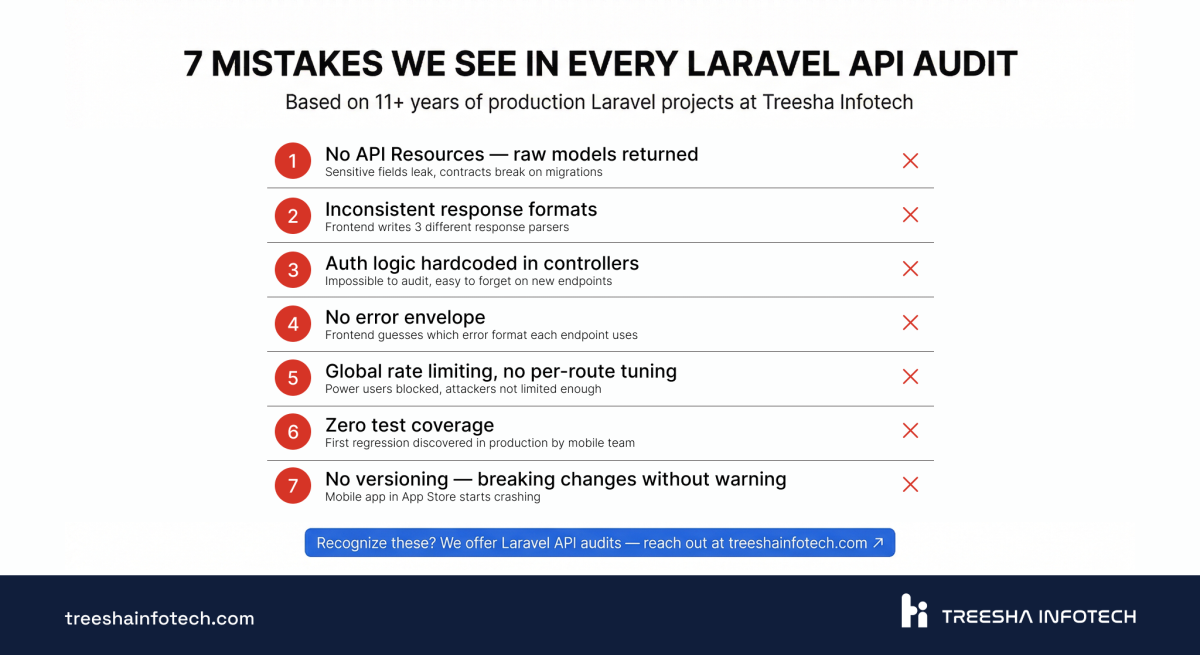
These come from real client projects we've reviewed or inherited over the past three years. Every one of them has caused production issues.
1. No API Resources — raw Eloquent models returned directly. New columns appear in API responses immediately. Sensitive fields leak. Frontend breaks when a migration renames a column.
2. Inconsistent response formats. Some endpoints return { "data": [...] }, others return a bare array, others return { "results": [...], "success": true }. Frontend developers write three different response parsers.
3. Auth logic hardcoded in controllers. Instead of policies or middleware, every controller manually checks if ($user->role !== 'admin'). Impossible to audit, easy to forget on new endpoints.
4. No error envelope. Validation errors return Laravel's default { "message": "...", "errors": {...} }. Other errors return { "error": "..." }. Exceptions return HTML. The frontend team guesses which format each endpoint uses.
5. Global rate limiting with no per-route tuning. The same 60/min limit on the login endpoint (too high) and the dashboard data endpoint (too low). Power users get blocked. Brute force attacks aren't rate-limited enough.
6. Zero test coverage. "We test in Postman" means nobody tests. The first regression is discovered by the mobile team in production.
7. No versioning — breaking changes deployed without warning. A field gets renamed, a relationship structure changes, and the mobile app that's already in the App Store starts crashing. No rollback path because there's no v1 to fall back to.
When Laravel Is the Right Choice (and When It Isn't)
Laravel wins when:
- Your team knows PHP — developer velocity in a familiar language always beats performance gains from a new one
- Complex business logic — Eloquent, policies, form requests, events, and queues handle enterprise complexity better than most frameworks
- Rapid prototyping to production — go from idea to deployed API in days, not weeks, which is why it's our default for SaaS and MVP development
- Full-stack needs — the same codebase can serve your API, admin panel, and background jobs
- You need AI features — Laravel 13's AI SDK means you can build RAG pipelines, chatbots, and agents without a separate Python service
Consider alternatives when:
- Pure throughput at massive scale with minimal business logic — Go or Rust
- ML model serving — FastAPI (Python) with direct model access
- Real-time multiplayer or chat at 100K+ concurrent connections — Elixir/Phoenix or raw WebSocket servers
- Your team is JavaScript-native and doesn't know PHP — Node.js with proper framework discipline
The honest answer: for 80% of business API projects, the framework matters less than the team's expertise and discipline. A well-structured Laravel API will outperform a chaotic Node.js API — and vice versa. Pick the tool your team can execute best with.
Need help building a production-ready Laravel API or auditing an existing one? Get a free quote or schedule a call with our team. We've been shipping Laravel since version 4.
Related reading:
- What's New in Laravel 13: AI SDK, Vector Search & Beautiful UI
- Next.js vs Laravel: Which Framework to Choose?
Frequently Asked Questions
Is Laravel still a good choice for API-only backends in 2026?
Sanctum vs Passport — which should I use?
How does Laravel API performance compare to Node.js and FastAPI?
Can I use Laravel as the API backend for a Next.js or React frontend?
Ready to start your project?
Tell us about your requirements and we'll get back with a clear plan within 24 hours. No sales pitch, just an honest conversation.

Co-founded Treesha Infotech and leads all technology decisions across the company. Full-stack architect with deep expertise in Laravel, Next.js, AI integrations, cloud infrastructure, and SaaS platform development. Ritesh drives engineering standards, code quality, and product innovation across every project the team delivers.