
Every week, someone asks me: "How much does it cost to build an AI chatbot?" The honest answer is always the same — it depends. But that's not helpful, so here's a detailed breakdown with real numbers.
I've spent the last two years building AI chatbots and agent systems at Treesha Infotech — from simple FAQ bots to full RAG-powered assistants that search across thousands of documents. The cost landscape has changed dramatically since GPT-3.5 made LLMs accessible in 2023, and it keeps shifting. This article reflects what things actually cost in 2026, not what some generic listicle told you in 2024.
In This Article
Custom vs Off-the-Shelf: When You Need a Custom AI Chatbot
Let's clear this up first, because half the people reading this don't need a custom chatbot at all.
If your goal is basic website live chat, FAQ deflection, or lead capture — use Intercom, Drift, or Zendesk AI. They're good at what they do. You'll be live in a week for $50-300/month per seat, and you won't need an engineering team.
Custom makes sense when your chatbot needs to know your business. When it needs to search your internal documentation, pull data from your CRM or ERP, execute multi-step workflows, or handle conversations that require reasoning over domain-specific data. A SaaS chatbot platform can't index your proprietary knowledge base, integrate with your custom Laravel backend, or follow your specific business logic for order processing.
The decision matrix is straightforward:
| Scenario | Recommendation |
|---|---|
| Standard live chat + FAQ | SaaS platform (Intercom, Drift, Tidio) |
| Lead qualification + booking | SaaS platform with integrations |
| Domain-specific Q&A over your docs | Custom RAG chatbot |
| Multi-system workflow automation | Custom AI agent |
| Compliance-heavy industry (healthcare, finance) | Custom — you need data control |
| Internal tool for employees | Custom — integrates with internal systems |
The 4 Types of AI Chatbots (and What They Cost)
Not all chatbots are built the same. The type you need determines everything — cost, timeline, team size, and ongoing maintenance.
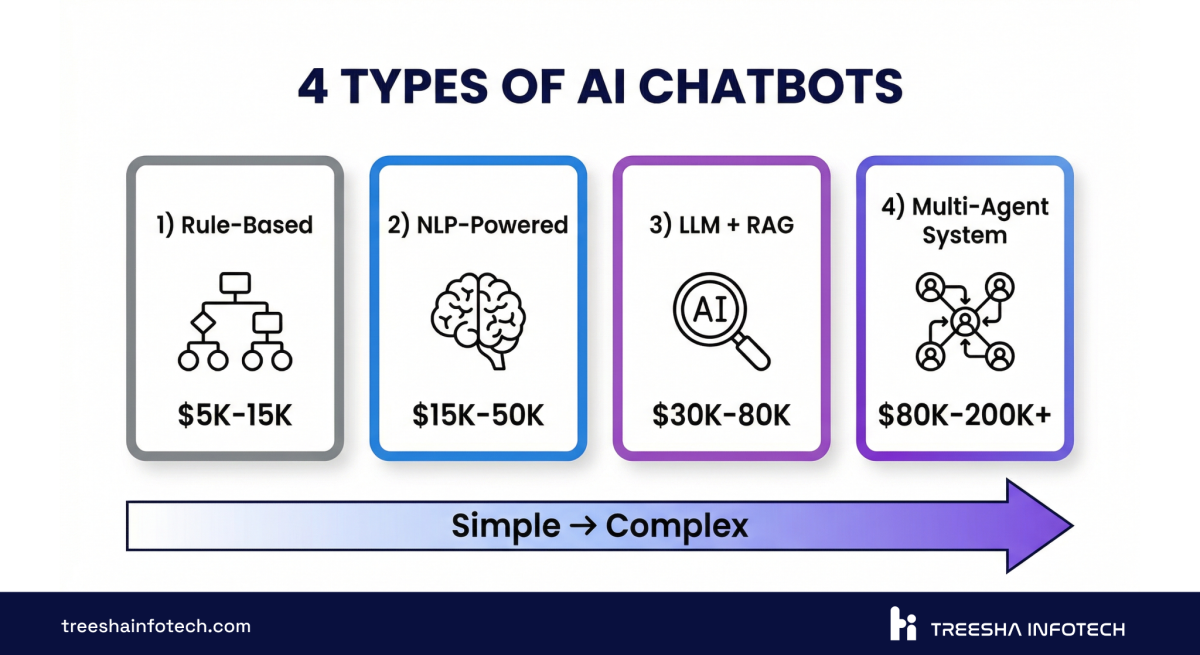
| Type | How It Works | Cost Range | Timeline | Best For |
|---|---|---|---|---|
| Rule-Based | Decision trees, keyword matching, scripted responses | $5,000 - $15,000 | 2-4 weeks | Simple FAQ, basic lead capture |
| NLP-Powered | Intent classification + entity extraction (Dialogflow, Rasa) | $15,000 - $40,000 | 4-6 weeks | Structured conversations, booking flows |
| LLM + RAG | Large language model with retrieval-augmented generation | $30,000 - $80,000 | 6-10 weeks | Knowledge base search, domain-specific Q&A |
| Multi-Agent System | Multiple AI agents with tool use, memory, and orchestration | $80,000 - $200,000+ | 12-16 weeks | Complex workflows, enterprise automation |
The LLM + RAG category is where most of the action is in 2026. It's the sweet spot — powerful enough to handle real business conversations, but not so complex that it requires a 6-month build. Most of what we deliver at Treesha falls into this bracket.
If you're a small business looking for immediate impact, a rule-based or NLP-powered bot is the sweet spot. Startups scaling fast should look at the LLM + RAG tier — it handles growing customer interactions without growing headcount. Enterprise teams with compliance requirements and large internal data typically need multi-agent systems in the $80K+ range.
Rule-based bots still have their place. If you have 30-50 well-defined questions and answers, a decision tree works fine and costs a fraction of an LLM-powered system. But the moment you need the chatbot to handle questions it wasn't explicitly programmed for, you need an LLM.
Development Cost Breakdown
Here's where the numbers get specific. These are industry costs — what you'd expect to pay an experienced development team in 2026.
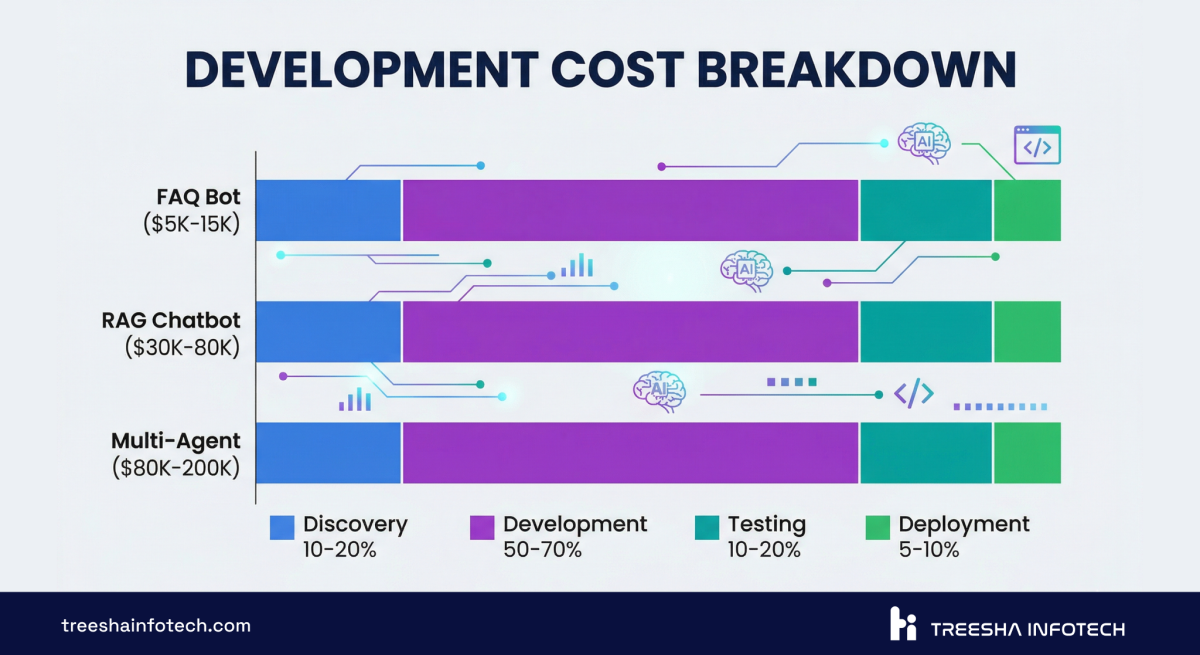
| Phase | Rule-Based | NLP-Powered | LLM + RAG | Multi-Agent |
|---|---|---|---|---|
| Discovery & Planning | $1,000 - $2,000 | $2,000 - $4,000 | $4,000 - $8,000 | $8,000 - $15,000 |
| Architecture & Design | $500 - $1,500 | $2,000 - $5,000 | $4,000 - $10,000 | $10,000 - $25,000 |
| Core Development | $2,000 - $6,000 | $6,000 - $15,000 | $12,000 - $35,000 | $35,000 - $90,000 |
| Knowledge Base / Data Pipeline | $500 - $1,500 | $2,000 - $5,000 | $4,000 - $12,000 | $10,000 - $30,000 |
| Testing & QA | $500 - $2,000 | $1,500 - $5,000 | $3,000 - $8,000 | $8,000 - $20,000 |
| Deployment & Integration | $500 - $2,000 | $1,500 - $6,000 | $3,000 - $7,000 | $9,000 - $20,000 |
| Total | $5,000 - $15,000 | $15,000 - $40,000 | $30,000 - $80,000 | $80,000 - $200,000 |
The knowledge base / data pipeline line is what catches people off guard. For an LLM + RAG chatbot, you need to ingest, chunk, embed, and index your documents. If your knowledge base is a clean set of markdown files, that's cheap. If it's 10,000 PDFs scattered across SharePoint, Confluence, and Google Drive — that's a project in itself.
What Drives the Cost Up (and Down)
The ranges above are wide for a reason. Here's what pushes you toward each end.
Cost drivers (up):
- Large knowledge base (10,000+ documents requiring custom chunking strategies)
- Multiple language support (each language needs its own embedding model or multilingual pipeline)
- Compliance requirements (HIPAA, SOC 2, GDPR — audit logging, data residency, encryption at rest)
- Complex integrations (ERP, CRM, ticketing systems, payment processors)
- Real-time data (chatbot needs live inventory, pricing, or order status — not just static docs)
- Custom UI (branded chat widget vs. off-the-shelf component)
Cost drivers (down):
- Clean, structured knowledge base (markdown, well-organized docs)
- Single language
- Open-source LLMs instead of proprietary APIs (Llama 3, Mistral via Ollama or vLLM)
- Standard integrations (REST APIs with good documentation)
- Working with a team that has reusable RAG infrastructure (more on this below)
- Phased rollout — start with one department, expand later
Typical Development Timeline
Here's what a realistic week-by-week breakdown looks like for an LLM-powered RAG chatbot — the most common type we build.
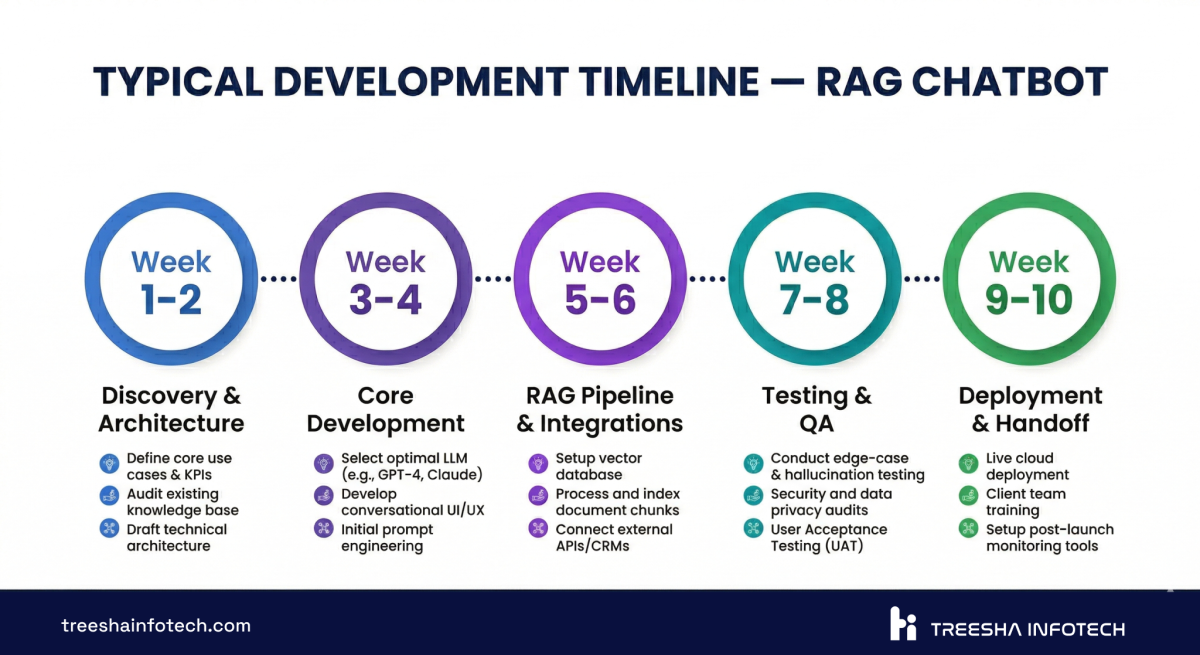
| Week | Phase | Deliverables |
|---|---|---|
| 1 | Discovery | Requirements doc, knowledge base audit, architecture proposal, cost estimate |
| 2 | Infrastructure Setup | Vector database provisioned, LLM provider configured, embedding pipeline scaffolded |
| 3-4 | Knowledge Base Ingestion | Documents chunked, embedded, and indexed. Retrieval quality tested against sample queries |
| 5-6 | Core Chat Development | Conversational logic, prompt engineering, context window management, response formatting |
| 7 | Integrations | API connections to your systems (CRM, ticketing, etc.), webhook handlers, authentication |
| 8 | Testing & Prompt Tuning | Edge case testing, hallucination checks, response quality scoring, prompt iteration |
| 9 | UI & Deployment | Chat widget integration, staging deployment, load testing, monitoring setup |
| 10 | Handoff & Training | Documentation, admin training, knowledge base update procedures, go-live |
This is a 10-week timeline for a mid-complexity RAG chatbot. Simpler bots compress to 3-4 weeks. Multi-agent systems stretch to 14-16 weeks.
The phases that teams underestimate are weeks 3-4 (knowledge base ingestion) and week 8 (testing and prompt tuning). Ingestion isn't just "throw PDFs into a vector database." You need to figure out chunking strategy, handle tables and images in documents, deal with duplicate content, and test retrieval quality across hundreds of queries. Prompt tuning is similarly iterative — the first version of your system prompt is never the final version.
The Hidden Cost: Ongoing Maintenance
This is the section most "AI chatbot cost" articles skip entirely. And it's the section that matters most for budgeting, because a chatbot isn't a website — you don't build it, deploy it, and walk away.
Here's what running an AI chatbot actually costs per month:
| Cost Category | Monthly Range | Notes |
|---|---|---|
| LLM API Fees | $200 - $5,000 | Depends on volume and model. GPT-4o: ~$5/1M input tokens. Claude Sonnet: ~$3/1M. Open-source: $0 API + $200-1,000 GPU hosting |
| Hosting & Infrastructure | $100 - $1,000 | Vector database, application server, CDN, SSL. Higher if self-hosting LLMs |
| Knowledge Base Updates | 2-4 hrs/month | New docs, updated policies, product changes. Someone has to keep the knowledge base current |
| Monitoring & Bug Fixes | $500 - $2,000 | Conversation log review, edge case fixes, prompt adjustments, error resolution |
| Model Tuning (Quarterly) | $1,000 - $5,000 | Prompt optimization based on conversation analytics, A/B testing system prompts, adding new capabilities |
| Total Monthly | $1,000 - $10,000 | Lower end: small-volume bot on open-source model. Higher end: enterprise with high traffic on proprietary APIs |
The LLM API fee line is the one that surprises people. A chatbot handling 5,000 conversations per month on GPT-4o with RAG context can easily hit $2,000-3,000/month in API costs alone. Each conversation involves multiple LLM calls — the retrieval step, the context assembly, the response generation, and sometimes a follow-up clarification.
Knowledge base updates are the boring-but-critical line item. Your product changes. Your policies change. Your pricing changes. If the chatbot's knowledge base doesn't reflect that, it starts giving wrong answers — and wrong answers are worse than no answers. Budget 2-4 hours per month of someone reviewing and updating the indexed content.
Monitoring is non-negotiable. You need to review conversation logs regularly to catch hallucinations, identify new question patterns, and spot integration failures. The best chatbot architectures include automated quality scoring that flags conversations below a confidence threshold for human review.
Why Experienced AI Teams Cost Less in the Long Run
This isn't a sales pitch about being cheap. It's about infrastructure reuse.
When a team builds their first RAG chatbot, they're building everything from scratch: the document ingestion pipeline, the chunking logic, the embedding workflow, the vector search layer, the LLM orchestration, the prompt management system, the monitoring dashboard. That's a significant chunk of the overall cost.
When a team has built their tenth RAG chatbot, most of that infrastructure already exists. The pipeline templates, the vector search patterns, the deployment scripts, the monitoring setup — it's all reusable. The team only builds what's unique to your project: your specific knowledge base, your custom integrations, your business logic.
At Treesha Infotech, we've built this reusable layer over the last two years across multiple chatbot and AI agent projects. Our RAG pipeline handles document ingestion from PDFs, markdown, HTML, and databases. Our vector search setup works across Pinecone, pgvector, and Weaviate. Our LLM orchestration layer supports Claude, GPT-4o, Gemini, and open-source models through a unified interface.
What does this mean in practice?
- Development time drops 30-40% — core document ingestion, vector search, and orchestration layers are already built
- Ongoing costs drop 20-30% — efficient caching, batched embeddings, and cost-optimized model routing including open-source fallbacks
- Zero handoff friction — one team handles backend, AI orchestration, and deployment, no multi-vendor bottlenecking
Working with a team that has existing RAG infrastructure, open-source model expertise, and production deployment experience can cut both development time and ongoing costs by 30-50%. Not because they charge less per hour — because they ship faster and build more efficiently.
Build vs Buy: Decision Framework
Here's a direct comparison to help you decide.
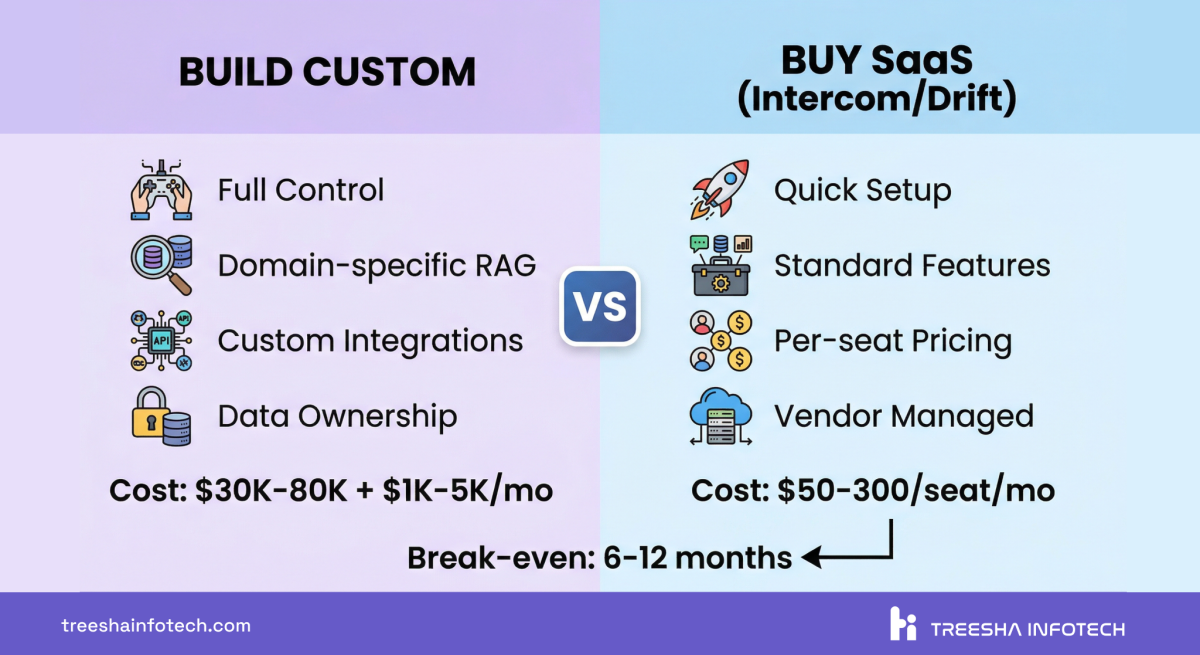
| Factor | Custom Build | SaaS Platform (Intercom, Drift, Zendesk AI) |
|---|---|---|
| Upfront Cost | $30,000 - $200,000 | $0 - $5,000 (setup + onboarding) |
| Monthly Cost | $1,000 - $10,000 (hosting + API + maintenance) | $50 - $300/seat/month |
| Time to Launch | 6-16 weeks | 1-2 weeks |
| Knowledge Base | Your docs, databases, internal systems | Limited to their knowledge base format |
| Integrations | Unlimited — any API, database, or system | Pre-built integrations only |
| Customization | Full control over UX, logic, and behavior | Limited to platform capabilities |
| Data Ownership | You own everything | Platform stores your data |
| Compliance | Full control (HIPAA, SOC 2, GDPR) | Depends on platform |
| Scaling Cost | Relatively flat (infrastructure-based) | Grows per-seat |
| Vendor Lock-in | None — you own the code | High — migration is painful |
| Best For | Domain-specific, complex, high-volume | Standard live chat, basic FAQ |
The math is straightforward. If you have 15 support agents on a SaaS platform at $200/seat/month, that's $36,000/year. Scale to 50 agents and you're at $120,000/year in licensing alone. A custom chatbot costs more upfront but turns that escalating subscription into a flat infrastructure cost. The break-even is typically 6-12 months.
What to Expect From the Development Process
If you've never built a custom AI chatbot, here's what each phase looks like from your side and what a good development partner should deliver at each stage.
Discovery (Week 1). The team reviews your use case, audits your knowledge base, and identifies integration points. You should receive a requirements document, a technical architecture proposal, and a clear cost estimate. If the partner can't explain how they'll build it, that's a red flag.
Prototype (Weeks 2-4). A working chatbot that answers questions from a subset of your knowledge base. It won't be polished, but it should demonstrate that the core retrieval and response generation works. This is where you validate the approach before investing in the full build.
Development (Weeks 5-8). Full knowledge base ingestion, integrations, conversation flow refinement, and UI work. Regular demos — you should see progress every week, not just at the end.
Testing (Week 8-9). Systematic testing with real queries. The team should share conversation logs, response quality scores, and a list of edge cases they've addressed. You should test it yourself — with queries the team hasn't seen.
Deployment & Handoff (Week 9-10). Staging deployment, then production. Documentation for your team. Training on how to update the knowledge base. Monitoring dashboards. A clear support agreement for the first 30-60 days.
Good partners also deliver a knowledge base update guide — a simple process your non-technical team can follow to add new documents, update policies, and keep the chatbot current. If the only way to update the chatbot is to call the development team, that's a design failure.
Red Flags When Hiring an AI Development Partner
I've seen enough bad AI projects to know the warning signs. Watch out for these:
Fixed price without discovery. If someone quotes you a firm price before understanding your knowledge base, integrations, and use case — they're guessing. Discovery exists for a reason.
No RAG experience. If they can't explain their chunking strategy, embedding model choice, or retrieval evaluation approach, they haven't built production RAG systems. Ask them how they handle tables in PDFs. Ask about their re-ranking strategy. The answers reveal a lot.
No maintenance plan. "We'll build it and hand it over" is not a plan. Ask about ongoing support, knowledge base update procedures, monitoring, and cost optimization.
Can't explain their tech stack. A good AI team should be able to tell you exactly which LLM, vector database, orchestration framework, and hosting setup they're recommending — and why. If every answer is "we use ChatGPT," they're not building a production system.
No portfolio of AI projects. Chatbot development is fundamentally different from web or mobile development. A team that's great at building Laravel applications might struggle with prompt engineering, embedding strategies, and LLM cost optimization. Look for teams with specific AI project experience.
No conversation monitoring plan. If they don't plan to track conversation quality, hallucination rates, and user satisfaction from day one — the chatbot will degrade quietly and nobody will notice until customers complain.
The Verdict
If you're building an AI chatbot in 2026, here's the short version:
For most businesses, an LLM-powered RAG chatbot is the right choice. It handles domain-specific questions, integrates with your systems, and scales without per-seat fees. Budget $30,000-80,000 for development and $1,000-5,000/month for ongoing costs.
Start with a focused scope. Don't try to automate every conversation on day one. Pick your highest-volume use case — typically customer support or internal knowledge search — and build for that. Expand later.
Budget for maintenance. The chatbot is not a "build it and forget it" project. Knowledge base updates, prompt tuning, and monitoring are ongoing. Teams that treat maintenance as an afterthought end up with chatbots that give wrong answers within 6 months.
Work with a team that's done this before. The reusable infrastructure and operational knowledge from previous projects cuts costs by 30-50%. You're paying for efficiency, not just hours.
If you're evaluating AI chatbot development for your business, we'd be happy to talk through the specifics. Get in touch and we'll scope it out — no commitments, just a clear picture of what your specific chatbot would cost and how long it would take.
Explore our AI Chatbot & Agent Development services for the full picture of what we offer.
Our AI Chatbot Work
We don't just write about this — we build it.
Wurkzen Rainmaker — A full-stack Voice AI platform for sales teams. We built the Python-powered AI engine, Laravel backend, and NuxtJS dashboard. The system processes thousands of sales calls daily with real-time coaching, intelligent call analysis, and CRM integration. This project pushed our AI infrastructure to handle real-time audio processing at scale — a fundamentally harder problem than text-based chatbots.
This project is built on the reusable infrastructure we've developed over the past two years. That infrastructure — the RAG pipelines, vector search setup, LLM orchestration, and deployment scripts — is what makes each new chatbot project faster and more cost-effective than the last.
For a deeper look at how AI agents extend beyond chatbots into full workflow automation, read our article on why AI agents are the future of business automation. And if you're using Laravel 13's new AI SDK, we're actively building chatbot and agent systems on top of it.
Frequently Asked Questions
How much does it cost to build an AI chatbot in 2026?
How long does it take to build a custom AI chatbot?
What is RAG and why does it matter for chatbots?
What are the ongoing costs of running an AI chatbot?
Should I build a custom AI chatbot or use a platform like Intercom or Drift?
What's the difference between an AI chatbot and an AI agent?
Can I use open-source LLMs instead of OpenAI to reduce costs?
How do I measure the ROI of an AI chatbot?
What data do I need to build an AI chatbot?
Ready to start your project?
Tell us about your requirements and we'll get back with a clear plan within 24 hours. No sales pitch — just an honest conversation.

Co-founded Treesha Infotech and leads all technology decisions across the company. Full-stack architect with deep expertise in Laravel, Next.js, AI integrations, cloud infrastructure, and SaaS platform development. Ritesh drives engineering standards, code quality, and product innovation across every project the team delivers.