
We get this question a lot: "Should I build with Next.js or Laravel?" After delivering dozens of projects on both frameworks across 11+ years, here's our honest take on when to use each — and when to use both.
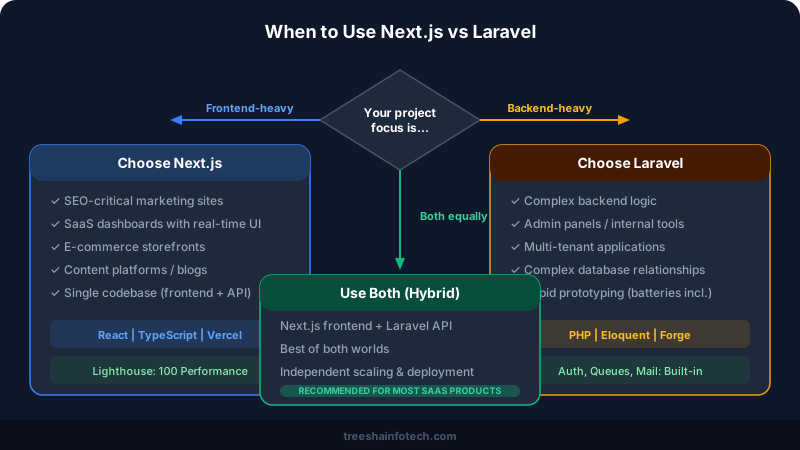
When to Choose Next.js
Next.js shines when performance, SEO, and modern user experience are priorities. It's our go-to framework for:
- Marketing websites that need to rank on Google — server-side rendering and static generation give you perfect Core Web Vitals scores
- SaaS dashboards with real-time data and interactive UIs
- E-commerce storefronts where page speed directly impacts conversion rates
- Content-heavy platforms like blogs, documentation sites, and knowledge bases
- Any project where you want a single codebase for frontend and API routes
The React ecosystem is massive — you'll find a library for almost anything. Server Components in Next.js 15 make it easy to build fast, SEO-friendly pages without sacrificing interactivity. And deployment on Vercel is practically zero-configuration.
Next.js Strengths
- SEO: Server-side rendering means Google sees fully rendered HTML immediately
- Performance: Automatic code splitting, image optimization, and edge caching
- Developer experience: Hot reload, TypeScript support, file-based routing
- Deployment: Vercel makes deployment a
git push - Full-stack: API routes let you build backend logic without a separate server
When to Choose Laravel
Laravel excels when your project is data-heavy, needs complex backend logic, or requires rapid prototyping with a batteries-included framework. It's ideal for:
- Admin panels and internal tools — Laravel Nova or Filament give you production-ready admin interfaces in hours
- Multi-tenant applications — Laravel's architecture handles tenant isolation cleanly
- Projects with complex database relationships — Eloquent ORM is one of the best in any language
- Payment and billing systems — Laravel Cashier handles Stripe/Paddle subscriptions out of the box
- Teams that prefer PHP and want a mature, well-documented ecosystem with 10+ years of community packages
Laravel's strength is its completeness. Authentication, queues, email, caching, database migrations, testing — everything is included and works together seamlessly. You don't spend days assembling libraries.
Laravel Strengths
- Batteries included: Auth, queues, mail, caching, testing — all built-in
- Eloquent ORM: The most elegant database abstraction in any framework
- Rapid prototyping: Scaffold a full CRUD app in minutes with Artisan
- Ecosystem: Forge, Vapor, Nova, Cashier — mature tools for every need
- Community: 10+ years of packages, tutorials, and battle-tested patterns
Head-to-Head Comparison
| Feature | Next.js | Laravel |
|---|---|---|
| Language | JavaScript / TypeScript | PHP |
| Frontend | React (built-in) | Blade templates or separate SPA |
| SEO | Excellent (SSR/SSG) | Good (requires SPA for dynamic UIs) |
| API Development | API Routes (good for simple) | Excellent (full REST/GraphQL) |
| Database ORM | Prisma or Drizzle (add-on) | Eloquent (built-in, exceptional) |
| Authentication | NextAuth.js (add-on) | Built-in (Breeze, Sanctum) |
| Deployment | Vercel (easiest), AWS | Any PHP hosting, Forge, Docker |
| Learning Curve | Moderate (React + Next concepts) | Low-moderate (great docs) |
| Best For | Frontend-first, SEO, dashboards | Backend-first, admin, complex logic |
The Hybrid Approach
In many projects, we use both — and this is often the best architecture. A Next.js frontend paired with a Laravel API backend gives you the best of both worlds: blazing fast UI with a robust, scalable backend.
When the Hybrid Works Best
- SaaS products where the dashboard needs real-time interactivity (Next.js) but the business logic is complex (Laravel)
- E-commerce platforms where the storefront needs SEO and speed (Next.js) but inventory management needs a solid backend (Laravel)
- Multi-platform products where the same Laravel API serves a web app (Next.js), mobile app (Flutter), and admin panel (Laravel Nova)
The two frameworks communicate via REST or GraphQL APIs. Each can be deployed, scaled, and maintained independently.
Real-World Performance Comparison
We've built production applications on both frameworks. Here's what we see in practice:
| Metric | Next.js | Laravel |
|---|---|---|
| Time to First Byte | 50-150ms (Vercel Edge) | 200-400ms (typical hosting) |
| Lighthouse Performance | 95-100 | 70-90 (depends on frontend) |
| Cold start | Near-zero (Vercel) | 100-300ms (PHP-FPM) |
| Built-in features | Minimal (add libraries) | Everything included |
| Hosting cost | Free tier available (Vercel) | $5-20/mo (shared hosting) |
Our Recommendation
There's no universal answer. The right choice depends on your team's expertise, project requirements, timeline, and budget:
- Choose Next.js if your project is frontend-heavy, needs SEO, or your team knows React
- Choose Laravel if your project is backend-heavy, needs complex data logic, or your team knows PHP
- Choose both if you need the best frontend experience AND complex backend — most of our larger projects use this hybrid approach
Frequently Asked Questions
Is Next.js better than Laravel?
Can I use Next.js and Laravel together?
Which framework is faster to build with?
Which framework should I choose for a SaaS product?
Ready to start your project?
Tell us about your requirements and we'll get back with a clear plan within 24 hours. No sales pitch — just an honest conversation.

Co-founded Treesha Infotech and leads all technology decisions across the company. Full-stack architect with deep expertise in Laravel, Next.js, AI integrations, cloud infrastructure, and SaaS platform development. Ritesh drives engineering standards, code quality, and product innovation across every project the team delivers.