
Every week, we hear from training companies and enterprises who chose Moodle for its flexibility — then hit a wall when they realize the default installation doesn't match their needs. The out-of-the-box Moodle experience is functional but generic. The real power of Moodle comes from customization: branded themes that reflect your organization, plugins that extend functionality, and multi-tenant architectures that let you serve dozens of clients from a single installation.
After managing 50+ Moodle projects at Treesha Infotech — from small training portals to multi-tenant platforms serving thousands of learners across multiple organizations — I've learned that the difference between a Moodle deployment that people love and one they tolerate comes down to three things: the right theme, the right plugins, and the right architecture.
In This Article
Understanding Moodle's Customization Layers
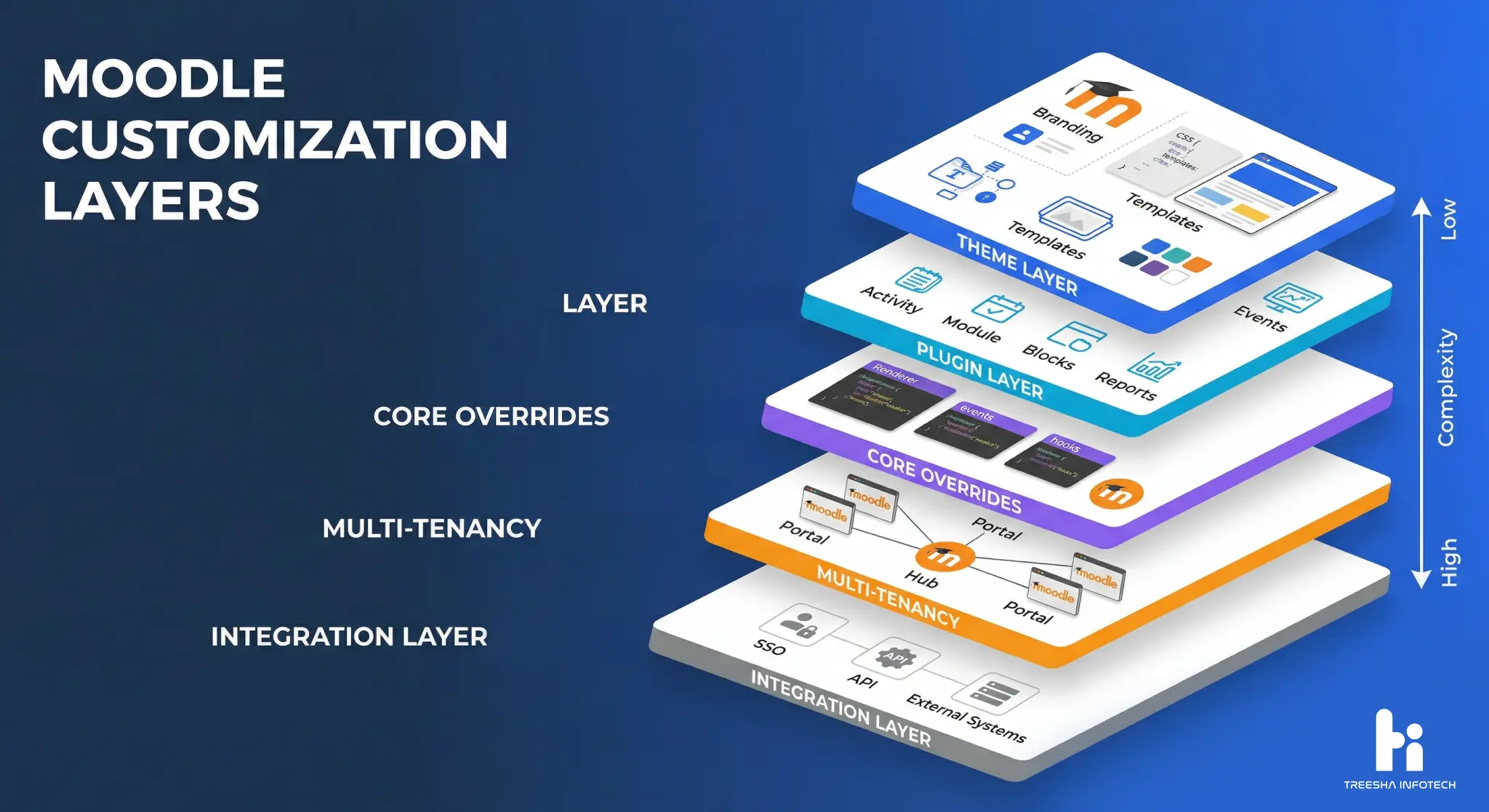
Moodle is built on a layered architecture that makes customization straightforward — if you know where each layer sits. Before diving into specifics, here's how the layers work:
| Layer | What It Controls | Complexity |
|---|---|---|
| Theme Layer | Branding, layout, CSS, templates | Low-Medium |
| Plugin Layer | Features, activities, blocks, reports | Medium-High |
| Core Overrides | Renderer overrides, event observers, hooks | High |
| Multi-Tenancy | Organization separation, user pools, branding per tenant | High |
| Integration Layer | SSO, APIs, external system connections | Medium-High |
The golden rule: never modify Moodle core files. Every customization should be done through themes, plugins, or local overrides. This ensures your changes survive Moodle updates and security patches.
Theme Customization: From Branding to Custom UX
Moodle's theme system is template-based, using Mustache templates and SCSS for styling. Every visible element can be customized without touching core code.
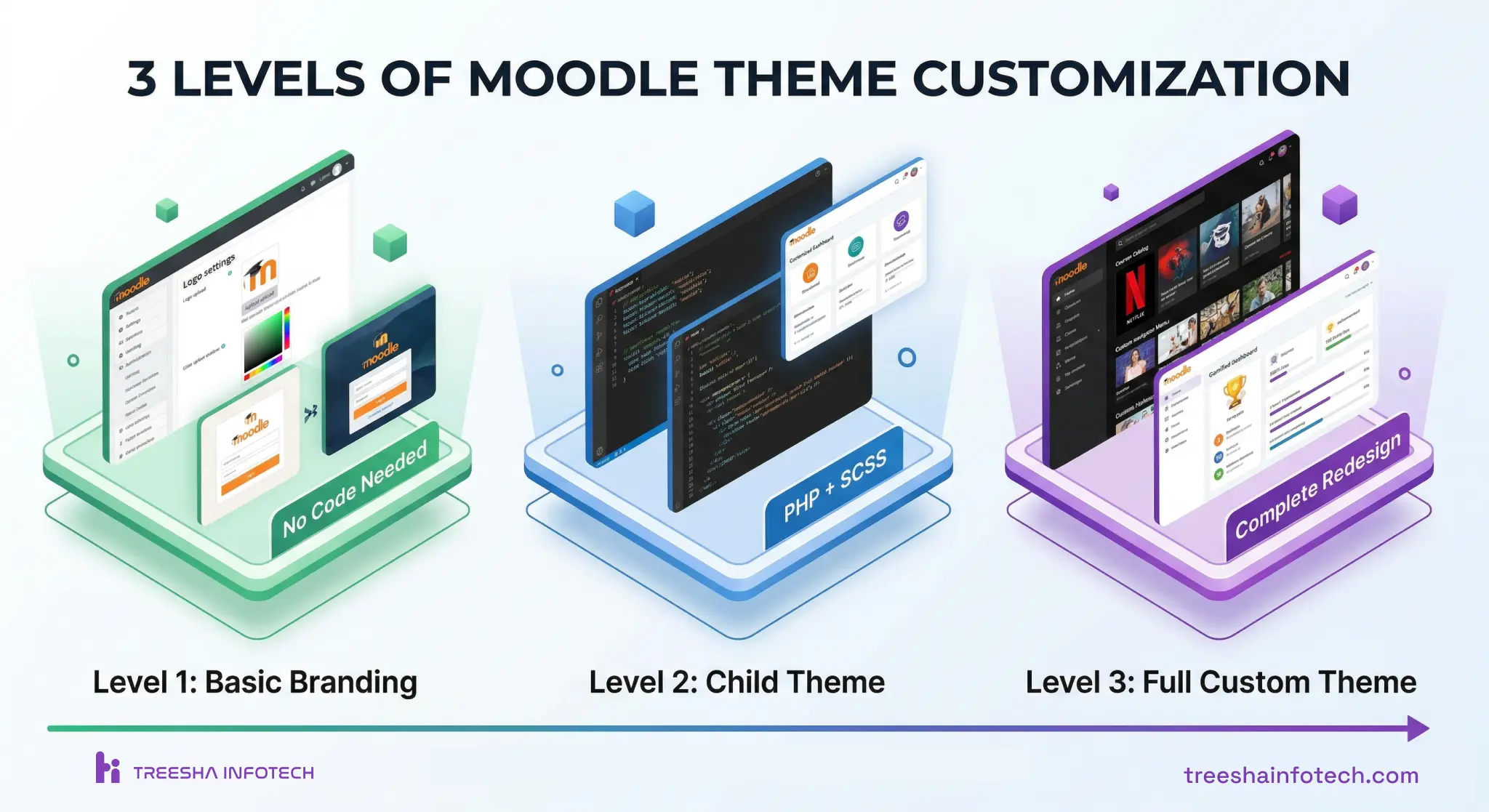
Level 1: Basic Branding (No Code)
You can change these directly from Moodle admin — no developer needed:
- Logo and favicon (Site administration > Appearance > Logos)
- Brand colors via Boost theme settings (primary, secondary, success, info)
- Custom CSS snippets (Site administration > Appearance > Additional HTML)
- Login page background image and text
- Course layout (topics, weeks, tiles)
This covers about 60% of what most organizations need for branding.
Level 2: Child Theme (PHP + SCSS)
For deeper customization, create a child theme based on Boost:
- Custom SCSS variables for complete color system control
- Modified Mustache templates for layout changes (header, footer, course page)
- Custom navigation structure and menus
- Branded dashboard with organization-specific widgets
- Responsive adjustments for mobile learners
A child theme inherits all of Boost's functionality while letting you override specific templates. This is the approach we use for 90% of our enterprise clients.
Level 3: Full Custom Theme
For organizations that need a completely different UX — like a Netflix-style course catalog or a gamified learning dashboard — a full custom theme is the way to go. This means:
- Custom page layouts and navigation patterns
- Interactive dashboard with progress visualization
- Custom course listing with filters, search, and categories
- Branded certificate viewer and portfolio pages
- Mobile-optimized touch interactions
Essential Plugins for Enterprise Moodle
After deploying 50+ Moodle platforms, these are the plugins we install on almost every enterprise project:
Must-Have Plugins
| Plugin | Purpose | Free/Paid |
|---|---|---|
| IOMAD | Multi-tenancy — separate organizations, branding, reporting | Free |
| Custom Certificate | Branded, auto-generated PDF certificates on course completion | Free |
| H5P | Interactive content — quizzes, videos, presentations, drag-and-drop | Free |
| BigBlueButton | Built-in virtual classroom and video conferencing | Free |
| Configurable Reports | Custom SQL-based reports and dashboards | Free |
| Attendance | Track learner attendance for live sessions | Free |
| Logstore xAPI | Send learning data to an LRS for advanced analytics | Free |
| Boost Navigation | Clean up and customize the navigation sidebar | Free |
Recommended Enterprise Plugins
| Plugin | Purpose | Free/Paid |
|---|---|---|
| Level Up! (XP) | Gamification — points, levels, leaderboards | Free (premium available) |
| Tiles Course Format | Visual, tile-based course layout (replaces topics/weeks) | Free |
| Fordson Theme | Enhanced Boost-based theme with more admin settings | Free |
| Intelliboard | Advanced learning analytics and reporting dashboard | Paid |
| SafeAssign/Turnitin | Plagiarism detection for assessments | Paid |
| Zoom Integration | Zoom meeting scheduling and joining from within Moodle | Free |
Choosing the Right Plugin Stack
Not every project needs every plugin. Here's how we decide:
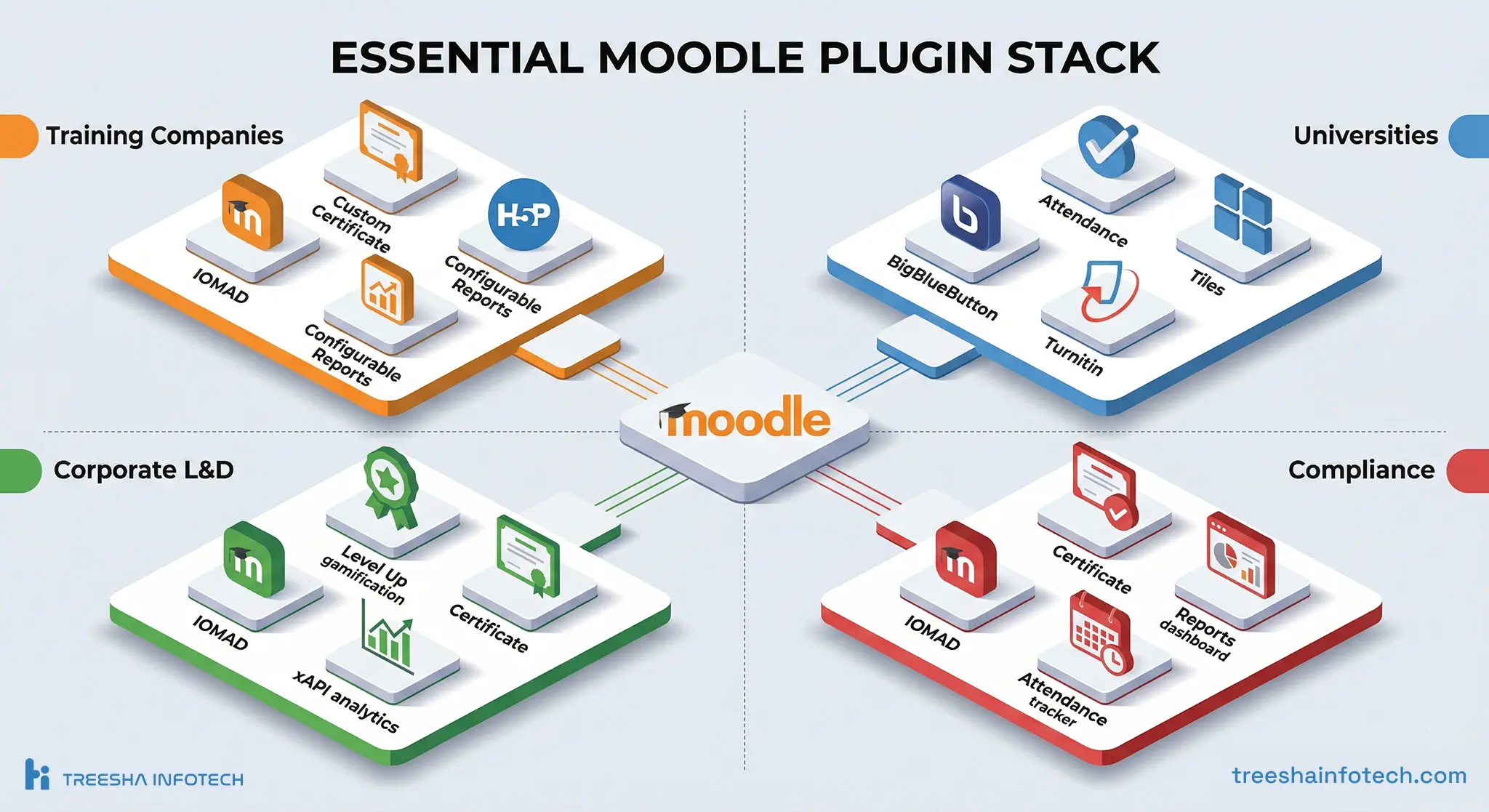
- Training companies — IOMAD + Custom Certificate + H5P + Configurable Reports
- Universities — BigBlueButton + Attendance + Turnitin + Tiles
- Corporate L&D — IOMAD + Level Up! + Logstore xAPI + Custom Certificate
- Compliance training — IOMAD + Custom Certificate + Configurable Reports + Attendance
Multi-Tenancy: Serving Multiple Organizations
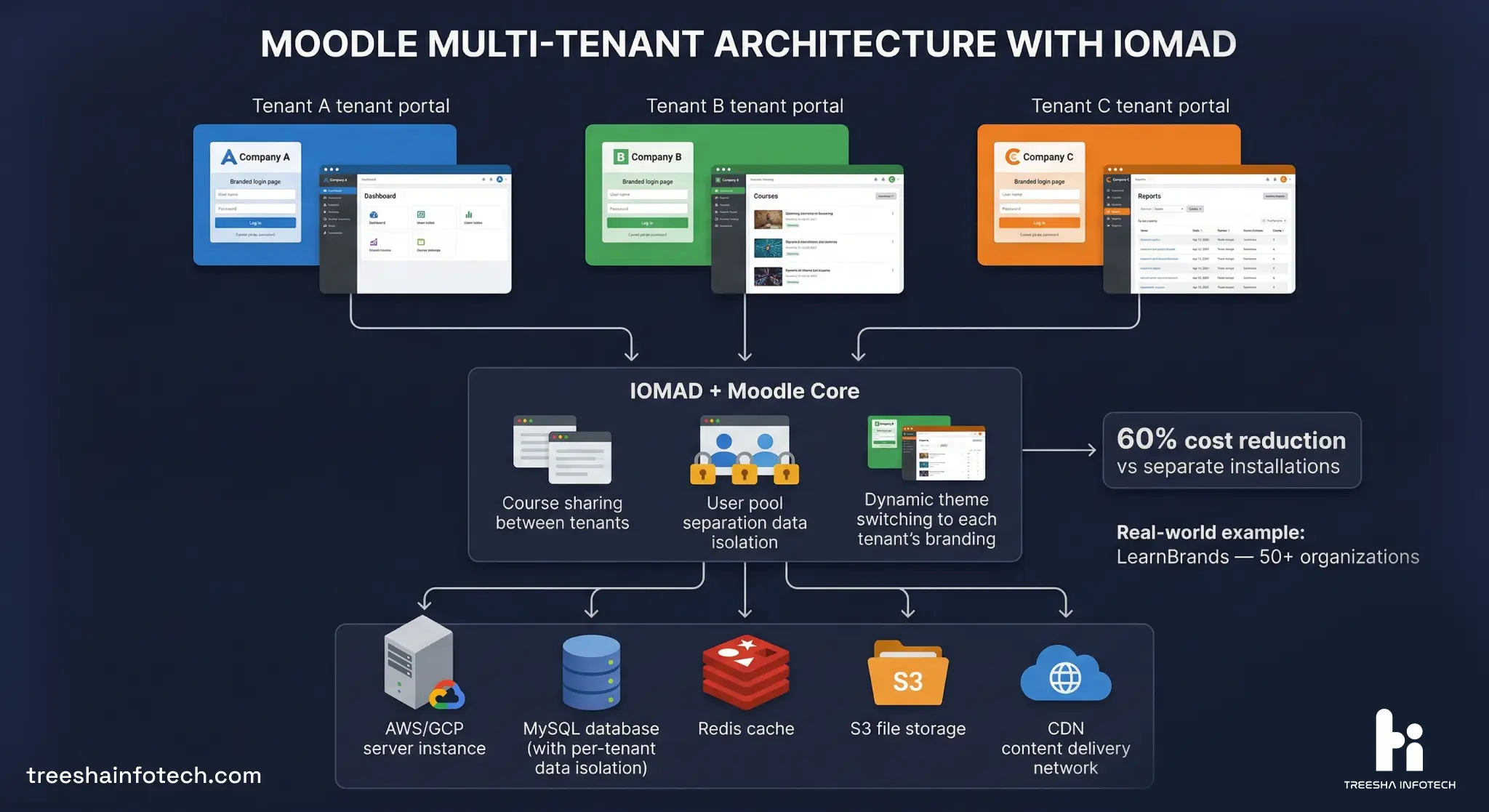
Multi-tenancy is the most valuable — and most complex — Moodle customization for training companies. It lets you serve multiple client organizations from a single Moodle installation, with each getting their own:
- Branded login page and theme
- User pool (learners only see their organization)
- Course catalog (custom courses per organization)
- Reporting dashboard (managers see only their data)
- Certificate templates
- Custom enrollment workflows
IOMAD: The Standard for Moodle Multi-Tenancy
IOMAD (Industry Organisation Management and Distribution) is the open-source solution we use for most multi-tenant deployments. It adds a "Company" layer on top of standard Moodle:
- Create unlimited companies/organizations
- Assign users, courses, and managers per company
- Custom theme per company (logo, colors, branding)
- Company-level reporting and analytics
- License management (allocate course seats per company)
- Department hierarchies within each company
Architecture for Scale
For multi-tenant Moodle serving 1,000+ concurrent users:
| Component | Recommendation |
|---|---|
| Hosting | AWS EC2 or GCP Compute (minimum 4 vCPU, 16GB RAM) |
| Database | Amazon RDS for MySQL/PostgreSQL (separate from app server) |
| Caching | Redis for session and application cache |
| File Storage | Amazon S3 for uploaded content and backups |
| CDN | CloudFront or Cloudflare for static assets and SCORM packages |
| Load Balancer | ALB with sticky sessions for multi-server setups |
| Monitoring | CloudWatch or Datadog for uptime and performance alerts |
Real Example: LearnBrands Multi-Tenant Platform
We built LearnBrands — a multi-tenant e-learning platform for the cannabis industry using IOMAD. Each client brand gets their own branded portal, course catalog, user management, and compliance reporting — all running on a single Moodle instance. The platform serves multiple organizations with thousands of active learners, reducing per-client hosting costs by over 60% compared to separate installations.
SCORM, xAPI & Content Standards
E-learning content standards determine how courseware communicates with your LMS. Getting this right is critical for tracking completions, scores, and compliance.
| Standard | Best For | Moodle Support |
|---|---|---|
| SCORM 1.2 | Legacy content, simple tracking (complete/incomplete) | Native — built-in |
| SCORM 2004 | Sequencing, complex navigation, detailed tracking | Native — built-in |
| xAPI (Tin Can) | Modern analytics, mobile learning, offline tracking | Via Logstore xAPI plugin |
| LTI 1.3 | Connecting external tools and content providers | Native — built-in |
| H5P | Interactive content created directly in Moodle | Via H5P plugin |
SCORM Best Practices
- Always test SCORM packages in a staging environment before production
- Use SCORM 1.2 unless you specifically need SCORM 2004 sequencing
- Set "Force new attempt" for compliance courses (prevents learners from replaying completed attempts)
- Monitor SCORM package sizes — packages over 100MB should be hosted on a CDN, not uploaded directly
- Keep a library of tested SCORM packages with version notes
Moving Beyond SCORM
SCORM was designed in the early 2000s and has significant limitations — no offline support, no mobile-native tracking, limited data. For new content development, consider:
- H5P for interactive content you build directly in Moodle (no external authoring tool needed)
- xAPI for detailed learning analytics and cross-platform tracking
- LTI 1.3 for connecting to external content providers like LinkedIn Learning, Coursera, or custom platforms
Performance Optimization for Scale
A default Moodle installation handles 50-100 concurrent users. Enterprise deployments need specific optimizations:
- Enable OPcache — PHP opcode caching reduces execution time by 40-60%
- Redis for sessions and cache — moves cache from database to memory (10x faster)
- Cron optimization — run Moodle cron every minute via system cron, not web-based
- Database tuning — increase innodb_buffer_pool_size to 70% of available RAM
- CDN for static assets — offload CSS, JS, images, and SCORM packages
- Disable unused plugins — every active plugin adds overhead to every page load
- Enable MUC (Moodle Universal Cache) — configure Redis as the application cache store
When to Build Custom vs. Use Existing Plugins
The Moodle plugins directory has 2,000+ plugins. Before building custom, always check if something existing solves your problem.
| Build Custom When | Use Existing When |
|---|---|
| You need integration with a proprietary system (custom CRM, HR tool) | A well-maintained plugin with 1,000+ downloads exists |
| The workflow is unique to your business process | The feature is a common LMS need (certificates, attendance, reports) |
| You need specific data handling for compliance or legal reasons | The plugin has been updated in the last 6 months |
| No existing plugin covers more than 60% of your requirement | You can configure the existing plugin to meet 80%+ of your needs |
The Cost of Custom Plugins
- Simple plugin (block, local): 2-3 weeks, $3,000-5,000
- Medium plugin (activity module, report): 4-6 weeks, $5,000-15,000
- Complex plugin (enrollment, multi-tenancy extensions): 6-12 weeks, $15,000-30,000
- Ongoing maintenance: 2-4 hours/month per custom plugin
Every custom plugin is a maintenance commitment — building them well requires deep open-source development expertise. Budget for ongoing updates when Moodle releases new versions — typically 2-4 hours of developer time per major Moodle upgrade per custom plugin.
Bottom Line
Moodle's strength is its flexibility — but that flexibility is only useful if you know how to leverage it. The difference between a generic Moodle installation and a platform your learners actually enjoy using comes down to thoughtful customization: the right theme for your brand, the right plugins for your workflow, and the right architecture for your scale.
> The key insight from 50+ Moodle projects: Start simple, extend gradually. Install IOMAD and a child theme on day one. Add plugins as specific needs emerge. Build custom only when nothing existing fits. This approach keeps costs low, maintenance manageable, and your platform stable.
If you're planning a Moodle deployment or need to upgrade an existing one — whether it's a single training portal or a multi-tenant platform serving dozens of organizations — we've likely solved a similar problem before. Browse our e-learning portfolio or reach out directly to discuss your requirements.
Frequently Asked Questions
How much does it cost to customize Moodle?
What is the best Moodle theme for corporate training?
Can Moodle support multiple organizations from one installation?
How do I add SCORM content to Moodle?
What are the most useful Moodle plugins for enterprise?
How do I create a custom Moodle plugin?
Should I use Moodle Cloud or self-hosted Moodle?
How often should I update Moodle?
Can Moodle integrate with my existing systems?
Ready to start your project?
Tell us about your requirements and we'll get back with a clear plan within 24 hours. No sales pitch — just an honest conversation.

Co-founded Treesha Infotech and leads operations for the company's Moodle and e-learning practice. Ashish manages project delivery, client communication, and quality assurance across all Moodle engagements — ensuring every platform ships on time, on budget, and beyond client expectations.