
I've spent the last 11 years building engineering teams — both in-house at Treesha Infotech and as augmented developers inside our clients' organizations across 20+ countries. I've watched companies burn six months and $50,000 on a single failed hire, and I've seen others scale from 3 engineers to 15 in two weeks using augmentation. The difference isn't luck. It's understanding which model fits your situation.
This guide is what I'd tell you if we were sitting across the table and you asked, "Should I hire, or should I augment?" No fluff, no buzzwords — just the operational reality of how staff augmentation works, what it costs, and when it's the wrong choice.
In This Article
What is Staff Augmentation? (Plain English)
Staff augmentation means you bring in external developers who work as members of your team. Not alongside your team. Not for your team. As your team.
They join your Slack channels. They push code to your GitHub repos. They attend your daily standups. They report to your engineering manager or CTO. The only difference between them and your in-house developers is who signs their paycheck.
That's the key distinction. With outsourcing, you hand over a project and get deliverables back. With freelancers, you post a task and get piecework. With staff augmentation, you get people — embedded engineers who build context over time, understand your product deeply, and operate within your development culture.
Think of it as renting highly skilled teammates instead of buying them. You skip the 3-6 month hiring process, the $15,000-$25,000 recruiting fee, the benefits overhead, and the risk of a bad hire. If it doesn't work out, you swap the person — not restructure your organization.
Staff Augmentation vs Outsourcing vs Freelancers
These three models get confused constantly. Here's a clear breakdown:
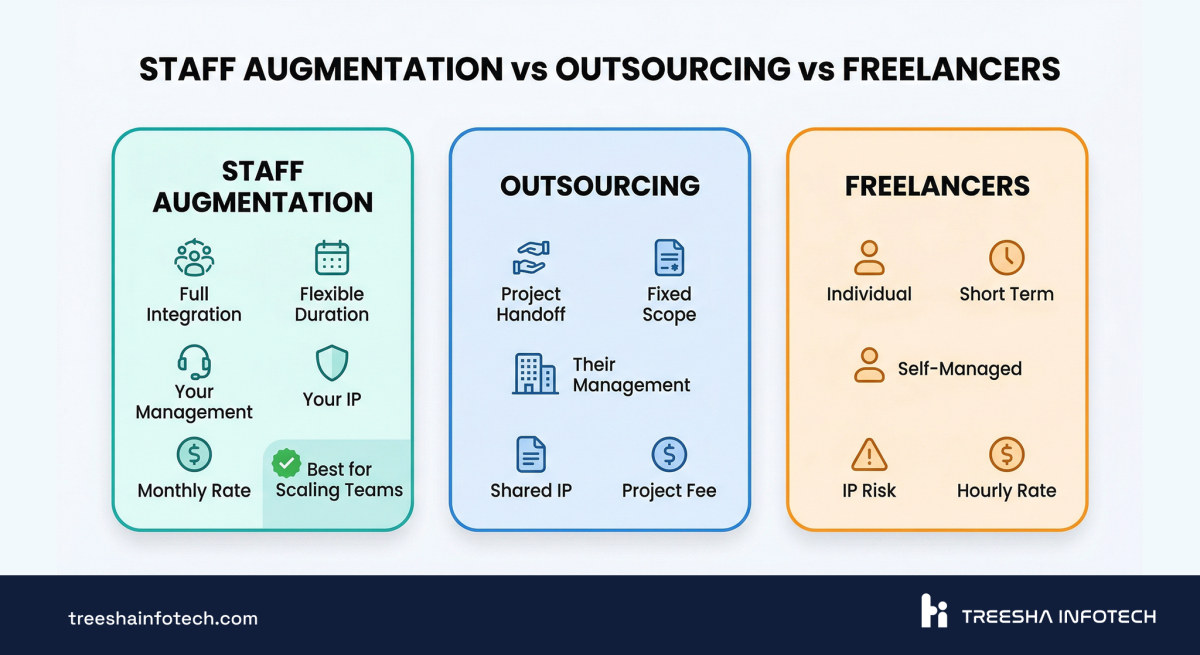
| Factor | Staff Augmentation | Project Outsourcing | Freelancers |
|---|---|---|---|
| Control | You manage directly | Partner manages | You manage loosely |
| Integration | Fully embedded in your team | Separate team, regular demos | Task-by-task |
| Cost structure | Monthly retainer per developer | Fixed price or T&M per project | Hourly rate per task |
| Flexibility | Scale up/down week to week | Scope-bound | Available when free |
| Management overhead | You run standups, code reviews | Partner handles day-to-day | You define and review tasks |
| IP ownership | Yours (developer uses your repos) | Yours (transferred at delivery) | Yours (if contracted properly) |
| Best for | Scaling your existing team fast | Complete projects with defined scope | Small tasks, prototypes, bug fixes |
| Knowledge retention | High (embedded over months) | Low (ends with project) | Very low (task-based) |
| Risk of failure | Low (trial + replacement) | Medium (scope creep, misalignment) | High (no redundancy) |
Staff augmentation wins when you already have a team and process in place but need more hands. If you have no technical leadership and want to hand off an entire project, outsourcing is the right call. If you need a one-off task done in a week, hire a freelancer.
The 4 Engagement Models
Not all augmentation looks the same. There are four models, and picking the right one depends on your workload, budget, and management capacity.
1. Part-Time Developer (20 hours/week)
When to use: You have a specific skill gap but not enough work to justify full-time. A React Native specialist for your mobile app while your team handles the backend. A DevOps engineer to set up your CI/CD pipeline.
Best for: Startups with tight budgets. Supplementing a specific skill. Maintenance-phase products.
2. Full-Time Dedicated Developer
When to use: You need a consistent contributor embedded in your team for months. They'll build context, learn your codebase, and become indistinguishable from in-house staff.
Best for: Growing startups. Companies with in-house leads who need more hands. Long-running product development.
3. Dedicated Team (3-5 developers)
When to use: You're launching a new product line, entering a new market, or scaling an existing product rapidly. You need a cohesive unit, not individual contributors.
Best for: Series A/B startups scaling fast. Enterprises launching new digital products. Companies building a parallel workstream.
4. Full Squad (cross-functional team)
When to use: You need a self-sufficient unit — frontend, backend, QA, and a tech lead — that can own an entire product or module. The squad operates semi-autonomously but within your processes.
Best for: Large-scale product launches. Companies building a second product. Organizations that need a complete engineering function fast.
Each model can be priced as monthly retainer or hourly rate. Discuss your specific needs with a partner to get an accurate quote — rates vary by seniority, skills, and engagement length.
The Real Cost: Hiring In-House vs Staff Augmentation
This is where the conversation changes from theoretical to financial. Let's run the real numbers.
The Full Cost of an In-House Senior Developer
| Cost Component | United States | United Kingdom | Germany |
|---|---|---|---|
| Base salary | $130,000-$170,000 | £65,000-£90,000 | €65,000-€85,000 |
| Benefits (health, dental, 401k) | $25,000-$40,000 | £8,000-£15,000 | €15,000-€25,000 |
| Office space & equipment | $8,000-$15,000 | £5,000-£10,000 | €5,000-€10,000 |
| Recruiting fee (20-25% of salary) | $26,000-$42,000 | £13,000-£22,000 | €13,000-€21,000 |
| Onboarding & training | $5,000-$10,000 | £3,000-£6,000 | €3,000-€6,000 |
| Total Year 1 | $194,000-$277,000 | £94,000-£143,000 | €101,000-€147,000 |
Why Augmentation Costs Less
Augmentation eliminates most of the categories above. There's no recruiting fee, no benefits overhead, no office space, no training cost, and no termination risk. You pay one flat monthly fee per developer and that's it.
The savings vary by partner, seniority, and engagement length — but for most companies, augmentation comes in significantly lower than in-house hiring, especially when you factor in time-to-hire and recruiting fees.
But cost isn't the whole story. Here are the hidden expenses of traditional hiring that nobody puts in the budget:
- Time to hire: 3-6 months for a senior developer. That's 3-6 months of lost velocity
- Ramp-up time: Even after hiring, it takes 1-3 months for a developer to be fully productive in your codebase
- Attrition risk: The average developer stays 2.3 years. When they leave, you restart the cycle — and lose institutional knowledge
- Opportunity cost: Every month you spend hiring is a month your competitors are shipping
With augmentation, you go from "we need a Laravel developer" to "a Laravel developer is in our standup" in under two weeks. The ROI is immediate. With hiring, your ROI doesn't start until month 6 at the earliest.
How Staff Augmentation Actually Works (Week by Week)
Theory is easy. Here's what the first month actually looks like when you engage an augmentation partner:
Week 1: Brief & Match
You describe the role — technology stack, seniority level, working hours, project context. A good partner responds with 2-3 pre-vetted profiles within 48 hours. You review CVs, conduct a short technical interview if you want (most clients do a 30-minute call), and select your developer.
Week 2: Paid Trial
The developer starts with a 1-week paid trial. They get access to your tools, join your channels, and begin working on real tasks — not artificial test projects. You evaluate their code quality, communication, problem-solving, and cultural fit. If the match isn't right, the partner replaces them at no extra cost.
Week 3-4: Full Integration
Trial passed. The developer is now fully embedded. They're attending sprint planning, picking up tickets from the backlog, participating in code reviews, and building context about your product architecture. By the end of week 4, most augmented developers are operating at 80-90% of the velocity of your in-house team.
Month 2 Onward: Steady State
The developer is part of your team. They understand your product, your code patterns, and your working style. You manage them exactly like you manage everyone else. The only thing that's different is that their paycheck comes from the augmentation partner, not from your payroll.
This is what separates augmentation from outsourcing. There's no "deliverables handoff." There's no "weekly status report from the vendor." There's just a developer in your standup who happens to be in Ahmedabad instead of Austin.
How to Integrate Augmented Developers (The Right Way)
This section matters more than any cost comparison. The number one reason augmentation engagements fail is poor integration. Not skill mismatch. Not timezone issues. Integration.
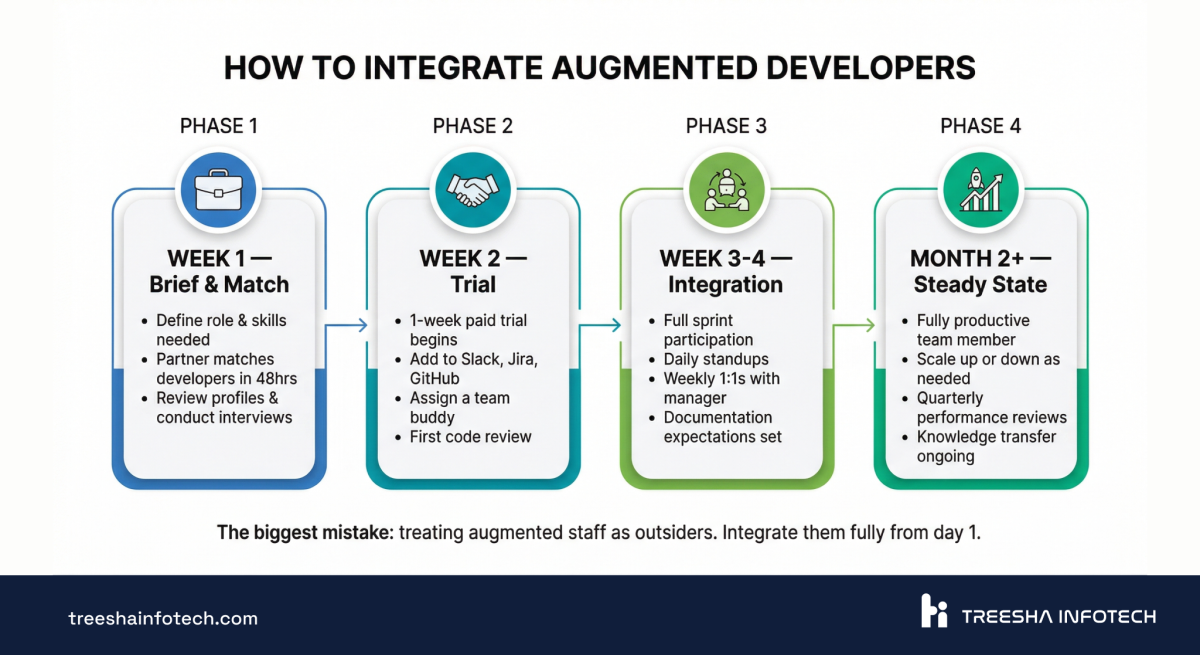
Here's the playbook:
Day 1: Full Access
Add them to everything. Slack, Jira, GitHub, Confluence, Figma — whatever your team uses. Don't make them request access for two weeks. Don't put them in a separate "vendor" channel. They're on your team. Treat them that way from minute one.
Day 1-3: Buddy System
Assign an in-house developer as their buddy for the first week. Not a manager — a peer. Someone who can answer "where does this service live?" and "what's the convention for naming migrations?" and "who owns the payments module?" The buddy accelerates onboarding by weeks.
Week 1: Set Communication Norms
Be explicit about what you expect:
- Timezone overlap: Define the core hours (e.g., 1:00 PM - 5:00 PM IST overlapping with 9:30 AM - 1:30 PM GMT)
- Response times: "Respond to Slack messages within 2 hours during overlap. Async is fine outside overlap."
- Standup format: Include them in your daily standup from day one
- Blocker escalation: "If you're blocked for more than 2 hours, message the team lead immediately"
Week 1-2: Code Review From Day One
Every pull request gets reviewed by your in-house team. This accomplishes two things: quality control and knowledge transfer. Your team learns the augmented developer's style. The augmented developer learns your patterns. Within two weeks, code reviews get faster because everyone is aligned.
Month 1: Weekly 1:1s
Schedule a weekly 15-minute 1:1 with the augmented developer for the first month. Ask: "What's slowing you down? What context are you missing? What would make you more effective?" These conversations catch small problems before they become big ones.
The Mistake That Kills Engagements
The single biggest mistake is creating an "us and them" dynamic. Augmented developers in a separate Slack channel. Excluded from team retrospectives. Left out of architecture discussions. Given only grunt work.
When you treat augmented staff as second-class team members, you get second-class output. When you treat them as real teammates, you get teammates.
When Staff Augmentation Works Best
Staff augmentation isn't always the answer. But for these five scenarios, it's almost always the best option:
1. You're scaling quickly for a new product or feature. You've secured funding, signed a big client, or committed to an aggressive roadmap. You need 3-5 more developers in the next month, not the next quarter. Augmentation gets you there.
2. You have a specific skill gap. Your team is strong in Laravel and React, but you need Moodle LMS expertise for a new e-learning product, or Python/ML skills for an AI feature. Augmenting with web development specialists who know your stack accelerates delivery without permanent headcount. Augmenting a specialist is faster and cheaper than hiring one full-time — especially for skills you won't need permanently.
3. You're handling a workload spike. A major release, a seasonal peak, or a client emergency that requires temporary capacity. Augmentation lets you scale up for 3-6 months and scale back down without layoffs.
4. You want to extend your runway. Instead of hiring 2 US-based developers at full burden, you can augment with a larger team for a fraction of the cost. Same output, much lower burn rate. For funded startups, this can mean 6+ extra months of runway.
5. You need to ship faster without compromising quality. Your current team is good, but there aren't enough of them. Every sprint, high-priority tickets get pushed to the next sprint. Augmentation adds capacity without changing your process.
When Staff Augmentation Doesn't Work
Honesty matters more than a sales pitch. Here are the situations where I'd tell you to look elsewhere:
You don't have a technical lead. Augmented developers need someone to manage them — assign tasks, review code, provide context. If you're a non-technical founder hoping to hire developers and have them figure it out, you need a CTO or tech lead first — or strategic IT consulting to fill that gap. Or use project outsourcing where the partner provides management.
The engagement is too short. If you need someone for less than 3 months, the onboarding investment often isn't worth the return. It takes 2-4 weeks for a developer to build meaningful context in your codebase. For engagements under 3 months, consider freelancers or fixed-scope outsourcing.
You want to hand off completely. If your mindset is "here are the requirements, come back when it's done," that's outsourcing, not augmentation. Augmentation requires your daily involvement — standups, code reviews, sprint planning. If you can't provide that, choose a different model.
Your company culture is anti-remote. If your team exclusively values in-office presence and has never worked with remote colleagues, adding an augmented developer across timezones will create friction. Fix the cultural readiness first.
You're trying to replace management with cheap labor. Augmented developers are not a substitute for engineering leadership. If your problem is bad architecture decisions, unclear requirements, or poor project management, adding more developers won't fix it. More developers plus bad management equals more chaos, not more output.
7 Things to Ask Before Engaging a Staff Augmentation Partner
Before you sign anything, get clear answers to these questions:
1. Do they offer a trial period? A reputable partner will give you a 1-week paid trial before you commit. If they demand a 3-month minimum upfront with no trial, walk away. At Treesha, every engagement starts with a paid trial — we don't want clients who feel trapped.
2. What's their replacement policy? If the developer isn't a fit, what happens? The best partners replace them at no additional cost and no gap in billing. Ask for this in writing.
3. What timezone overlap do they provide? India (IST, UTC+5:30) overlaps naturally with UK and European mornings and with US East Coast mornings. Clarify how many overlap hours you'll get and whether the developer can adjust their schedule.
4. How are developers vetted? Ask about their hiring process. How many applicants do they screen? What technical assessments do they use? What's their acceptance rate? A partner who hires everyone who applies isn't providing augmentation — they're providing bodies.
5. What's the minimum commitment? The best augmentation models are week-to-week or month-to-month. If someone is asking for a 12-month lock-in, the economics probably don't favor you.
6. Who handles HR and payroll? The whole point of augmentation is that you don't deal with employment logistics. Your partner should handle payroll, taxes, benefits, time off, and retention. You manage the work. They manage the person.
7. What about IP, NDAs, and compliance? All code should be written in your repositories. The developer should sign an NDA before seeing your codebase. IP assignment should be clear in the contract — everything they build belongs to you, full stop. If you handle EU user data, confirm your partner is GDPR-compliant and will sign a Data Processing Agreement (DPA). For regulated industries, ask whether developers can work within your encrypted environments or client-provisioned hardware.
The CTO's Pre-Engagement Checklist
You've decided to augment. Before your new developer starts on Monday, make sure you've done this:
- Defined the role clearly — technology stack, seniority level, specific responsibilities, success criteria for the first month
- Prepared onboarding documentation — architecture overview, local setup guide, coding conventions, deployment process. If you don't have this, write it now. Your in-house team needs it too
- Set up tool access — GitHub/GitLab repo access, Jira/Linear board, Slack channels, Figma, staging environment credentials. Have these ready before day one
- Assigned a team buddy — a peer-level in-house developer who can answer questions for the first 1-2 weeks
- Defined working hours — core overlap hours, standup time, acceptable async response times
- Planned the first sprint — have 2 weeks of clearly defined tickets ready. Don't start with "explore the codebase." Start with real but manageable tasks
- Communicated to your team — tell your in-house developers that a new team member is joining. Set the tone: this is a teammate, not a contractor
- Prepared a 30-day review plan — define what success looks like at day 7, day 14, and day 30. Share it with the developer and the augmentation partner
The Exit: What Happens When You're Done
The question CTOs rarely ask upfront — but always worry about: "If we end this, will we be stuck?"
No. And here's why augmentation has zero vendor lock-in by design:
Your code lives in your repos. From day one, augmented developers push to your GitHub or GitLab. There's no "vendor repository" to migrate from. Every line of code is already yours, in your environment, following your conventions.
Documentation is continuous. Because augmented developers work within your team's processes — writing PR descriptions, updating Confluence, commenting in Jira — knowledge transfer happens organically throughout the engagement, not in a frantic handover at the end.
The transition is a team change, not a project handoff. When an augmented developer leaves, it's the same as an in-house developer leaving. Your codebase, your architecture decisions, your documentation — all stay. You assign their tickets to someone else and move on.
A clean offboarding looks like this:
- 2-week notice period — developer completes in-progress work and documents any undocumented decisions
- Knowledge transfer sessions with the team member picking up their responsibilities
- Access revocation on the final day
- Optional: partner provides a replacement if you still need the capacity
This is the fundamental advantage over outsourcing. With outsourcing, you get a deliverable and hope the documentation is good enough. With augmentation, the knowledge was in your team's systems all along.
The Verdict
Staff augmentation is the fastest, most cost-effective way to scale an engineering team — if you have the management structure to support it.
It won't fix broken processes. It won't replace engineering leadership. And it doesn't work for every company or every situation. But for the majority of growing tech companies that need to ship more, ship faster, and do it without blowing up their payroll, it's the right model.
The economics are clear: 60-70% cost savings versus in-house hiring, immediate productivity (no 3-6 month hiring cycle), and the flexibility to scale up or down as your business demands change.
The operational model is proven: developers embedded in your team, working in your tools, managed by your leads, delivering code that's indistinguishable from in-house work.
If you're a CTO sitting on a growing backlog, a tight runway, or a hiring pipeline that's moving too slowly — staff augmentation is probably the conversation you need to have next.
> The bottom line: Hire in-house for your core team that defines your culture and architecture. Augment for everything else — the skill gaps, the scaling sprints, the specialized expertise you need for 6 months, not 6 years.
We've been providing dedicated developers and augmented teams to companies across 20+ countries for over a decade. If you want to explore whether augmentation fits your situation, we're happy to talk it through — no pitch, just an honest conversation about what would actually work for your team. And if you're still in the research phase, our careers page gives you a sense of the team depth behind our augmentation practice.
Frequently Asked Questions
What is IT staff augmentation?
How much does staff augmentation cost compared to hiring in-house?
What is the difference between staff augmentation and outsourcing?
How quickly can I get augmented developers?
What skills are available through staff augmentation?
How do I manage augmented developers effectively?
What are the risks of staff augmentation?
When should I NOT use staff augmentation?
Can I convert augmented staff to full-time employees?
Ready to start your project?
Tell us about your requirements and we'll get back with a clear plan within 24 hours. No sales pitch, just an honest conversation.

Founded Treesha Infotech in 2014 with a mission to deliver world-class IT solutions from India. With 300+ projects across 20+ countries, Raju leads client strategy, business development, and long-term partnerships. A recognized Moodle specialist, he personally oversees every major engagement to ensure it exceeds expectations.