
I've evaluated, deployed, and maintained LMS platforms for over a decade. During that time, I've watched organizations make the same expensive mistake repeatedly: they choose an LMS based on a polished demo, sign a multi-year contract, and realize six months in that the platform doesn't fit their workflow. Switching costs are brutal — migration eats 2-4 months, you lose historical data, and your learners have to re-orient to a new interface.
This guide exists because the LMS market is crowded and confusing. There are 800+ platforms listed on G2 alone. Most comparison articles are written by people who haven't actually deployed these systems for real organizations. We have. At Treesha Infotech, we've built and managed LMS platforms for training companies, universities, government bodies, and enterprises across four continents. This is what we've learned.
In This Article
Why Your LMS Choice Matters More Than You Think
The average organization keeps their LMS for 5-7 years. That means your choice today will define your training infrastructure well into the 2030s. Three things matter more than the sales pitch:
Total cost of ownership (TCO) over 3 years. SaaS per-user pricing looks cheap at the start — but at scale, it becomes your biggest line item. A platform priced for 50 users can cost 10-20x more when you grow to 1,000 learners. Open-source platforms like Moodle flip this — higher upfront investment, dramatically lower cost at scale.
Switching costs are real. Migrating from one LMS to another takes 4-8 weeks minimum. SCORM content transfers cleanly, but custom workflows, reporting configurations, and historical completion records don't. For compliance-heavy industries, losing completion history can trigger regulatory problems. We've helped organizations migrate off platforms they were locked into for years — it's never painless.
Adoption determines ROI. The fanciest LMS in the world delivers zero value if your learners hate using it. In our experience, customizability matters more than out-of-the-box polish. A platform you can shape to match your workflows always outperforms a rigid platform with a prettier default UI.
8 Features Every Corporate LMS Must Have
Before comparing platforms, you need to know what you're comparing them on. These eight capabilities are non-negotiable for corporate training in 2026.
Why these eight specifically? Because the landscape has shifted. xAPI adoption is accelerating as organizations outgrow SCORM's limitations. AI-powered content authoring has gone from nice-to-have to table stakes — if your LMS can't integrate with H5P or AI authoring tools, you're creating content the slow way. And with hybrid work now permanent, mobile-first learning isn't a feature request anymore, it's a baseline expectation.
| Feature | Why It Matters |
|---|---|
| SCORM/xAPI Support | Industry-standard content plays across platforms. Without this, you're locked to one vendor's content format. |
| Multi-Tenancy | Serve multiple business units, clients, or franchise locations from one installation. Essential for training companies and large enterprises. |
| Reporting & Analytics | Managers need completion rates, assessment scores, time-on-task, and compliance status — without exporting to Excel. |
| SSO Integration | Your learners already have corporate credentials (Microsoft 365, Google Workspace, Okta). Making them create another login kills adoption. |
| Mobile Access | 40-60% of corporate learners access training on mobile devices. This isn't optional anymore. |
| API & Integrations | Your LMS needs to talk to HR systems, CRMs, and content authoring tools. A closed API means manual data entry forever. |
| Compliance Tracking | Automated certificate generation, expiry reminders, audit trails, and re-certification workflows. |
| Content Authoring | Built-in tools or tight integration with external authoring tools (Articulate, H5P) to create and update courses without developer help. |
If a platform is weak on any of these eight, it's going to cause problems. Keep this list handy as we go through each platform.
The 6 Platforms We Evaluated
We selected these six based on what we actually encounter in client projects. These aren't the six most popular — they're the six that come up most in buying conversations with the kinds of organizations we work with: mid-market companies, training providers, and enterprises with 200-10,000+ learners.
Our evaluation is based on hands-on deployment experience (for Moodle, IOMAD, and LearnDash) and thorough technical evaluation, client migration projects, and published documentation for the SaaS platforms. I'll be upfront — Moodle and LearnDash are platforms we deploy regularly, so we know them at a deeper level than the SaaS options. I'll note where our perspective is based on direct experience vs. external evaluation.
Platform-by-Platform Breakdown
1. Moodle
Type: Open source, self-hosted (or MoodleCloud) Market position: The world's most deployed LMS — 400+ million users across 240+ countries.
Moodle is the platform we know best. We've deployed it for cannabis compliance training, Canadian food safety certification, K-12 STEM education, UK corporate training, and Australian vocational licensing. Across all of these, Moodle's core strength is the same: it does exactly what you need because you can make it do exactly what you need.
Strengths:
- Zero licensing cost — the software is free, forever
- 2,000+ plugins for virtually any feature you can imagine — and with open-source development expertise, custom plugins fill the gaps
- SCORM 1.2, SCORM 2004, xAPI, LTI 1.3 — all supported natively or via plugins
- Full control over data, hosting, security, and customization
- Massive community — any problem you encounter has likely been solved before
- Granular role-based access control with custom role creation
Limitations:
- Out-of-the-box UI looks dated compared to modern SaaS platforms (fixable with custom themes)
- Self-hosted means you need a hosting partner or internal DevOps capability
- Admin interface has a steep learning curve for non-technical administrators
- Plugin quality varies — some are well-maintained, others are abandoned
Pricing: Free software. You pay for hosting (scales with your user count) and a one-time implementation cost. No per-user fees, ever — your cost stays flat whether you have 100 or 10,000 learners.
Best for: Organizations with 500+ users who want full control, training companies serving multiple clients, compliance-heavy industries, anyone who doesn't want to pay per-user licensing in perpetuity.
2. IOMAD (Moodle Multi-Tenancy)
Type: Free open-source extension for Moodle Market position: The standard multi-tenancy solution for Moodle in corporate environments.
IOMAD deserves its own section because multi-tenancy is the single most requested feature in corporate LMS. If you're a training company serving multiple client organizations, or an enterprise with separate business units that each need their own branding and reporting, IOMAD is the answer.
We built the LearnBrands platform on IOMAD — a multi-tenant e-learning system for the cannabis industry where each brand gets its own portal, user pool, course catalog, and compliance reporting, all running on a single Moodle installation. The architecture reduced per-client hosting costs by over 60%.
What IOMAD adds to Moodle:
- Unlimited company/organization creation within one Moodle instance
- Separate branding (theme, logo, colors) per company
- Independent user pools — learners only see their organization
- Company-level course assignment and license management
- Department hierarchies within each company
- Per-company reporting dashboards for managers
- Automated user provisioning via CSV or API
Limitations:
- Adds complexity to Moodle administration
- Some Moodle plugins aren't IOMAD-aware and may not respect tenant boundaries
- Requires careful planning of the tenant structure before deployment
Pricing: Free. Same as Moodle — you pay for hosting and implementation only.
Best for: Training companies serving multiple clients, franchise operations, large enterprises with distinct business units, any scenario where you'd otherwise need to manage multiple separate LMS installations.
3. LearnDash
Type: WordPress plugin (self-hosted) Market position: The leading LMS plugin for WordPress — used by Fortune 500 companies and solo course creators alike.
LearnDash is our go-to recommendation when the client's ecosystem is WordPress-based. If you're already running WordPress for your main site and want to sell courses or deliver internal training without a separate platform, LearnDash is the fastest path to a working LMS.
Strengths:
- Deep WordPress integration — your LMS lives alongside your existing site
- Drag-and-drop course builder that non-technical users actually enjoy
- WooCommerce integration for course sales, subscriptions, and bundles
- Solid SCORM/xAPI support (via add-on)
- Active development with regular updates
- Large ecosystem of add-ons and compatible themes
Limitations:
- Tied to WordPress — if WordPress isn't your platform, LearnDash isn't viable
- Multi-tenancy is limited compared to IOMAD
- Reporting is adequate but not as deep as Moodle's with Configurable Reports
- Performance can degrade with 10,000+ concurrent users unless hosting is carefully optimized
- Not ideal for highly regulated compliance training where audit trails matter
Pricing: Low annual license fee for the plugin, plus WordPress hosting and any premium add-ons. One of the most affordable LMS options on this list.
Best for: WordPress-based businesses selling courses online, small-to-medium organizations (under 5,000 learners), course creators who want a quick setup without managing a full LMS infrastructure.
4. TalentLMS
Type: Cloud SaaS Market position: Popular with small-to-medium businesses for its simplicity and quick setup.
TalentLMS is the LMS you can set up in an afternoon. The onboarding is genuinely impressive — import users, upload SCORM packages, and you're live. For small teams that need training infrastructure yesterday, it delivers.
Strengths:
- Fastest time-to-launch of any platform on this list
- Clean, modern UI that requires zero training for administrators
- Built-in course authoring tools (no external tools needed)
- Decent gamification features (points, badges, leaderboards)
- SCORM and xAPI support included
Limitations:
- Per-user pricing gets expensive fast — costs can increase 5-7x when scaling from 40 to 1,000 users
- Limited customization — you get their UI, their workflow, their way
- Multi-tenancy exists ("Branches") but is basic compared to IOMAD
- API is functional but not as extensive as Moodle's
- Reporting is adequate for small deployments, limited for enterprise needs
- You don't own your data — it lives on their servers
Pricing: Free for up to 5 users (max 10 courses). Paid plans scale with user count — affordable for small teams, but per-user pricing adds up quickly at scale. Enterprise pricing on request.
Best for: Small teams (under 100 users) that want quick setup, organizations with straightforward training needs and no compliance requirements, companies testing whether they need an LMS at all.
5. Docebo
Type: Cloud SaaS (AI-powered) Market position: Enterprise-focused, positioned as an "AI-powered learning suite."
Docebo has invested heavily in AI features — content recommendations, auto-tagging, skill mapping. If you're a large enterprise looking for a polished, vendor-managed experience and have the budget to match, Docebo is one of the stronger SaaS options.
Strengths:
- AI-powered content recommendations and learning paths
- Strong multi-tenancy ("Extended Enterprise") for partner/customer training
- Good integrations ecosystem (Salesforce, Workday, MS Teams)
- Polished learner experience out of the box
- Solid reporting and analytics
Limitations:
- Enterprise-level pricing with steep scaling as users and features increase
- Multi-year contracts are standard — hard to exit
- Customization is limited to configuration, not code-level changes
- AI features are useful but not transformative in practice (in our assessment)
- You're dependent on their roadmap — if they don't build what you need, you wait
- SCORM support is solid; xAPI support is more limited
Pricing: Enterprise-level annual commitment. Costs scale significantly with user count and feature modules. Multi-year contracts are standard. Expect one of the higher price tags on this list.
Best for: Large enterprises (1,000+ users) with big L&D budgets who want a fully managed solution and don't mind vendor lock-in.
6. Absorb LMS
Type: Cloud SaaS Market position: Mid-market to enterprise, known for strong admin experience and customer support.
Absorb is the "safe choice" for mid-market companies. Good support, clean interface, reasonable feature set. It won't wow you, but it also won't frustrate you — which is more than some platforms can say.
Strengths:
- Excellent customer support (frequently cited in reviews)
- Clean admin interface — easier to manage than most enterprise LMS
- Strong e-commerce capabilities for selling courses
- Good SCORM support and content management
- Reliable uptime and performance
Limitations:
- Pricing is opaque — no published rates, everything is "contact sales"
- Mid-to-high annual pricing, even for smaller deployments
- Multi-tenancy exists but is an add-on with additional cost
- Customization is configuration-only — no code-level access
- API is functional but less extensive than open-source alternatives
- Smaller plugin/integration ecosystem than Moodle or Docebo
Pricing: Not publicly listed — contact sales for a quote. Per-user pricing with volume tiers. Multi-year contracts are common. Mid-range enterprise pricing compared to Docebo.
Best for: Mid-market companies (300-2,000 users) who want a managed solution with good support and are willing to pay for convenience.
7. Litmos (by CallidusCloud / SAP)
Type: Cloud SaaS Market position: Part of the SAP ecosystem, positioned for corporate compliance and sales training.
Litmos changed hands several times (CallidusCloud, SAP, then Francisco Partners acquired it in 2022). The platform is competent, particularly for compliance training, but the ownership changes have created some uncertainty about long-term direction.
Strengths:
- Built-in content library (300+ off-the-shelf courses)
- Strong compliance training features
- Good Salesforce integration (legacy of CallidusCloud)
- Simple, no-frills learner interface
- Quick deployment for standard use cases
Limitations:
- UI feels dated compared to newer SaaS platforms
- Customization options are limited
- Reporting is adequate but not best-in-class
- Ownership changes raise questions about product roadmap continuity
- Multi-tenancy is basic
- Community is smaller than Moodle or even TalentLMS
Pricing: Per-user/month pricing with volume discounts. Minimum annual commitment. More affordable than Docebo and Absorb at small scale, but per-user costs compound as you grow.
Best for: SAP-ecosystem companies, organizations that primarily need off-the-shelf compliance courses, sales training teams already using Salesforce.
Feature Comparison Matrix
Here's how all seven platforms stack up across the eight features that matter:
| Feature | Moodle | IOMAD | LearnDash | TalentLMS | Docebo | Absorb | Litmos |
|---|---|---|---|---|---|---|---|
| SCORM/xAPI | Native | Native | Add-on | Yes | Yes | Yes | Yes |
| Multi-Tenancy | Via IOMAD | Native | Limited | Basic | Strong | Add-on | Basic |
| Reporting | Excellent | Excellent | Adequate | Adequate | Strong | Good | Adequate |
| SSO (SAML/OAuth) | Yes | Yes | Via plugin | Yes | Yes | Yes | Yes |
| Mobile App | Moodle Mobile | Moodle Mobile | Responsive | Yes | Yes | Yes | Yes |
| API & Integrations | Extensive | Extensive | WordPress | Good | Strong | Good | Good |
| Compliance Tracking | Excellent | Excellent | Basic | Basic | Good | Good | Strong |
| Content Authoring | Via H5P | Via H5P | Drag & drop | Built-in | AI-assisted | Basic | Built-in library |
| Self-Hosted Option | Yes | Yes | Yes (WordPress) | No | No | No | No |
| Per-User Fees | No | No | No | Yes | Yes | Yes | Yes |
The last two rows are the most important for long-term TCO. Self-hosting and zero per-user fees mean your costs stay predictable regardless of how many learners you add.
Pricing Comparison
The table below shows how annual costs scale with user growth — not exact figures, but the relative trajectory based on our deployment experience and publicly available pricing tiers:
| Platform | 100 Users | 500 Users | 1,000 Users | 5,000 Users | Cost Trajectory |
|---|---|---|---|---|---|
| Moodle (self-hosted) | Low | Low | Low | Low | Flat — hosting only, no per-user fees |
| IOMAD (self-hosted) | Low | Low | Low | Low | Flat — same as Moodle |
| LearnDash | Low | Low | Low | Low | Flat — annual license + hosting |
| TalentLMS | Low | Medium | High | Contact sales | Scales steeply with user count |
| Docebo | High | High | Very High | Very High | Enterprise pricing from day one |
| Absorb LMS | Medium-High | High | High | Contact sales | Mid-range enterprise |
| Litmos | Low-Medium | High | Very High | Contact sales | Per-user pricing compounds fast |
Moodle and IOMAD costs reflect hosting only — the software is free. Implementation is a separate one-time cost. LearnDash includes plugin license + WordPress hosting.
The pattern is clear. Open-source platforms (Moodle, IOMAD, LearnDash) have flat or near-flat cost curves. SaaS platforms scale linearly or worse with user count. At 1,000+ users, the gap between open-source and SaaS becomes an order of magnitude.
How to Evaluate Cost for Your Specific Case
Every organization's requirements are different, so rather than relying on generic price tags, here's how to get accurate numbers:
For open-source platforms (Moodle, IOMAD, LearnDash): Ask your implementation partner for a scoped quote based on your user count, customization needs, and hosting requirements. The software is free — the cost is in setup, theming, custom plugins, and ongoing hosting. Get a breakdown of one-time vs recurring costs.
For SaaS platforms: Always request a fully loaded quote. Ask specifically about:
- Per-user fees at your projected 3-year user count, not just today's
- Multi-tenancy, advanced reporting, and API access — these are often paid add-ons
- SSO integration and custom branding fees
- Early termination terms and data export options if you decide to leave
Compare 3-year TCO, not monthly pricing. SaaS looks cheaper month-to-month but compounds significantly at scale. Open-source looks more expensive upfront but stabilizes quickly. The crossover usually happens within the first year for organizations with 500+ learners.
Build vs Buy: When Custom Makes Sense
Every few months, someone asks us whether they should build a custom LMS from scratch. The answer is almost always no.
A custom LMS sounds appealing: you get exactly what you want, no compromises, no vendor dependency. But the reality is different:
| Factor | Custom-Built LMS | Moodle + Customization |
|---|---|---|
| Development cost | 5-10x higher | 1x (baseline) |
| Timeline to launch | 6-12 months | 4-8 weeks |
| SCORM/xAPI support | Build from scratch | Native |
| Ongoing maintenance | Requires dedicated dev team | Hosting + periodic updates |
| Security patches | Your responsibility to discover and fix | Community-driven, regular releases |
| Plugin ecosystem | None — build every feature | 2,000+ existing plugins |
| Community support | None | 400M+ user community |
We've never encountered a corporate training use case that Moodle couldn't handle with the right combination of themes, plugins, and custom development. Even the most complex requirements — multi-tenancy with per-tenant branding, custom enrollment workflows, integration with proprietary HR systems — are achievable through Moodle's extension points.
The one scenario where custom development makes sense: you're building a learning platform as your core product (not internal training) and your UX requirements are so specific that no LMS can be adapted. Even then, we'd suggest starting with LearnDash or Moodle as a backend and building a custom frontend on top.
For Your Licence, we did exactly that — a Laravel-based course marketplace with Moodle handling the actual course delivery. Best of both worlds: a completely custom buying experience with a battle-tested learning engine underneath.
The Verdict: Which LMS Should You Choose?
After deploying LMS platforms for organizations across five countries and a dozen industries, here's our honest recommendation:
Choose Moodle with IOMAD if:
- You have 500+ learners (or expect to grow there)
- You serve multiple organizations or business units
- Compliance tracking and audit trails are important
- You want full control over your data and infrastructure
- You're thinking in 3-5 year terms, not 3-5 months
- You have budget for proper implementation (or a partner like us)
Choose LearnDash if:
- Your business runs on WordPress
- You're selling courses online (B2C or B2B)
- You need a working LMS in days, not weeks
- Your learner count is under 5,000
- You don't need enterprise-grade multi-tenancy or compliance features
Choose TalentLMS if:
- You have under 100 users
- You need something live this week
- Your training needs are straightforward (onboarding, basic compliance)
- You're okay migrating to something else later when you scale
Choose Docebo or Absorb if:
- Your organization requires a fully vendor-managed, zero-maintenance solution
- You have a substantial annual L&D budget for platform licensing
- Your IT policy prohibits self-hosted applications
- You value predictable vendor support over customization flexibility
- You need a recognized vendor name for procurement approval
These are legitimate requirements for many enterprises. Not every organization wants to manage infrastructure, and for teams without technical staff, a well-supported SaaS platform is a strategic choice — not a compromise.
For organizations that want full control, scalability, and long-term cost efficiency — Moodle is the answer. It has been for 20 years. What's changed is that in 2026, with the right theming and configuration, a Moodle deployment can look and feel as modern as any SaaS platform while costing a fraction of the price and giving you complete ownership.
Implementation Checklist
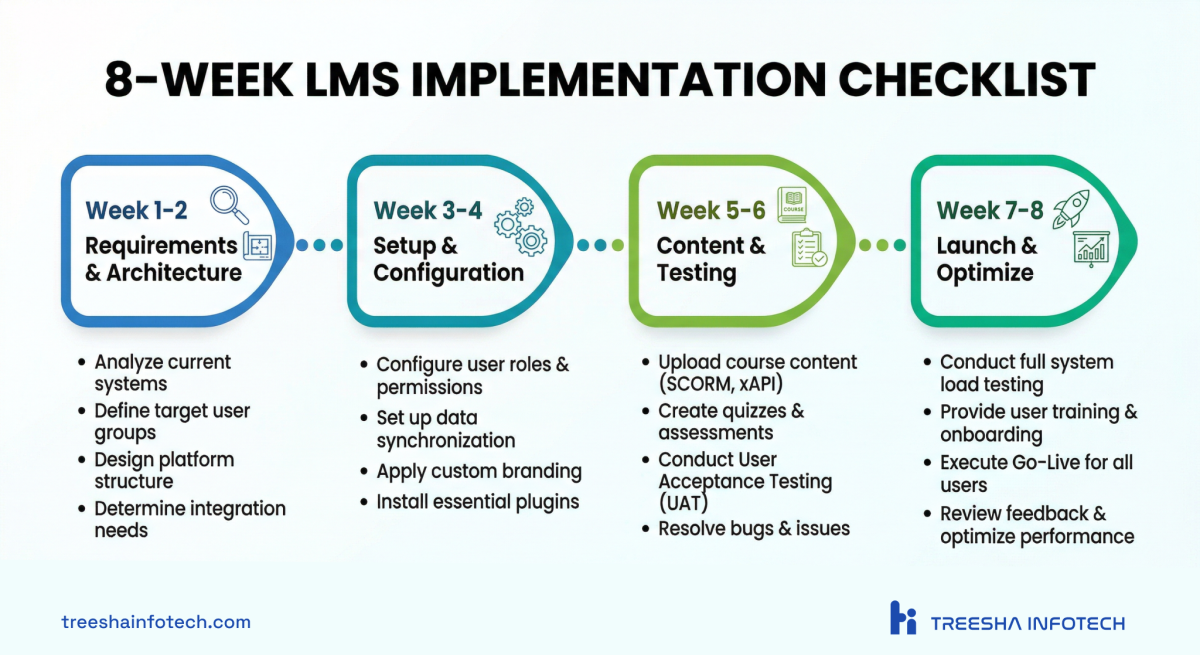
Once you've chosen your platform, here's the sequence that works:
Weeks 1-2: Requirements & Architecture
- Document your training programs (courses, audiences, compliance requirements)
- Define your user roles (learner, manager, admin, instructor)
- Map your integration requirements (SSO, HR system, content tools)
- Decide on hosting infrastructure (for self-hosted platforms)
- If multi-tenant: plan your tenant structure before touching any configuration
Weeks 3-4: Setup & Configuration
- Install and configure the platform
- Set up SSO and user provisioning
- Configure roles, permissions, and enrollment workflows
- Apply branding (theme, logo, email templates)
- Create your course structure (categories, templates)
- Plan data migration: export user records, SCORM packages, and historical completion data from your current system
- Test migrated completion records against source data — compliance audits depend on this
Weeks 5-6: Content & Testing
- Upload or create course content (SCORM packages, H5P, documents)
- Configure assessments, certificates, and completion criteria
- Run user acceptance testing with a pilot group (10-20 real users)
- Test reporting — verify the data you need is actually captured
- Load test if you expect 500+ concurrent users
Weeks 7-8: Launch & Optimize
- Soft launch to a limited group (one department or one client)
- Gather feedback and iterate on UX pain points
- Train your administrators on day-to-day management
- Full launch with communication plan
- Set up monitoring and support workflows
Our Track Record
We don't just write about LMS platforms — we deploy them. Here's a snapshot of our e-learning work:
- LearnBrands — Multi-tenant IOMAD platform for the cannabis industry. Separate branded portals, user pools, and compliance reporting per client. Reduced per-client hosting costs by 60%+.
- Probe IT — Moodle-based compliance training for Canadian workers. Food safety, WHMIS, and TDG certification with automated certificate generation. 10,000+ learners served with 99.9% uptime.
- CTE Learning — STEM and career-focused education platform for K-12 and workforce development across US school districts.
- B Hive Learning — Corporate e-learning delivery platform for a UK training company. Articulate Storyline integration, SCORM packaging, custom branding per client organization.
- Your Licence — Laravel marketplace + Moodle LMS for Australian vocational training. Stripe payments, multi-sector certification, and passwordless login for workers in the field.
Every one of these runs on Moodle. That's not a coincidence — it's the result of evaluating the alternatives for each project and Moodle consistently winning on flexibility, cost, and long-term viability.
Bottom Line
The LMS market wants you to believe the decision is complicated. It isn't. If you need control, scalability, and value, Moodle with IOMAD handles corporate training better than platforms costing ten times more. If your world is WordPress and you're selling courses, LearnDash is the right tool. SaaS platforms have their place for small teams who need speed over flexibility — just know what you're trading away.
> The best LMS is the one your learners actually use. That means the right content, the right UX, and a platform flexible enough to adapt as your training needs evolve. In our experience, that flexibility is what separates a training program that transforms your workforce from one that becomes an expensive checkbox exercise.
If you're evaluating LMS platforms and want a second opinion from a team that's deployed them for organizations across five countries — we're happy to talk through your requirements. No sales pitch, just an honest assessment of what fits. Get in touch.
Frequently Asked Questions
What is the best LMS for corporate training in 2026?
How much does a corporate LMS cost?
Can I use one LMS for multiple client organizations?
Should I build a custom LMS or use an existing platform?
What is IOMAD and why do enterprises use it?
How do I migrate from one LMS to another?
Is Moodle secure enough for corporate use?
What LMS features matter most for compliance training?
Ready to start your project?
Tell us about your requirements and we'll get back with a clear plan within 24 hours. No sales pitch — just an honest conversation.

Co-founded Treesha Infotech and leads operations for the company's Moodle and e-learning practice. Ashish manages project delivery, client communication, and quality assurance across all Moodle engagements — ensuring every platform ships on time, on budget, and beyond client expectations.