
The demo went great. The agent searched the knowledge base, found the right documents, synthesized an answer, and even created a follow-up task in Jira. Everyone in the room was impressed.
Then you deployed it to production. And within the first week: a tool call failed silently and the agent gave a confident but completely wrong answer. API costs hit $3,000 in a day because the agent got stuck in a reasoning loop. A customer received an email the agent composed without human review. And the monitoring dashboard showed... nothing, because nobody set up observability for agent-specific behavior.
This is the gap between demo and production. And after shipping AI agents and chatbots across multiple industries at Treesha Infotech, I can tell you — every team hits the same walls. This article is the field guide I wish I had before our first production agent.
In This Article
The Production Architecture Stack (4 Layers)
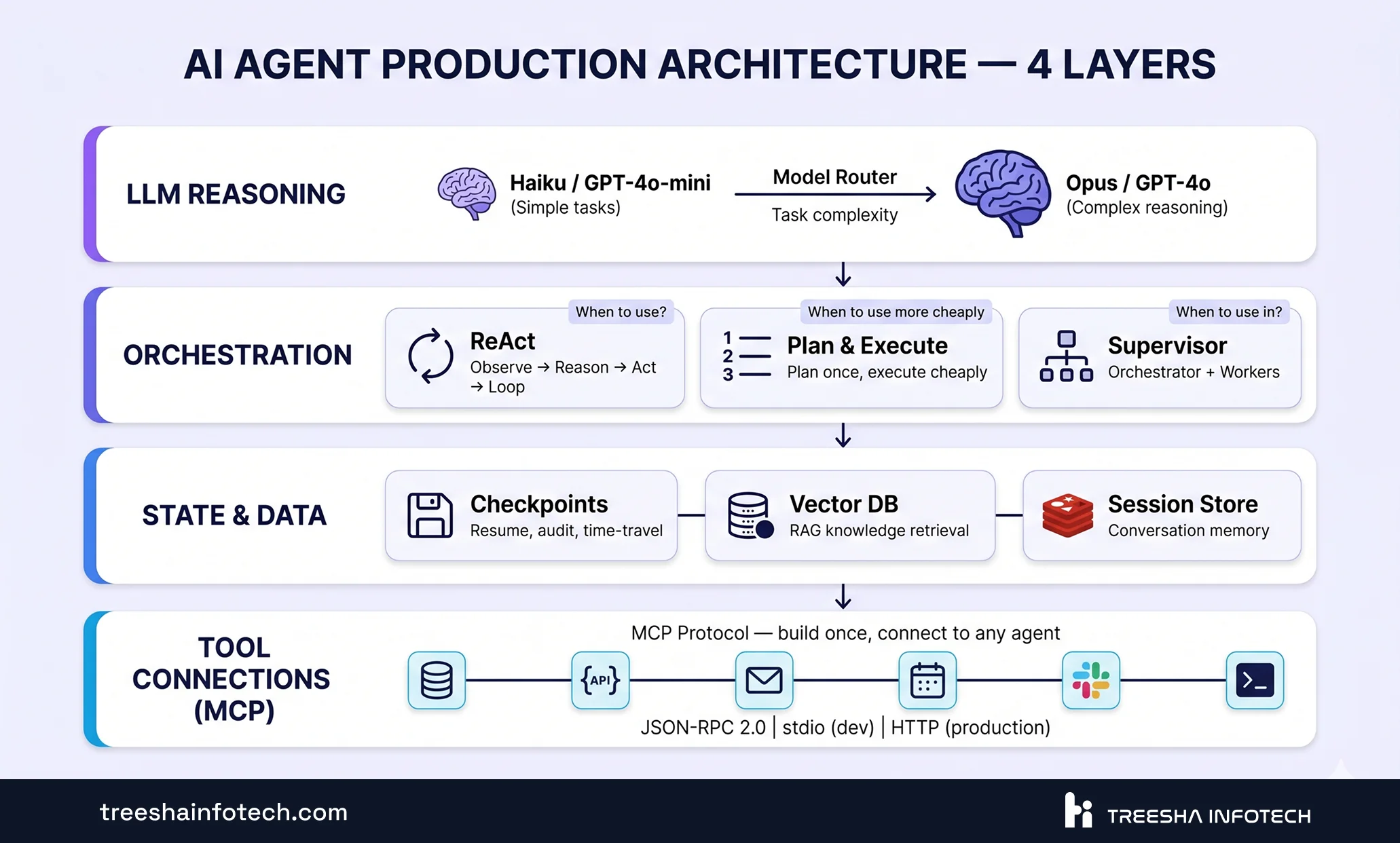
Every production AI agent, regardless of framework or use case, follows the same four-layer architecture. Understanding these layers is the difference between an agent that works in demos and one that works at scale.
Layer 1: LLM Reasoning
This is the brain — the language model that does the thinking. But in production, you don't use a single model. You use model routing — a fast, cheap model handles simple classification and extraction tasks, while a powerful model handles complex reasoning, multi-step planning, and ambiguous decisions.
The 2026 routing menu (input/output cost per million tokens):
| Tier | Anthropic | OpenAI | |
|---|---|---|---|
| Cheap (classification, extraction, routing decisions) | Claude Haiku 4.5 — $1/$5 | GPT-5.4 Nano — $0.20/$1.25 | Gemini 2.5 Flash — $0.30/$2.50 |
| Balanced (most production reasoning) | Claude Sonnet 4.6 — $3/$15 | GPT-5.4 — $2.50/$15 | Gemini 2.5 Pro — $1.25/$10 |
| Premium (complex multi-step reasoning, ambiguous decisions) | Claude Opus 4.7 — $5/$25 | GPT-5.5 — $5/$30 (Pro at $30/$180) | Gemini 2.5 Pro >200k ctx — $2.50/$15 |
The routing logic itself can be a lightweight classifier or a simple rules engine. Don't use an expensive model to decide which model to use — that's the most common anti-pattern we see in cost reviews.
Layer 2: Orchestration
This is how the agent decides what to do and in what order. Three patterns dominate production systems:
- ReAct (Reason + Act) — The agent observes, reasons about the observation, takes an action, observes the result, and loops. Best for iterative tasks with unpredictable steps. Most common pattern in production
- Plan-and-Execute — A powerful model creates a plan upfront, then a cheaper model executes each step. 92% task completion rate in benchmarks, 3.6x speedup, lower cost than pure ReAct. Best when the task structure is somewhat predictable
- Supervisor — One orchestrator agent delegates tasks to specialized worker agents. Best for multi-domain problems where different agents have different tool access and expertise
One under-discussed pattern: tiered routing. Before any LLM call decides what to do, run a deterministic keyword/regex pass (~1ms) and then an embedding similarity check (~20ms). On real production traffic, these two tiers correctly classify 70-80% of incoming queries. Only the genuinely ambiguous 20-30% reach the LLM classifier (~100ms, real cost). The effect is "LLM call every turn" → "LLM call maybe 1 in 5 turns" — same accuracy, fraction of the cost and latency. The LLM is best used as the participant in the turn, not the driver.
Layer 3: State and Data
Agents need memory. Short-term memory (conversation context), long-term memory (user preferences, past interactions), and working memory (intermediate results during a multi-step task).
In production, this means:
- Checkpointing — saving agent state at each step so you can resume after failures, audit decisions, and even "time travel" to debug what happened
- Vector database — for RAG-based knowledge retrieval (pgvector, Pinecone, Weaviate)
- Session storage — Redis or PostgreSQL for conversation state across requests
Layer 4: Tool Connections
The agent's hands — how it interacts with the outside world. APIs, databases, file systems, email services, CRM, calendar. This is where MCP comes in.
MCP: The Protocol That Changes Everything
Model Context Protocol is the single most important development in the AI agent ecosystem in 2026. Built by Anthropic, now an open standard with implementations across every major framework.
The Problem MCP Solves
Before MCP, every agent-tool integration was custom. Want your agent to search a database? Write a custom tool function. Want it to send Slack messages? Write another one. Want it to access Google Calendar? Another one. For every M agents and N tools, you needed M x N custom integrations.
MCP replaces this with a standard protocol. Build an MCP server for your tool once, and any MCP-compatible agent can use it. One tool implementation, every agent. Think of it as USB for AI — a universal connector that replaced dozens of proprietary cables.
How It Works
MCP uses JSON-RPC 2.0 — a simple request-response protocol. An MCP server exposes tools (functions the agent can call), resources (data the agent can read), and prompts (templates for common tasks). An MCP client in your agent framework discovers available tools and invokes them.
In development, MCP servers run locally via stdio. In production, they communicate over HTTP with proper authentication, rate limiting, and monitoring.
The Key Insight
Agents that write code to interact with tools — rather than making direct API calls — use fewer tokens and have lower latency. Instead of passing the entire API response through the LLM's context window, the agent writes a small script, executes it, and processes only the result. This is a pattern we've adopted in every production agent we build.
What's Coming
The 2026 MCP roadmap focuses on three areas: transport scalability for enterprise deployments, agent-to-agent communication (agents calling other agents via MCP), and enterprise governance (audit trails, access control, compliance). Google's A2A protocol (donated to the Linux Foundation in June 2025) complements MCP — where MCP connects agents to tools, A2A connects agents to other agents across organizational boundaries.
Framework Comparison: LangGraph vs CrewAI vs AutoGen
Three frameworks dominate the AI agent space. Here's an honest, vendor-neutral comparison based on what we've used in production.
| Factor | LangGraph | CrewAI | AutoGen |
|---|---|---|---|
| Best for | Complex stateful workflows | Quick role-based prototyping | Multi-party conversations |
| Production readiness | Most battle-tested — v1.2.0 (May 2026), powers Klarna, LinkedIn, Uber, Replit | Production-ready, growing fast | Maintenance mode (Microsoft shifted to Agent Framework) |
| MCP integration | Deepest — tools become graph nodes with streaming | Treats MCP tools as callables | Treats MCP tools as callables |
| State management | Built-in checkpointing + time travel debugging | Sequential task output passing | In-memory conversation history |
| Architecture model | Directed graphs with cycles, conditionals, parallel branches | Role-based agents with sequential/hierarchical tasks | Multi-agent conversation threads |
| Cost efficiency | Lower (efficient routing) | Moderate | Higher (5-6x due to conversational overhead) |
| Learning curve | Steeper — graph concepts take time | Gentler — intuitive role/task model | Moderate |
Our Recommendation
LangGraph for production. The graph-based execution model gives you the most control over agent behavior. Built-in checkpointing means you can pause, resume, inspect, and replay any agent execution. The integration with MCP is the deepest of any framework.
CrewAI for prototyping and simpler agents. When you need to get a proof-of-concept running in days, not weeks, CrewAI's role-based model is intuitive and fast. For agents that follow a predictable sequence of tasks (research → analyze → write → review), CrewAI is excellent.
Avoid AutoGen for new projects. Microsoft has shifted focus to their new Agent Framework. AutoGen is in maintenance mode.
The 5 Things That Break in Production
Every production agent hits these walls. Here's what breaks and how to fix it.
1. Tool Calling Failures (3-15% failure rate)
Even well-engineered agents fail to call tools correctly 3-15% of the time. The model generates malformed parameters, calls a tool that doesn't exist, or passes the wrong type.
The fix:
- Retry with exponential backoff (3 retries covers 95% of transient failures)
- Fallback tools — if the primary API is down, route to a cached or simplified alternative
- Circuit breakers — if a tool fails 5 times in 10 minutes, stop calling it and notify the team
- Parameter validation before execution — check types, ranges, and required fields before the tool runs
2. Cost Spirals
An agent stuck in a reasoning loop can burn through thousands of tokens per minute. A multi-agent system where agents pass verbose messages to each other can cost 5-6x what a single agent costs.
We saw this firsthand on a customer-support agent we built last year. The agent had legitimate access to a knowledge base, a ticketing system, and an escalation API. One Tuesday night, an edge-case query sent it into a planning loop — it kept re-reading the same three documents, re-summarizing, re-planning, never converging on an answer. By the time the morning team checked, it had consumed 2.4 million tokens overnight on a single session. Our hard token-cap-per-session was set at 50K, but it had been disabled three weeks earlier during a config refactor that nobody documented. Two lessons: hard limits should be unkillable defaults, and budget alerts need to fire on absolute volume, not just delta from baseline.
The fix:
- Model routing — fast model for simple tasks, expensive model only for complex reasoning (40-60% savings)
- Prompt caching — cache common prompt prefixes, system prompts, and tool descriptions (40-90% reduction)
- Context compression — summarize long conversation histories instead of passing raw transcripts. Poor context management accounts for 60-70% of agent spend
- Max iteration limits — hard cap on how many steps an agent can take before escalating to a human
- Budget alerts — per-session and per-hour cost caps with automatic shutdown
3. Hallucinated Actions
The agent doesn't just hallucinate information — it hallucinated an action. It called a tool with fabricated parameters. It sent an email to a made-up address. It created a database record with plausible but completely wrong data. And it did all of this with full confidence, at machine speed.
The fix:
- Pre-execution validation — before any tool call executes, validate parameters against known schemas, allowlists, and business rules
- Allowlisted tools — the agent can only call tools you've explicitly registered. No dynamic tool discovery in production
- Write-operation gates — any action that modifies data (create, update, delete, send) requires either a confidence threshold or human approval
- Output verification — after a tool returns, validate the result before the agent acts on it
4. Cascading Errors in Multi-Agent Chains
In a multi-agent system, one agent's bad output becomes the next agent's input. A research agent that retrieves the wrong documents feeds incorrect context to a writing agent, which produces a plausible but wrong report, which a review agent approves because the format looks correct.
The fix:
- Inter-step validation — check the output of each agent before passing it to the next
- Reflective agents — a lightweight "critic" agent that evaluates outputs before they propagate
- Deterministic fallbacks — if validation fails, fall back to a rule-based system rather than trying to self-correct (self-correction loops often make things worse)
- Chain-of-thought logging — record every agent's reasoning so you can trace where the error originated
5. Silent Failures
The most dangerous failure mode. The agent produces output that is wrong but well-formed. It looks like success. The response is coherent, properly formatted, and confidently delivered — but the answer is factually incorrect, or the action was inappropriate for the context.
On one deployment, we had a tool that returned valid-looking but stale product data for 9 days before observability caught it. An upstream cache had silently switched to read from a backup that lagged by a quarter. The agent kept returning prices from 2025, no errors anywhere, and the eval suite passed because it only checked schema, not freshness. Semantic eval — checking whether the content of the response was actually current — is what would have caught it. We added a "data recency" check to every read-heavy tool after that.
The fix:
- Semantic evaluation — score agent outputs against expected answers using an evaluation model
- Human-in-the-loop for high-stakes decisions — don't let agents make irreversible decisions without human review
- Confidence scoring — track the model's self-assessed confidence and flag low-confidence outputs for review
- A/B testing against baselines — run the agent's output alongside a known-good baseline and compare
The "Start Simple" Progression
The biggest mistake in AI agent development is starting too complex. Here's the progression that works:
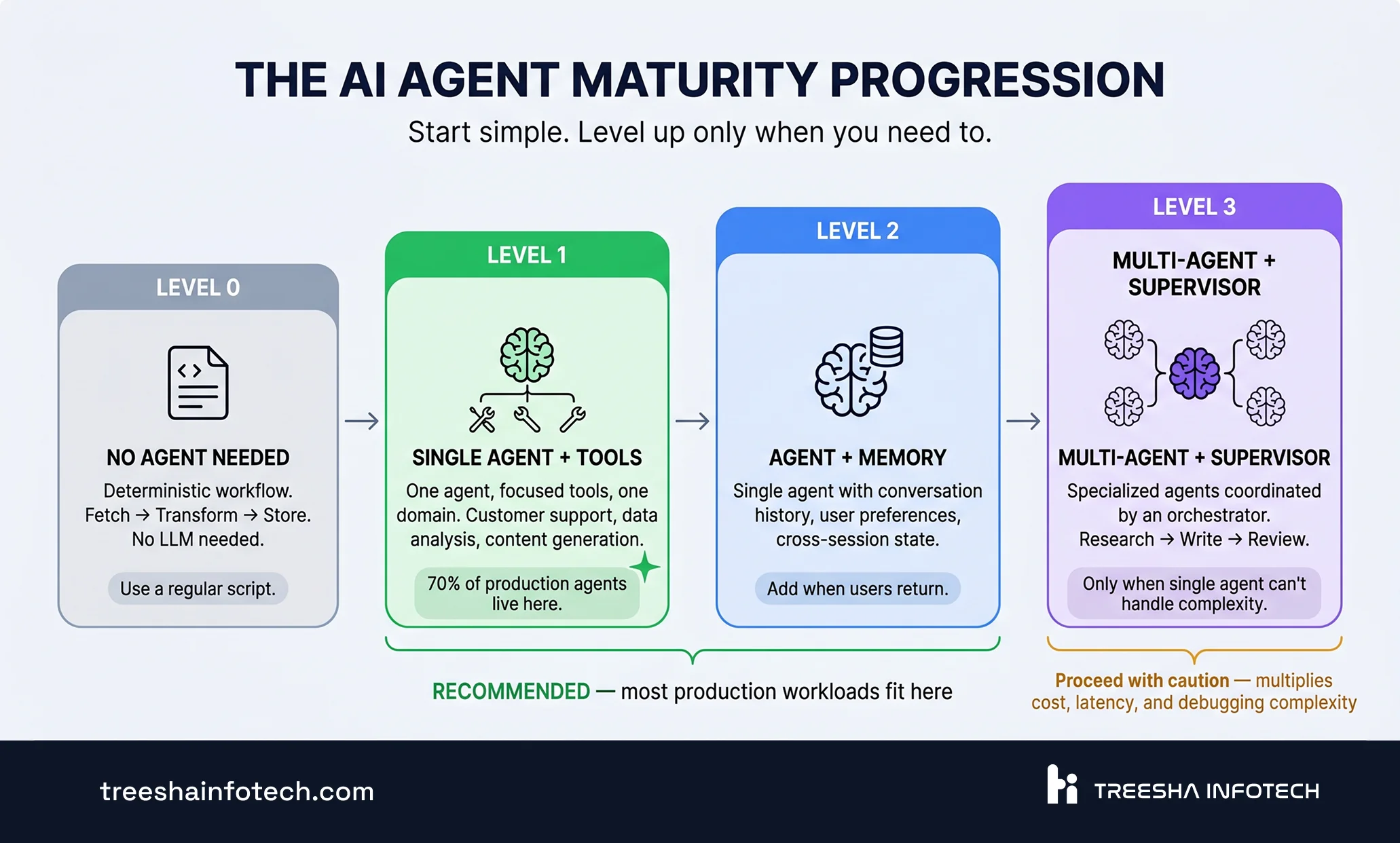
Level 0: No Agent Needed
A deterministic chain of API calls. If the workflow is entirely predictable — "fetch data from A, transform it, store in B" — you don't need an agent. Use a regular script. Agents add value when decisions need to be made based on unstructured input.
Level 1: Single Agent with Tools
One agent, a focused set of tools, one task domain. This is where 70% of production agents should live. A customer support agent that searches your knowledge base and generates responses. A data analysis agent that queries your database and produces reports.
Level 2: Agent with Memory and State
The same single agent, but now it remembers past interactions, tracks user preferences, and maintains state across sessions. This requires checkpointing and a proper storage layer.
Level 3: Multi-Agent with Supervisor
Multiple specialized agents coordinated by a supervisor. A research agent, a writing agent, and a review agent working together. Only go here when a single agent genuinely can't handle the complexity — not because multi-agent sounds impressive.
Observability: You Can't Fix What You Can't See
Standard application monitoring (Datadog, New Relic, Grafana) tracks request latency, error rates, and CPU usage. This is necessary but completely insufficient for agents.
Agent-specific observability needs to answer:
- What tools did the agent call, in what order, and with what parameters?
- How many tokens did each step consume?
- Where in the reasoning chain did the agent go wrong?
- What was the agent's confidence at each decision point?
- How much did this session cost?
Tool Comparison
| Tool | Type | Best For | Key Feature |
|---|---|---|---|
| LangSmith | Commercial | LangGraph-first teams | Zero-config tracing for LangGraph, built by LangChain |
| Langfuse | Open-source (MIT, acquired by ClickHouse Jan 2026) | Self-hosted, privacy-sensitive deployments | Full tracing, prompt management, cost analytics |
| Braintrust | Commercial | Evaluation-first workflows | Integrated eval scoring with CI deployment blocking |
| Arize Phoenix | Open-source | Drift detection, embedding analysis | ML-native observability, model performance tracking |
| Laminar | Open-source | Trace-driven agent debugging | Step-by-step replay, debugging-focused UX |
What to Alert On
- Cost per session exceeding 3x your average — indicates reasoning loops or context blowout
- Tool failure rate above 5% — indicates API issues or parameter generation problems
- Latency per step exceeding your SLA — identifies bottleneck tools or slow model responses
- Hallucination rate (if you have evaluation scoring) trending upward — indicates prompt drift or model degradation
Cost Management That Actually Works
Unoptimized multi-agent systems burn money. Here's how to cut costs by 70-90% without sacrificing quality.
Model routing (40-60% savings): Use a lightweight classifier to route each request. Simple questions → Claude Haiku 4.5, GPT-5.4 Nano, or Gemini 2.5 Flash. Complex reasoning → Claude Opus 4.7, GPT-5.5, or Gemini 2.5 Pro. Most requests are simple. This single technique is the highest-ROI optimization.
Prompt caching (90% reduction on cached input): System prompts, tool descriptions, and common context blocks are repeated in every request. As of 2026, Anthropic, OpenAI, and Google all offer prompt caching at roughly 10% of standard input cost on cached tokens. Cache the static elements and only pay full price on the dynamic parts. The savings scale linearly with request volume.
Context compression: The number one cost driver is context window size. Long conversation histories, verbose tool outputs, and accumulated reasoning chains fill the context window fast. Compress aggressively: summarize past conversations, truncate tool outputs to relevant fields, and use rolling windows instead of full history.
Batch processing (50% discount): For non-real-time tasks — report generation, data enrichment, content creation — use the Batch API. Anthropic, OpenAI, and Google all offer 50% discounts for requests that can tolerate up to 24-hour processing latency.
Token budget per session: Set hard limits. If an agent has consumed 50K tokens in a single session without completing its task, it should escalate to a human rather than continuing to spend. This prevents runaway costs from edge cases.
Real-World Example: A Multi-Model Routing Config
For a recent enterprise project — a natural-language analytics platform built for an operator in cinema exhibition, answering questions across alerts, lamp inventory, maintenance, and telemetry data spanning thousands of auditoriums — we shipped a per-skill model routing config that looks like this:
1defaults:
2  routing:    { provider: openai,    model: gpt-5-mini,        timeout_s: 5 }
3  extraction: { provider: anthropic, model: claude-sonnet-4-6, timeout_s: 10 }
4  formatting: { provider: openai,    model: gpt-5-mini,        timeout_s: 5 }
5  diagnostic: { provider: anthropic, model: claude-opus-4-7,   timeout_s: 30 }
6
7# Per-skill extraction overrides — complex skills get the better model
8extraction_overrides:
9  alerts:    { provider: anthropic, model: claude-sonnet-4-6 }  # multi-constraint queries
10  assets:    { provider: openai,    model: gpt-5-mini }         # simple schema, high volume
11  telemetry: { provider: anthropic, model: claude-sonnet-4-6 }  # numeric thresholds, cross-refs
12  composite: { provider: anthropic, model: claude-sonnet-4-6 }  # cross-domain joins
13
14fallbacks:
15  extraction:
16    - { provider: anthropic, model: claude-sonnet-4-6 }
17    - { provider: openai,    model: gpt-5-4 }
Why some skills run Anthropic and others run OpenAI
The obvious question on seeing this config: why is one skill on Anthropic and the next on OpenAI? Isn't picking a provider per skill arbitrary — or worse, a sign of indecision?
It isn't arbitrary, and the choice is empirical, not religious. Different models have different strengths, and those strengths show up unevenly across skills. The right model for a skill is whichever wins cost-per-correct-answer on that skill's golden eval set — not whichever vendor your team prefers.
Concretely, what we observed across this project's evals:
- Simple schemas, high volume (assets, lamps, maintenance): GPT-5 mini and Nano are 5-15x cheaper than Sonnet 4.6 and reach near-equal accuracy on these simpler extractions. Sonnet here is pure waste.
- Multi-constraint extraction with numeric thresholds and cross-references (alerts, telemetry, cross-domain composites): Sonnet 4.6 stays above 95% accuracy where GPT-5 mini drops into the 86-89% range. The accuracy gap shows up as clarification turns, wrong answers, and lost user trust — all of which cost more than the per-token price difference.
- Multi-step reasoning for "why" questions (diagnostic): Opus 4.7 with extended thinking is in a different league. We only route there when the simpler models can't handle it.
So the rule isn't "Anthropic is better than OpenAI" or vice versa. The rule is: for each skill, run every candidate model against the same eval set, look at the cost-per-correct number, pick the winner. Cost-per-correct, not cost-per-token, is the only metric that actually matters. GPT-5 mini at 88% accuracy on alerts at $4.50/day looks cheaper than Sonnet 4.6 at 96% accuracy at $37.50/day — until you count the cost of being wrong 12% of the time.
Three things this config makes possible
1. Switching providers is a YAML edit, not a code change. Every quarter we run a failover drill that shifts 100% of extraction traffic to the secondary provider for a full day. If anything breaks, the abstraction has a leak — fix it before a real outage finds it.
2. Per-skill cost calibration. Simple skills run on Nano-class models at fractions of a cent per call. Hard skills run on Sonnet-class models for accuracy. Same system, two orders of magnitude cost difference per call, driven by what the call actually needs.
3. Provider-independent on day one. No single-vendor lockup. When Anthropic had a regional outage last quarter, extraction fell back to GPT-5.4 inside the retry budget. The only thing that paged us was the elevated fallback-rate metric — no users noticed.
The pattern generalizes: every production agent system above moderate scale ends up with some version of this routing table. Get to it on day one, instead of after the first surprise bill or the first provider outage.
Guardrails: The 4-Layer Safety Net
Guardrails aren't a single filter. They're a feedback loop with four checkpoints:
Layer 1: Input Validation. Before the agent sees the user's message, check for prompt injection attempts, PII that shouldn't be processed, and requests that fall outside the agent's scope. Reject or sanitize before the LLM processes anything.
Layer 2: Pre-Execution Check. After the agent decides to call a tool but before the call executes, validate the parameters. Is this tool in the allowlist? Are the parameters within expected ranges? Is this a write operation that requires approval? This layer prevents hallucinated actions.
Layer 3: Post-Execution Check. After a tool returns its result, validate the response. Did the API return an error? Is the data in the expected format? Does the result make sense given the request? Catch failures before the agent incorporates bad data into its reasoning.
Layer 4: Output Validation. Before the agent's final response reaches the user, check for harmful content, factual consistency with retrieved sources, appropriate tone, and completeness. This is your last line of defense.
Each layer feeds back into the routing decision. If Layer 2 rejects a tool call, the agent re-plans. If Layer 3 catches a bad result, the agent retries or escalates. The guardrails aren't just passive filters — they actively shape agent behavior.
The Bottom Line
AI agents in production are not chatbots with extra steps. They're autonomous systems that make decisions and take actions at machine speed. The architecture, monitoring, and safety requirements are fundamentally different from any software most engineering teams have built before.
The teams that succeed follow the same pattern: start simple (Level 1, single agent), instrument everything from day one, set cost guardrails before they need them, and resist the urge to go multi-agent until a single agent is genuinely insufficient.
The teams that fail build impressive demos, skip observability, underestimate costs, and deploy without guardrails. They discover their agent's failure modes from customer complaints, not from dashboards.
> Start here: If you're moving from POC to production, start with one agent, one workflow, and comprehensive observability. Get that working reliably before adding complexity. Our AI & ML development team builds production agent systems — from architecture design through deployment and monitoring. If you're hitting the demo-to-production wall, get a free quote or schedule a call with our AI team.
Related Reading
- What's New in Laravel — May 2026: Autoscaling Queues, AI Agents Without Python & Laravel Moat — the PHP-native agent story
- Legacy PHP to Modern Stack: A Practical Migration Playbook — strangler-fig migration patterns we apply to AI workloads too
- Why AI Agents Are the Future of Business Automation — the business case for AI agents
- AI Chatbot Development: Cost, Timeline & What to Expect — cost and timeline for chatbot projects
- RAG vs Fine-Tuning: Choosing the Right AI Strategy — choosing the right knowledge strategy for your agent
Frequently Asked Questions
What's the difference between an AI chatbot and an AI agent?
How much does it cost to run AI agents in production?
Should we build our own agent framework or use LangGraph/CrewAI?
How do we test AI agents before deploying to production?
Ready to start your project?
Tell us about your requirements and we'll get back with a clear plan within 24 hours. No sales pitch, just an honest conversation.

Co-founded Treesha Infotech and leads all technology decisions across the company. Full-stack architect with deep expertise in Laravel, Next.js, AI integrations, cloud infrastructure, and SaaS platform development. Ritesh drives engineering standards, code quality, and product innovation across every project the team delivers.