
I've sat across the table from dozens of CTOs who open with the same line: "The app works. It just... takes forever to change anything."
They're running a PHP application built 6, 8, maybe 10 years ago. It was perfectly fine when it was built. CodeIgniter 2 was a reasonable choice in 2014. Custom PHP with no framework was how things were done in 2012. Even Laravel 4 was cutting-edge once. But the world moved, and the codebase didn't.
Now they can't hire developers willing to touch it. Every feature takes three sprints instead of one. Security patches stopped coming two years ago. And the one person who understands the authentication module is thinking about leaving.
This is not a technology problem. It's a business problem. And after leading migrations across 300+ projects at Treesha Infotech, here's the playbook we use to solve it.
In This Article
The 5 Warning Signs You Need to Migrate Now
Not every old application needs migration. Some legacy systems run fine for years with minimal maintenance. But if you're seeing three or more of these signs, the clock is ticking:
- Your PHP version is out of security support. PHP 5.6 lost support in 2018. PHP 7.4 in 2022. PHP 8.0 in 2023. PHP 8.1 in December 2025. And PHP 8.2 hits end-of-life on December 31, 2026 — only seven months away as I write this. The only versions still receiving security patches today are PHP 8.3, 8.4, and 8.5. If you're running anything older, you're exposed to unpatched vulnerabilities with no fix coming
- Job postings attract nobody. You post "Senior PHP Developer — CodeIgniter" and get crickets. Developers want to work on modern stacks with proper tooling, testing frameworks, and package management. Legacy maintenance roles are the hardest positions to fill in 2026
- Adding a feature takes 3-5x longer than it should. Business logic buried in views. SQL queries scattered across controllers. Global variables passed through six layers. Every change risks breaking something unrelated because there are no tests to catch regressions
- You can't integrate modern tools. Stripe, Twilio, AWS, Slack — every modern SaaS product provides SDKs that require Composer and PSR-4 autoloading. If your codebase predates Composer, every integration becomes a custom curl wrapper that you have to maintain forever
- One person holds all the knowledge. The developer who built it is your single point of failure. No documentation, no tests, no architecture diagrams. If they leave, you're staring at a codebase nobody understands
Know Your Legacy Stack
The migration path depends on what you're starting from. Here's what we see most often and how urgent each one is.
A note before the table: these recommendations reflect our experience running migrations as a Laravel-specialized team. Symfony is the credible non-Laravel alternative — equally mature, component-oriented, strong in enterprise and Drupal-adjacent codebases. If your team already knows Symfony, that's the right target for you. The decision framework is the same regardless of destination.
| Legacy Stack | Status in 2026 | Migration Urgency | Recommended Path |
|---|---|---|---|
| CodeIgniter 2 | Dead — no updates since 2015 | Critical | Rewrite to Laravel |
| CodeIgniter 3 | Maintenance-only, no PHP 8.2+ guarantee | Critical | Strangler fig to Laravel |
| CodeIgniter 4 | Active, but small ecosystem | Moderate | Evaluate — may not need migration |
| Laravel 4/5 | Beyond support window | High | Upgrade path to Laravel 13 |
| CakePHP 2/3 | End of life, no security patches | Critical | Rewrite to Laravel or Symfony |
| Custom procedural PHP | No framework, no ORM, no routing | Critical | Strangler fig to Laravel |
| WordPress (as application) | Maintained but hitting ceiling | Moderate-High | Headless WordPress or Laravel/Symfony rebuild |
The 3 Migration Strategies (And When to Use Each)
Every legacy migration boils down to one of three approaches. Picking the wrong one is the most expensive mistake you can make.
Strategy 1: Strangler Fig Pattern
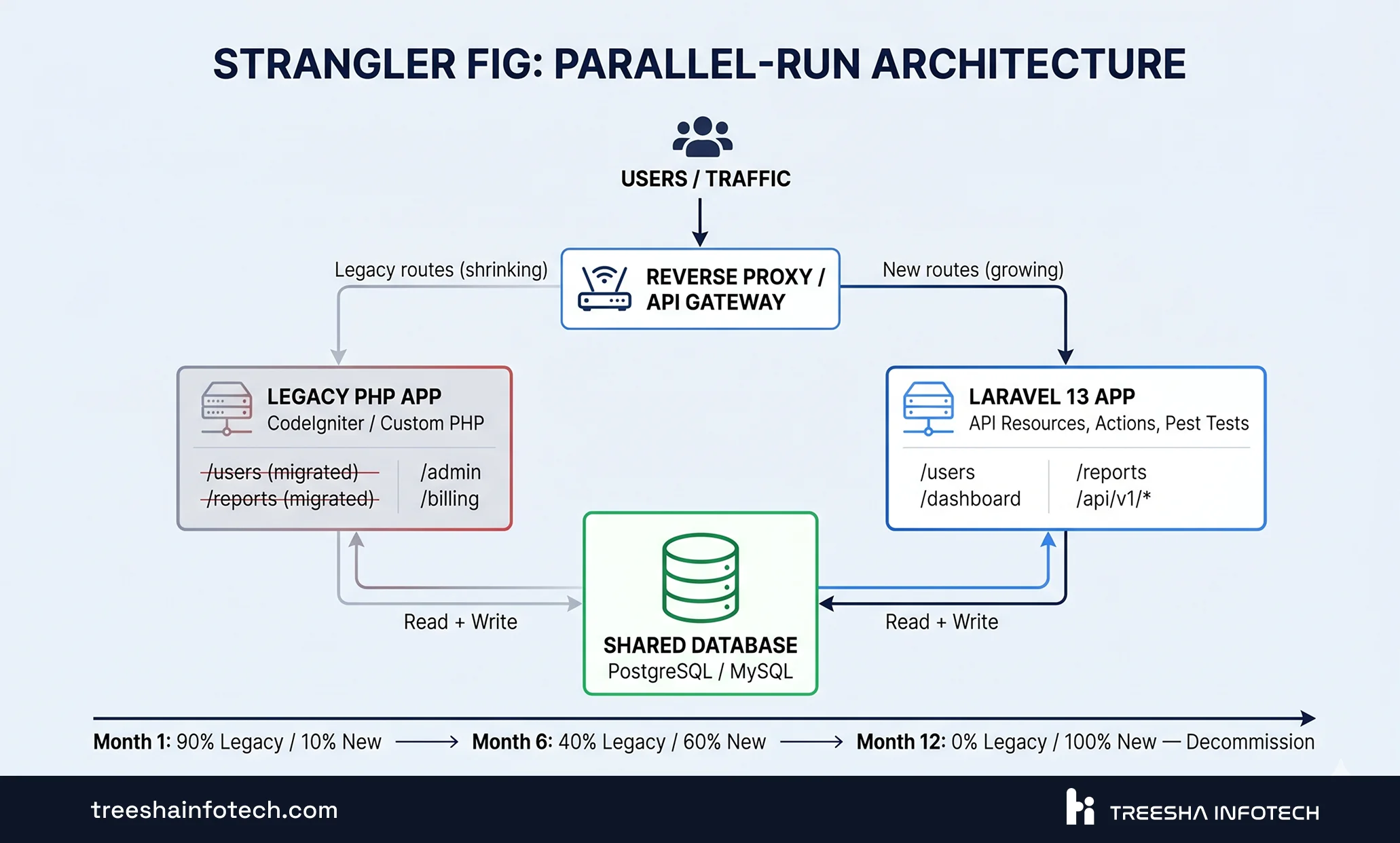
What it is: Build new features in Laravel alongside the legacy system. Route traffic between old and new using a reverse proxy or API gateway. Gradually move functionality until the legacy system has nothing left to do, then shut it down.
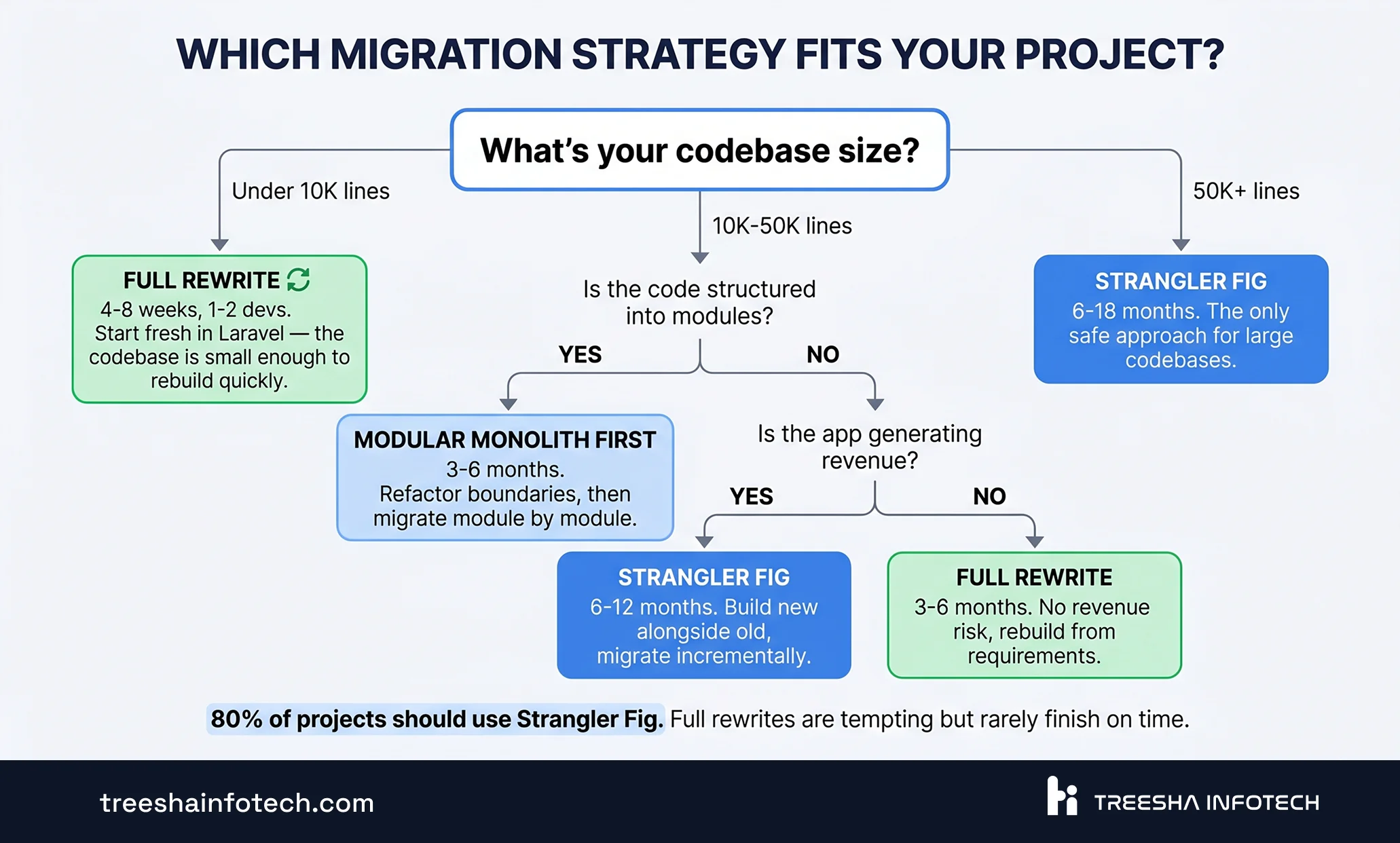
When to use: Medium to large applications (10K+ lines) where the legacy system still works and generates revenue. You can't afford downtime or a feature freeze during migration.
Timeline: 6-18 months depending on application size.
The advantage: You ship value from week one. New features go into the modern stack immediately. The legacy system shrinks over time rather than being replaced in one risky cutover.
Strategy 2: Modular Monolith First
What it is: Before extracting services or doing a full migration, refactor the existing monolith into well-defined modules with clear boundaries. Each module gets its own directory, its own models, and clean interfaces. Once the modules are isolated, you can migrate them one at a time to Laravel.
When to use: Medium applications (10K-50K lines) where the code is tangled but the underlying logic is sound. The application just needs structure, not a complete rewrite.
Timeline: 3-6 months for modularization, then selective migration.
The advantage: Lower risk than a full rewrite. You understand the system deeply before migrating anything. And if the modularized monolith works well enough, you might decide some modules don't need migration at all.
Strategy 3: Full Rewrite
What it is: Start from scratch in Laravel. Build the entire application from the ground up based on current requirements, not legacy code.
When to use: Only when the codebase is genuinely unsalvageable — no tests, no documentation, no one who understands it, and the original developers are gone. Or when the application requirements have changed so dramatically that the old code solves the wrong problem.
Timeline: 6-18+ months. Add 30% buffer to any estimate.
The danger: Full rewrites take 2-3x longer than estimated. They're exciting in month one and painful by month six. You deliver zero business value until launch day. And the legacy system still needs maintenance during the entire rewrite period.
Why Laravel 13 Specifically
Migrating to "modern PHP" can mean different things. Here's why Laravel 13 — and not Laravel 12, not Symfony, not a non-PHP rewrite — is the migration target we recommend in 2026.
Symfony deserves the most serious consideration as an alternative: it's equally mature, more component-oriented, and dominates the enterprise PHP and Drupal-adjacent worlds. If your team already runs Symfony in production or your codebase depends on Symfony components, stay where you are. For teams without a strong existing preference, the reasons below are why we land on Laravel.
The longest-supported version available. Laravel 13 was released on March 17, 2026. It receives bug fixes through August 2027 and security patches through March 2028. The current stable release as of May 2026 is v13.11.2. Migrating to Laravel 12 today gives you about 9 months of bug-fix support; Laravel 13 gives you 18. The extra runway matters when a migration project stretches longer than planned — and they always do.
The AI SDK is first-party. Laravel 13 ships with a native AI SDK supporting 11 provider gateways out of the box — OpenAI, Anthropic, Gemini, AWS Bedrock, Ollama, Mistral, and more. If your modernization roadmap includes any AI features (chatbots, document analysis, embedding search, agent workflows), this saves months of integration plumbing. Pre-Laravel-13 projects need third-party packages with inconsistent APIs.
MCP support is built in. The Model Context Protocol packages — laravel/mcp for production and laravel/boost for development — let your Laravel application both consume MCP servers and expose itself as one. MCP is becoming the standard interface for AI tooling, and being on the version that supports it natively is real leverage.
Queue infrastructure matured. Laravel 13 introduces debounceable jobs, Redis Cluster support, sub-minute scheduling, the BatchStarted event, and queue inspection methods. For applications doing heavy background work — email, exports, integrations, AI calls, webhooks — this is where Laravel 13 pulls clearly ahead of older versions.
PHP 8.3 minimum. Laravel 13 requires PHP 8.3+, which forces your migration to land on a fully-supported PHP version. No "we migrated to Laravel 11 but we're still on PHP 8.1" situations — the framework refuses to install. This is a feature, not a bug.
The starter kits are good. Authentication, registration, password reset, profile management, two-factor, passkeys — all generated with php artisan install:api or install:inertia. What used to be two or three sprints of boilerplate is now five minutes. For a migration project where the legacy app already has these flows, the starter kits give you a working reference implementation immediately.
Pest 3 as default testing. Faster syntax than PHPUnit, parallel execution out of the box, architecture tests that enforce module boundaries automatically. Writing characterization tests against the legacy system (which you'll need before migrating any module) is significantly less painful in Pest than in PHPUnit.
If you're not already locked into a specific framework choice, Laravel 13 is the right migration target for the vast majority of legacy PHP projects in 2026. Ecosystem maturity, AI tooling, queue capabilities, and support window all point the same direction.
The Migration Playbook: Phase by Phase
Here's the phase-by-phase approach we use at Treesha for a typical strangler fig migration from legacy PHP to Laravel.
Phase 1: Audit (Weeks 1-2)
Before writing a single line of new code, map everything:
- Route inventory — every URL the application serves, documented in a spreadsheet
- Database schema — export the full schema, document relationships, identify tables with no foreign keys (there will be many)
- Dependencies — every external service, API, cron job, and file system dependency
- Test coverage — if tests exist, run them. If they don't (most likely), note which modules are most fragile
- Traffic patterns — which routes get the most traffic? Which ones are critical to revenue?
The output is a migration map: a prioritized list of modules ranked by business value and migration complexity. High value, low complexity modules go first.
On one recent migration — an 8-year-old CodeIgniter 3 platform serving over 200k active learners — the audit phase uncovered 47 cron jobs scattered across 3 servers. We found them only by grepping every /etc/crontab, every user crontab, and asking three engineers who'd been there longer than five years. Budget two full weeks for cron and scheduled-task inventory on any app over five years old. They're always more numerous, more critical, and less documented than anyone remembers.
Phase 2: Foundation (Weeks 3-4)
Set up the new Laravel project alongside the legacy system:
- Fresh Laravel 13.11.x installation (current stable as of May 2026) with the modern structure — Actions, DTOs, Form Requests, Service Container bindings registered properly
- Pest 3 as the testing framework — faster syntax than PHPUnit, parallel execution, and architecture tests that enforce module boundaries automatically
- Laravel Horizon for queue monitoring — every migrated module that does background work routes through Redis-backed queues from day one
- Laravel Pulse for production observability — tracks slow queries, job throughput, exception rates, and request times across the new stack
- Laravel Telescope for development debugging — full visibility into requests, queries, mail, jobs during the parallel-run period
- Shared database bridge — the Laravel app connects to the same database as the legacy system. Both read and write to the same tables. This is temporary but critical
- Reverse proxy configuration (Nginx or API gateway) to route traffic between legacy and new
- CI/CD pipeline for the new codebase from day one — Pest tests, Pint formatting, PHPStan static analysis, automated deployment
- Authentication bridge — users log in once and are recognized by both systems
Phase 3: Strangler Migration (Weeks 5-12+)
This is where the real work happens. For each module on your migration map:
1. Write the Laravel equivalent — routes, controllers, services, tests 2. Run both versions in parallel, comparing outputs 3. Route traffic to the new version behind a feature flag 4. Monitor for errors, edge cases, data inconsistencies 5. Cut over fully once confidence is established 6. Remove the legacy code for that module
Start with a low-risk, self-contained module — a settings page, a reporting dashboard, a notification system. Build confidence with something that won't take down the business if it breaks.
The same CodeIgniter 3 migration I mentioned earlier shipped 14 modules across 11 months. The first 8 modules took 4 months. The last 6 modules took 7. That ratio is typical: the early modules are the obvious, well-bounded ones — auth, settings, reporting. The later modules are the tangled ones that touch everything else, full of edge cases nobody documented. Budget aggressively for the back half of any strangler migration.
Phase 4: Cutover (Weeks 13-16)
When the last module has been migrated:
- Final traffic routing — all requests go to the new system
- Legacy system enters read-only mode for 2 weeks as a safety net
- Monitor error rates, performance, and data integrity
- Decommission the legacy system once you're confident
- Celebrate. Then clean up the database schema
Before/After: What Modern Looks Like
For teams who haven't worked in a modern Laravel codebase, here's what changes. These aren't hypothetical — they're patterns we refactor in every migration project.
Database Queries
Legacy (raw SQL scattered in controllers):
1// Legacy: raw SQL, no parameterization, SQL injection risk
2$result = mysql_query("SELECT * FROM users WHERE email = '" . $_POST['email'] . "'");
3$user = mysql_fetch_assoc($result);
Modern (Eloquent ORM with type safety):
1// Modern: Eloquent, parameterized, type-safe
2$user = User::where('email', $request->validated('email'))->first();
Configuration
Legacy (hardcoded credentials in source code):
1// Legacy: credentials in source code, committed to Git
2$db_host = 'production-db.company.com';
3$db_pass = 'realPassword123';
4$stripe_key = 'sk_live_abc123...';
Modern (environment variables, never committed):
1// Modern: .env file, never committed, per-environment
2$host = config('database.connections.mysql.host');
3$stripe = config('services.stripe.secret');
Request Handling
Legacy (no validation, no separation of concerns):
1// Legacy: validation, business logic, and response all in one function
2function updateUser() {
3    if (empty($_POST['name'])) { echo "Name required"; return; }
4    $name = mysqli_real_escape_string($conn, $_POST['name']);
5    mysqli_query($conn, "UPDATE users SET name='$name' WHERE id=" . $_SESSION['id']);
6    header('Location: /dashboard');
7}
Modern (Form Request + Action class):
1// Modern: validation in Form Request, logic in Action class
2class UpdateUserAction
3{
4    public function execute(UpdateUserRequest $request): User
5    {
6        return $request->user()->update(
7            $request->validated()
8        );
9    }
10}
The difference isn't just cleaner code. It's testable code. Every one of these modern patterns can be covered by a Pest test in minutes. The legacy patterns are essentially untestable without rewriting them first.
The Human Side Nobody Talks About
Every migration article focuses on the technical path. Almost none address why migrations actually fail — and it's rarely the code.
"It works fine." The most dangerous phrase in engineering. Stakeholders who don't experience the daily pain of legacy code see migration as unnecessary risk. Your job is to quantify the cost of doing nothing: time spent on workarounds, features that can't be built, security incidents waiting to happen, developers who quit.
Dual-maintenance fatigue. During the strangler fig period, your team maintains two systems simultaneously. This is exhausting. Be honest about it upfront. Set a firm cutover deadline for each module so the parallel state doesn't drag on indefinitely. If your team is too small to handle both, augment with dedicated developers for the migration period.
The messy middle. Months 3-6 of a migration are the hardest. The initial excitement fades, the easy modules are done, and you're deep in the complex, tangled parts of the system. This is when migrations get abandoned. The antidote is visible progress — migrate in small, demonstrable chunks so stakeholders see continuous forward motion.
Developer morale. Engineers maintaining legacy code while watching colleagues build new features in Laravel will feel left behind. Rotate team members between legacy maintenance and new development. Everyone should get time on the modern stack.
Timeline and Cost Expectations
Every migration is different, but here are the ranges we've seen across hundreds of projects:
| Codebase Size | Team Size | Strategy | Timeline | Relative Cost |
|---|---|---|---|---|
| Small (under 10K lines) | 1-2 developers | Full rewrite or strangler fig | 4-8 weeks | 1x (baseline) |
| Medium (10K-50K lines) | 2-3 developers | Strangler fig | 3-6 months | 3-5x |
| Large (50K-100K lines) | 3-5 developers | Strangler fig + modular monolith | 6-12 months | 8-15x |
| Very large (100K+ lines) | 4-8 developers | Strangler fig with dedicated migration team | 12-18 months | 15-25x |
These timelines include testing, parallel running, and cutover — not just writing code. The biggest variable isn't the code volume — it's the quality of the existing database schema and whether there are tests.
5 Migration Mistakes We See Repeatedly
After hundreds of migration projects, these are the patterns that cause the most damage:
1. Jumping straight to microservices. "While we're migrating, let's also break the monolith into microservices." No. Migrate to a well-structured Laravel monolith first. You can extract services later when you actually need to. Premature microservices add network complexity, deployment overhead, and distributed debugging nightmares to a project that's already complex.
2. Attempting a big-bang rewrite. Rewriting everything in parallel and switching over on a single launch day. This works for small apps. For anything over 10K lines, it's a recipe for missed deadlines, budget overruns, and a launch day full of surprises.
3. Skipping the database bridge. Trying to migrate the database schema at the same time as the application code. This doubles the risk and doubles the debugging surface. Use the shared database bridge — let both systems read and write to the same database until the code migration is complete, then clean up the schema.
4. No test coverage before migration starts. If you don't have tests proving what the legacy system does, you have no way to verify the new system does the same thing. Before migrating any module, write characterization tests against the legacy system. These become your migration acceptance criteria.
5. Underestimating the long tail. The first 80% of routes take 40% of the timeline. The last 20% — the edge cases, the admin tools nobody remembers, the cron jobs running on a forgotten server — take the other 60%. Budget accordingly.
When NOT to Migrate
Honesty is more valuable than a sales pitch. Don't migrate if:
- The application has less than 2 years of useful life left. If you're planning to sunset the product, sell the company, or pivot entirely, migration is a wasted investment. Patch security issues and move on
- The app is truly maintenance-only. No new features planned, stable user base, no integration requirements. If all you need is security patches and the occasional bug fix, a legacy maintenance team is more cost-effective than migration
- You don't have a technical lead. Migration requires someone who can make architecture decisions, review code, and manage the parallel-run period. If you're a non-technical founder without engineering leadership, hire a CTO or engage an IT consulting partner before starting any migration
- Your team is one person. A solo developer cannot maintain a legacy system and build a new one simultaneously. Either augment your team or accept that the migration timeline will be much longer
The worst outcome is a half-finished migration — a legacy system that's been partially gutted and a new system that's incomplete. If you're not ready to commit to seeing it through, wait until you are.
The Bottom Line
Legacy PHP migration isn't glamorous. There's no keynote talk about upgrading CodeIgniter 2 to Laravel 13. But for the companies stuck in legacy codebases, it's the single highest-ROI investment they can make.
The code gets easier to change. The hiring pipeline opens up. Security vulnerabilities get patched. Modern tools integrate in hours instead of weeks. And your engineering team stops dreading Monday mornings.
The playbook is proven: audit what you have, pick the right strategy (strangler fig for most), migrate module by module, and don't skip the tests. The technology isn't the hard part — it's the discipline to see it through.
> Start here: If your PHP application is showing three or more of the warning signs we listed, the first step is a technical audit — not a migration. Two weeks of assessment saves months of misdirection. Our IT consulting team runs these assessments regularly, and we'll tell you honestly whether migration is worth it for your specific situation.
We've helped companies move from CodeIgniter to Laravel, from custom PHP to modern architecture, and from WordPress-as-platform to headless setups. The pattern is always the same: migrate incrementally, test relentlessly, and never do a big-bang rewrite. If you're sitting on a legacy codebase and wondering where to start — get a free quote or schedule a call with our migration team.
Related Reading
- Laravel API Development: Best Practices for 2026 — what your new Laravel API should look like
- Next.js vs Laravel: Which Framework to Choose? — the hybrid architecture we recommend for most migrations
- What is Staff Augmentation? A Complete Guide for CTOs — scaling your team for the migration period
Frequently Asked Questions
How long does a legacy PHP migration take?
Should we rewrite from scratch or refactor incrementally?
Can we keep the existing database during migration?
How do we maintain the legacy app while building the new one?
Ready to start your project?
Tell us about your requirements and we'll get back with a clear plan within 24 hours. No sales pitch — just an honest conversation.

Co-founded Treesha Infotech and leads all technology decisions across the company. Full-stack architect with deep expertise in Laravel, Next.js, AI integrations, cloud infrastructure, and SaaS platform development. Ritesh drives engineering standards, code quality, and product innovation across every project the team delivers.