
Every month, a CTO or VP of Engineering asks me some version of the same question: "We want to make our AI actually know our business. Should we use RAG or fine-tuning?" The answer isn't as simple as most articles make it, but it's not as complicated as consultants want you to believe either.
I've spent the last two years building both RAG systems and fine-tuned models at Treesha Infotech — from document search engines for internal knowledge bases to domain-specific models for specialized industries. After deploying both approaches across multiple projects, I have a strong opinion on which one most businesses should start with, and when you actually need the other.
This article is the guide I wish someone had given me before I spent $40,000 fine-tuning a model that should have been a RAG pipeline.
In This Article
The Short Answer (for Busy CTOs)
80% of business AI use cases are solved by RAG. If your goal is making an LLM answer questions using your company's documents, policies, product data, or knowledge base — RAG is almost certainly the right starting point. It's cheaper, faster to deploy, easier to update, and produces answers you can trace back to source documents.
Fine-tuning is for the other 20% — when you need the model to think differently, not just know different things. If you need a model that reasons like a domain expert, writes in a very specific style, or performs a specialized task (medical coding, legal clause analysis, proprietary language generation), fine-tuning changes the model's behavior in ways RAG cannot.
For complex enterprise use cases, you combine both. Fine-tune for reasoning and tone, RAG for current data and citations. This hybrid approach costs more, but it's the only option when you need a model that both thinks like your domain expert and has access to real-time information. I'll walk through exactly when each approach pays for itself — skip to the Decision Framework if you want the cheat sheet.
How RAG Actually Works
RAG stands for Retrieval-Augmented Generation, but that name obscures what's actually happening. Let me explain it like I'm whiteboarding it in your office.
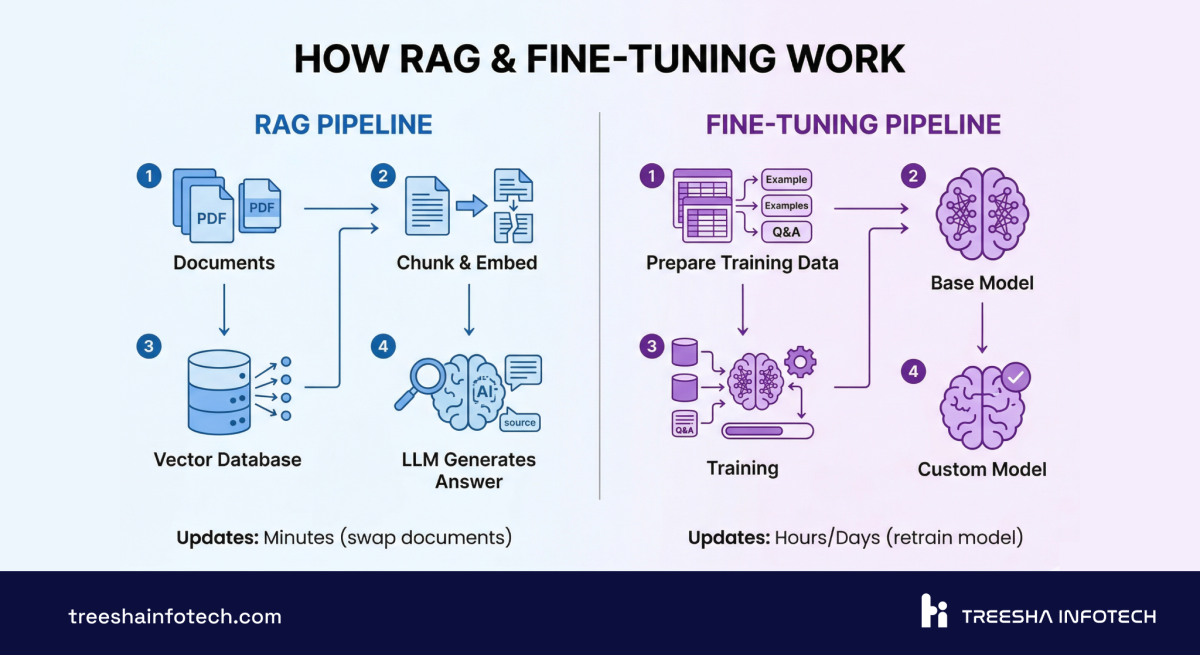
Step 1: Document ingestion. You take all your company documents — PDFs, knowledge base articles, product docs, Confluence pages, internal wikis, even Slack threads — and feed them into a pipeline.
Step 2: Chunking. Those documents get split into smaller pieces, typically 200-500 tokens each. This is where most teams make their first mistake — chunk too large and retrieval is imprecise, chunk too small and you lose context. There's no universal "right" chunk size; it depends on your content structure.
Step 3: Embedding. Each chunk gets converted into a vector — a list of numbers (typically 1536 or 3072 dimensions) that represents the semantic meaning of that text. The embedding model captures what the text means, not just the words it contains. "How do I reset my password?" and "I forgot my login credentials" produce similar vectors even though they share zero keywords.
Step 4: Vector storage. Those vectors go into a vector database — pgvector, Pinecone, Weaviate, Qdrant — where they're indexed for fast similarity search.
Step 5: Query time. When a user asks a question, their query gets embedded into the same vector space. The vector database finds the 5-10 most semantically similar chunks from your documents. This takes 50-200ms.
Step 6: Context injection. Those retrieved chunks get stuffed into the LLM's prompt as context: "Here are the relevant documents. Answer the user's question based on this information."
Step 7: Generation. The LLM reads the retrieved context and generates a response grounded in your actual data — not its training data from 2024.
The key insight: the LLM itself never changes. You're using the same Claude or GPT-4o that everyone else uses, but you're giving it your data at query time. The model's general intelligence stays intact. You're augmenting it, not modifying it.
This is why RAG updates are instant. Add a new document? Chunk it, embed it, store it. The next query will find it. No retraining. No downtime. No risk of breaking something that was working.
How Fine-Tuning Actually Works
Fine-tuning goes deeper. Instead of giving the model your data at query time, you change the model itself.
Step 1: Dataset preparation. This is 60-70% of the work and the step every team underestimates. You need hundreds to thousands of high-quality input-output examples that teach the model how to behave. For a customer support model, that means curated conversations. For a medical model, that means validated diagnosis-reasoning pairs. For a code model, that means correct code with explanations.
The data has to be clean, consistent, and representative. Bad training data doesn't just produce a bad model — it produces a confidently wrong model. Garbage in, garbage out, but at $50,000 scale.
Step 2: Training runs. The base model (Llama 3, Mistral, GPT-4o-mini) gets additional training on your dataset. Modern approaches like LoRA (Low-Rank Adaptation) make this more efficient — you're not retraining the entire model, just adjusting a small set of adapter weights. A LoRA fine-tune on a 7B parameter model takes 2-8 hours on a single A100 GPU. A full fine-tune on a 70B model can take days on multiple GPUs.
Step 3: Evaluation. You test the fine-tuned model against a held-out dataset it hasn't seen. This is critical — without rigorous evaluation, you have no idea whether the fine-tuning actually worked or just memorized the training data. You need to test for accuracy, hallucination rate, and catastrophic forgetting (did the model lose general capabilities while learning your domain?).
Step 4: Deployment. The fine-tuned model gets hosted on GPU infrastructure — either your own or a managed service. This adds ongoing compute cost that RAG doesn't have.
The key insight: fine-tuning changes how the model thinks. A fine-tuned medical model doesn't just know medical facts — it reasons about symptoms and diagnoses in the way a clinician would. A fine-tuned legal model doesn't just retrieve legal clauses — it applies legal reasoning to new situations. This depth of behavioral change is impossible with RAG alone.
But there's a trade-off: the model's knowledge is frozen at training time. If your product pricing changes, if a new policy gets published, if a regulation updates — the fine-tuned model doesn't know until you retrain it.
Head-to-Head Comparison
Here's the comprehensive comparison. I've included factors that most comparison articles skip — latency, team skills, and vendor lock-in matter more than people think.
| Factor | RAG | Fine-Tuning |
|---|---|---|
| Development Cost | $15,000 - $40,000 | $25,000 - $80,000 |
| Monthly Operational Cost | $500 - $3,000 | $1,000 - $5,000 |
| Time to Production | 4-8 weeks | 6-12 weeks |
| Query Latency | 300-800ms (retrieval + generation) | 100-400ms (generation only) |
| Knowledge Freshness | Real-time (add docs instantly) | Frozen at training time (retrain to update) |
| Hallucination Risk | Low (grounded in retrieved docs) | Medium (can hallucinate if training data has gaps) |
| Source Citations | Yes (can point to exact documents) | No (knowledge is baked into weights) |
| Customization Depth | Surface-level (what it knows) | Deep (how it thinks, writes, reasons) |
| Data Privacy | Your data stays in your vector DB | Your data is used in training (check vendor terms) |
| Scalability | Linear (more docs = more storage) | Fixed (model size doesn't grow with data) |
| Maintenance Effort | Low (update docs, re-embed) | High (curate data, retrain, evaluate, deploy) |
| Team Skills Needed | Backend dev + basic ML | ML engineer + domain expert + GPU infra |
| Vendor Lock-in | Low (swap LLMs freely) | High (fine-tuned weights are provider-specific) |
| Best For | Knowledge retrieval, Q&A, search | Behavioral change, domain reasoning, style |
The latency difference is real and underappreciated. RAG adds a retrieval step — 200-500ms to search the vector database and assemble context — before the LLM even starts generating. For interactive chat, this is fine. For real-time voice AI or high-throughput classification, that extra latency matters.
Real Cost Breakdown
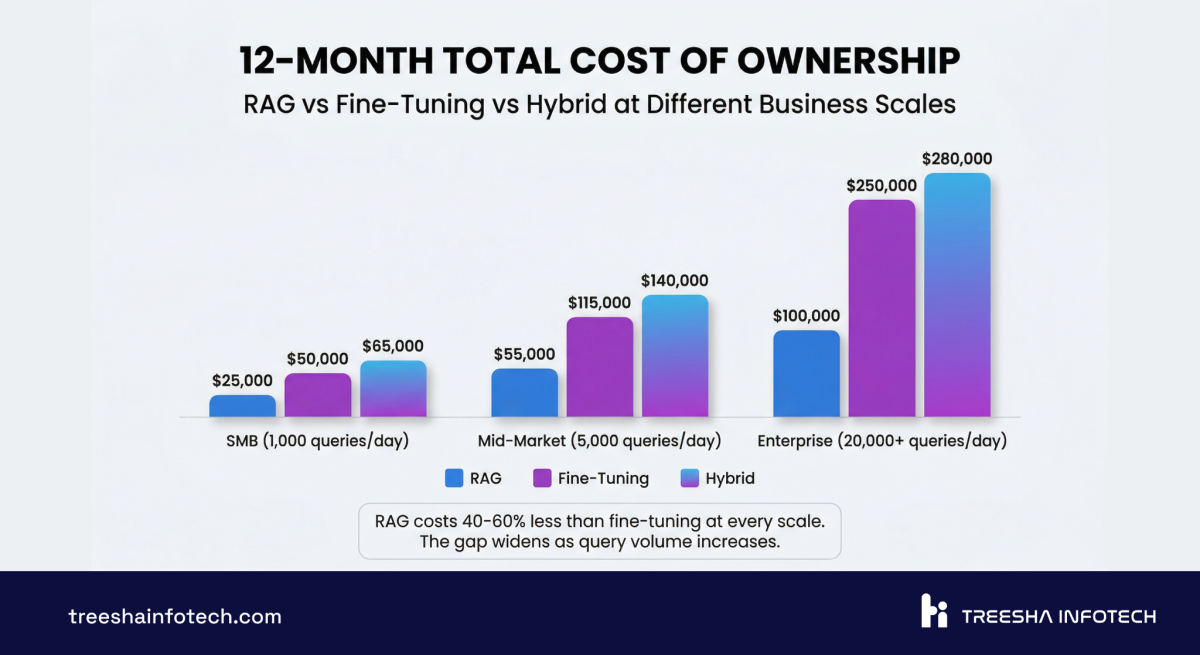
This is the section that matters for budgeting. I'm breaking down actual numbers — development cost, monthly operations, and 12-month TCO at different scales.
Development Cost
| Phase | RAG | Fine-Tuning | Hybrid (Both) |
|---|---|---|---|
| Discovery & Architecture | $3,000 - $6,000 | $4,000 - $10,000 | $6,000 - $15,000 |
| Data Pipeline / Dataset Prep | $4,000 - $12,000 | $10,000 - $30,000 | $12,000 - $35,000 |
| Core Development | $5,000 - $15,000 | $8,000 - $25,000 | $15,000 - $35,000 |
| Testing & Evaluation | $2,000 - $5,000 | $3,000 - $10,000 | $5,000 - $12,000 |
| Deployment & Monitoring | $1,000 - $2,000 | $2,000 - $5,000 | $2,000 - $5,000 |
| Total Development | $15,000 - $40,000 | $25,000 - $80,000 | $40,000 - $100,000 |
The dataset preparation line in the fine-tuning column is what kills budgets. For RAG, your existing documents are the data — you just need to ingest and index them. For fine-tuning, you need to curate, clean, format, and validate training examples. If your company doesn't have 500+ high-quality examples ready, creating them is a project in itself.
Monthly Cost by Query Volume
| Monthly Queries | RAG Cost/Month | Fine-Tuning Cost/Month |
|---|---|---|
| 3,000 (100/day) | $500 - $800 | $1,000 - $2,000 |
| 30,000 (1,000/day) | $1,200 - $2,500 | $1,500 - $3,000 |
| 300,000 (10,000/day) | $3,000 - $8,000 | $2,500 - $5,000 |
Notice the crossover. At low volume, RAG is significantly cheaper because you don't need GPU hosting — you use API-based models and pay per token. At high volume, fine-tuning can become cheaper per query because you're running your own model without per-token API fees, and there's no retrieval overhead per request.
Cost per 1,000 Queries
| Scale | RAG | Fine-Tuning |
|---|---|---|
| Low volume (100/day) | $5.00 - $8.00 | $10.00 - $20.00 |
| Medium volume (1,000/day) | $1.20 - $2.50 | $1.50 - $3.00 |
| High volume (10,000/day) | $0.30 - $0.80 | $0.25 - $0.50 |
12-Month TCO
| Scenario | RAG | Fine-Tuning |
|---|---|---|
| SMB (100 queries/day) | $21,000 - $50,000 | $37,000 - $104,000 |
| Mid-Market (1,000 queries/day) | $29,000 - $70,000 | $43,000 - $116,000 |
| Enterprise (10,000 queries/day) | $51,000 - $136,000 | $55,000 - $140,000 |
At SMB scale, RAG wins on cost by a wide margin. At enterprise scale, the gap narrows significantly — and if you need the behavioral customization that fine-tuning provides, the marginal cost difference doesn't matter.
Hidden Costs Most Articles Don't Mention
Embedding costs for RAG. Every time you add or update documents, you pay for embedding generation. At scale (100,000+ documents), initial embedding can cost $500-2,000 in API fees alone. Ongoing re-embedding for updates adds $100-500/month.
Evaluation datasets for fine-tuning. You need a separate test dataset to measure model quality. Creating and maintaining this costs $2,000-10,000 and needs domain expert time.
Retraining cycles for fine-tuning. Knowledge updates require retraining — $500-5,000 per cycle in compute costs, plus the engineering time to prepare data, run training, evaluate, and deploy. Most companies retrain monthly or quarterly.
Monitoring for both. You need conversation quality scoring, hallucination detection, and user feedback loops. Budget $500-1,500/month regardless of approach.
When RAG Wins (with Examples)
RAG is the right choice whenever the problem is fundamentally about knowledge access — making the model aware of information it doesn't have.
Customer support chatbots. Your product documentation, troubleshooting guides, and policy documents change constantly. RAG keeps the chatbot current without retraining. When a customer asks about a feature you shipped last week, the chatbot finds the new docs automatically. We've built AI chatbot systems where the knowledge base updates daily with zero downtime. Example: A B2B SaaS client we worked with deflected roughly 60% of incoming Tier 1 tickets in the first three months by routing common questions to a RAG-grounded chatbot — and pushed knowledge updates to production without ever retraining the model.
Internal knowledge search. Employees searching across Confluence, SharePoint, Google Drive, and internal wikis. RAG consolidates all of these into a single searchable interface. "What's our refund policy for enterprise clients?" pulls the answer from the right document regardless of which system it lives in. Example: An EdTech platform with 12,000+ Confluence pages cut average internal-search time from 4 minutes to under 30 seconds, and engineers stopped re-asking the same architecture questions in Slack every week.
Document Q&A. Legal teams reviewing contracts. Compliance teams searching regulations. HR answering policy questions. The documents are the single source of truth, and the AI needs to cite them — not paraphrase from memory.
FAQ and help center automation. Questions have definitive answers that live in your knowledge base. RAG retrieves the exact answer and can point users to the source article. If the answer changes, update the document — the chatbot follows automatically.
Real-time data applications. Inventory levels, pricing, order status, live dashboards — any scenario where the data changes hourly or daily. RAG can query databases and APIs at retrieval time. Fine-tuned models can't know what happened after their training cutoff.
Compliance and regulated industries. When you need an audit trail of where every answer came from, RAG's source citations are non-negotiable. "The AI said X because of paragraph 3 in document Y" is the kind of traceability that compliance officers need. We cover the full cost picture for building these systems in our AI chatbot development guide.
When Fine-Tuning Wins (with Examples)
Fine-tuning is the right choice when RAG isn't enough — when you need the model to reason differently, not just access different information.
Domain-specific reasoning. A medical AI that needs to reason about differential diagnosis doesn't just need access to medical textbooks — it needs to think like a clinician. A legal AI that drafts contract clauses needs to understand legal reasoning patterns, not just retrieve existing clauses. Fine-tuning teaches the model how to think in your domain. Example: A legal-tech client we scoped tried RAG-only for contract clause classification and stalled at ~70% accuracy. After fine-tuning on roughly 2,000 reviewed contracts, accuracy jumped past 90% — the model finally learned the patterns retrieval kept missing.
Consistent tone and style. If your brand voice is highly specific and every output must match it precisely — product descriptions, marketing copy, customer communications — fine-tuning bakes that style into the model. RAG can include style guides as context, but fine-tuning produces more consistent results at scale. Example: A consumer brand with 50,000+ SKUs needed product descriptions in a very specific voice across 4 languages. Fine-tuning on their existing high-performing copy let them generate on-brand descriptions in seconds — RAG-with-style-guide kept drifting after the first few sentences.
Proprietary language and taxonomy. If your industry has specialized terminology, internal codes, or classification systems that the base model doesn't understand, fine-tuning teaches the model your vocabulary. A model fine-tuned on your insurance claims data understands your claim codes and coverage categories without needing to look them up every time.
Classification and extraction tasks. Categorizing support tickets, extracting structured data from unstructured text, scoring leads based on conversation transcripts — these repetitive, pattern-based tasks benefit from fine-tuning because the model learns the classification boundaries from your specific examples.
Low-latency applications. Voice AI, real-time chat, and high-throughput pipelines where the 200-500ms retrieval overhead of RAG is unacceptable. Fine-tuned models respond directly without the retrieval step. This was a factor in the architecture decisions for projects like Wurkzen Rainmaker, where real-time voice processing demands minimum latency.
Cost optimization at massive scale. If you're running 10,000+ queries per day, fine-tuning a smaller open-source model (Llama 3 8B, Mistral 7B) can dramatically reduce per-query costs compared to API-based RAG with a larger model.
The Hybrid Approach: Best of Both Worlds
Here's what the best enterprise AI systems actually look like: fine-tuned reasoning with RAG-grounded data. Neither approach alone handles the full complexity.
The architecture: Fine-tune a model on your domain's reasoning patterns, communication style, and specialized tasks. Then wire up a RAG pipeline so that fine-tuned model retrieves current data before generating responses.
The fine-tuned layer handles how the model thinks: clinical reasoning, legal analysis, financial modeling, your specific classification taxonomy. The RAG layer handles what the model knows right now: current policies, latest documents, live data, recent changes.
When the hybrid pays for itself:
- Enterprise knowledge systems where the AI needs to reason about domain-specific data that changes regularly
- Regulated industries where answers must cite current documents but also apply domain reasoning
- Customer-facing AI that needs your brand voice (fine-tuned) while staying current with product changes (RAG)
- Multi-department platforms where the same model serves legal, HR, and engineering with different reasoning styles but shared knowledge
The hybrid approach costs $40,000-100,000 to build and adds complexity — you're maintaining both a training pipeline and a retrieval pipeline. But for the use cases where it's needed, nothing else delivers the same quality.
A practical hybrid workflow looks like this:
1. Fine-tune a base model (Llama 3 70B or Mistral) on 2,000+ domain-specific examples 2. Deploy the fine-tuned model on GPU infrastructure 3. Build a RAG pipeline that feeds current documents as context to the fine-tuned model 4. The fine-tuned model applies domain reasoning to the retrieved context 5. Monitor, evaluate, retrain quarterly, update RAG documents continuously
We use this pattern for enterprise clients where the AI needs to be both a domain expert and factually current. For most businesses starting their AI journey, RAG alone is the right first step.
Vector Database Comparison for RAG
If you're building RAG, you need a vector database. This decision matters more than most teams realize — it affects cost, performance, operational complexity, and long-term scalability.
| Feature | pgvector | Pinecone | Weaviate | Qdrant | Chroma |
|---|---|---|---|---|---|
| Type | PostgreSQL extension | Managed SaaS | Open source | Open source | Open source |
| Hosting | Your existing Postgres | Fully managed | Self-hosted or cloud | Self-hosted or cloud | Self-hosted |
| Cost | Free (uses your DB) | $70-2,000+/month | Free (self-host) or cloud pricing | Free (self-host) or cloud pricing | Free |
| Max Vectors | 10M+ (with proper indexing) | Billions | Billions | Billions | ~1M (dev-focused) |
| Query Latency | 5-50ms | 10-30ms | 10-50ms | 5-30ms | 10-100ms |
| Filtering | Full SQL (joins, WHERE, etc.) | Metadata filtering | GraphQL + filters | Payload filtering | Metadata filtering |
| Hybrid Search | Yes (full-text + vector) | No (vector only) | Yes (BM25 + vector) | Yes (full-text + vector) | No |
| Operational Overhead | None (it's Postgres) | None (managed) | Medium (separate service) | Medium (separate service) | Low |
| Best For | Teams on PostgreSQL, <5M vectors | Large scale, zero ops | Complex data relationships | High performance, large scale | Prototyping |
Our default: pgvector. Here's why. Most of our clients already run PostgreSQL. pgvector runs as an extension inside that same database — no new infrastructure, no new service to monitor, no new vendor to manage. For collections under 5 million vectors (which covers 90% of business use cases), pgvector's performance is excellent.
Laravel 13's native vector search makes this even more compelling. You get whereVectorSimilarTo() in the query builder, automatic embedding generation, and hybrid search combining full-text with AI reranking — all inside your existing Laravel application.
When to graduate from pgvector:
- Over 10 million vectors — Pinecone or Qdrant handles this better
- Need real-time index updates at thousands of writes per second
- Need multi-tenancy with strict data isolation at the vector level
- Your retrieval latency budget is under 5ms consistently
For everyone else, pgvector saves $70-2,000/month in vector database hosting and eliminates an entire service from your architecture.
7 Mistakes Companies Make with AI Strategy
I've seen these mistakes across dozens of projects. Every single one is avoidable.
1. Fine-tuning when RAG would work. This is the most expensive mistake. A company spends $50,000-80,000 fine-tuning a model to "know" their product documentation — when a $20,000 RAG system would have been faster, cheaper, and easier to maintain. Fine-tuning teaches the model how to think. If your problem is what it knows, use RAG.
2. Bad chunking strategy. The default "split every 500 tokens" approach loses context at chunk boundaries. A sentence that starts in one chunk and ends in another becomes meaningless in both. Use recursive chunking with overlap. Respect document structure — headings, sections, paragraphs. Table rows should stay together. Code blocks should never be split mid-function.
3. Wrong embedding model. Not all embedding models are equal. Using a general-purpose embedding model for highly technical content (medical, legal, engineering) produces mediocre retrieval. Domain-specific embedding models or multi-lingual models make a measurable difference. Test retrieval quality with your actual queries before committing to a model.
4. Ignoring evaluation. "It seems to work" is not evaluation. Build a test set of 100+ question-answer pairs from real user queries. Measure retrieval precision (did we find the right documents?), answer accuracy (is the response correct?), and hallucination rate (did the model make anything up?). Run this evaluation after every change to your pipeline.
5. No monitoring in production. The chatbot works great in demo. Three months later, nobody's checking conversation logs, the knowledge base is stale, and the model is confidently giving outdated answers. Build monitoring from day one: conversation quality scores, user feedback, retrieval hit rates, and automated alerts for low-confidence responses.
6. Underestimating dataset preparation for fine-tuning. Teams budget 20% of the project for data prep and spend 60% of the timeline on it. Curating, cleaning, and validating training data is tedious, domain-expert-intensive work. If you don't have at least 500 high-quality examples ready before starting, add 3-4 weeks to your timeline and $10,000-20,000 to your budget.
7. Not planning for knowledge updates. Your data isn't static. Products change. Policies update. Regulations evolve. With RAG, updates are straightforward — re-embed the changed documents. With fine-tuning, updates require a full retrain cycle. Whatever approach you choose, design the update workflow before you build the system, not after.
Decision Framework: Choose Your Path
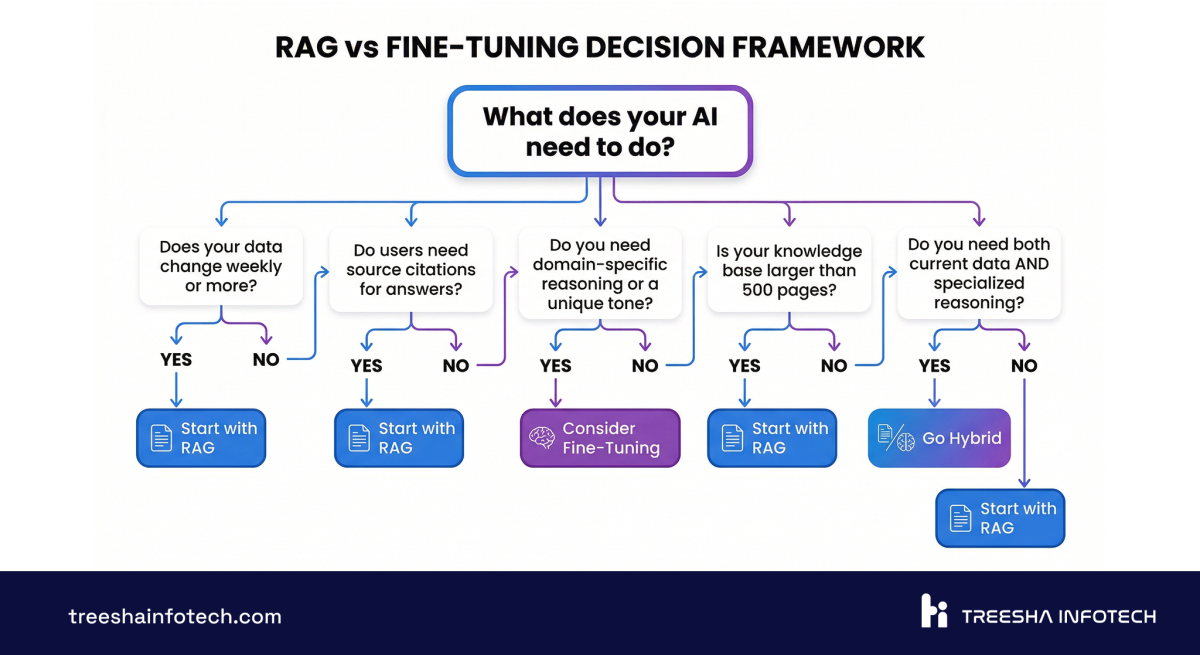
Stop reading comparison articles. Answer these five questions and the answer will be clear.
The Quick Decision Tree
Does your data change more than once a month?
- Yes: RAG (or hybrid). Fine-tuning can't keep up with frequent changes.
- No: Either approach works. Continue to next question.
Do you need to cite sources in your responses?
- Yes: RAG. Fine-tuning can't point to specific documents.
- No: Either approach works. Continue.
Do you need the model to reason differently than a general-purpose LLM?
- Yes: Fine-tuning (or hybrid). RAG gives the model more information, but doesn't change how it reasons.
- No: RAG. You don't need to modify the model.
Is your use case primarily about knowledge access or behavioral change?
- Knowledge access: RAG.
- Behavioral change: Fine-tuning.
- Both: Hybrid.
What's your budget and timeline?
- Under $30K or under 6 weeks: RAG.
- $30K-80K and 8-12 weeks: Either, depending on above answers.
- $80K+ and 12+ weeks: Hybrid is on the table.
Scoring Matrix
Rate your needs from 0-3 on each factor. Total the scores.
| Factor | Score 0 | Score 1 | Score 2 | Score 3 |
|---|---|---|---|---|
| Data freshness needs | Static data | Quarterly updates | Monthly updates | Daily/weekly updates |
| Source citation requirement | Never needed | Nice to have | Important | Regulatory requirement |
| Domain reasoning complexity | General knowledge | Some specialization | Heavy specialization | Novel reasoning patterns |
| Style/tone consistency | Flexible | Somewhat consistent | Very consistent | Brand-critical |
| Query volume (daily) | Under 100 | 100-1,000 | 1,000-10,000 | 10,000+ |
Score 0-5: Fine-tuning is likely your best bet. Your data is stable, citations don't matter, and you need deep behavioral customization.
Score 6-10: RAG is your starting point. You need fresh data, citations matter, and the general-purpose LLM's reasoning is sufficient with the right context.
Score 11-15: Consider the hybrid approach. You have competing needs — fresh data AND deep customization. Start with RAG, layer fine-tuning when the use case justifies the investment.
The Verdict
If you're building business AI in 2026, here's the honest recommendation:
Start with RAG. For customer support, internal knowledge search, document Q&A, FAQ automation, and any use case where the problem is "the model doesn't know our stuff" — RAG is faster, cheaper, and easier to maintain. Budget $15,000-40,000 for development and $500-3,000/month for operations. You'll be in production in 4-8 weeks.
Graduate to fine-tuning only when RAG hits a wall. If you need the model to reason like a domain expert, adopt a highly specific communication style, or perform classification tasks with your proprietary taxonomy — fine-tuning is worth the investment. But let production data from your RAG system inform the decision, not speculation.
The hybrid approach is for organizations that have validated both needs. Don't start here. Build RAG first, prove the value, identify the gaps, then add fine-tuning where it matters.
The biggest risk isn't choosing the wrong approach — it's over-engineering the first version. Ship a RAG system, learn from real users, and iterate. The AI landscape moves fast, and the team that ships in 6 weeks and iterates beats the team that plans for 6 months every time.
If you're evaluating RAG, fine-tuning, or a hybrid approach for your business, we'd be happy to walk through the specifics. Explore our AI & ML Development and AI Chatbot & Agent services, or get in touch for a technical scoping conversation.
Our AI Work
We've deployed both RAG and fine-tuned systems in production.
Wurkzen Rainmaker — A Voice AI platform for sales teams with real-time call analysis, AI coaching, and CRM integration. The architecture combines fine-tuned models for sales reasoning with RAG for company-specific playbooks and product knowledge. Thousands of sales calls processed daily.
Our RAG infrastructure — document ingestion pipelines, vector search, embedding management, and LLM orchestration — is the same foundation we use across projects. Each new implementation builds on proven patterns, which is why we deliver faster and iterate more efficiently than teams building from scratch.
For more on AI costs and timelines, read our detailed breakdown of AI chatbot development costs. And if you're building on Laravel, Laravel 13's native vector search and AI SDK make RAG implementation dramatically simpler.
Frequently Asked Questions
What is RAG in AI and how does it work?
What is fine-tuning an LLM?
When should I use RAG instead of fine-tuning?
When is fine-tuning better than RAG?
Can I use RAG and fine-tuning together?
How much does RAG cost compared to fine-tuning?
What is a vector database and do I need one for RAG?
How long does it take to implement RAG vs fine-tuning?
What are the risks of fine-tuning an LLM?
Does RAG work with open-source LLMs?
Ready to start your project?
Tell us about your requirements and we'll get back with a clear plan within 24 hours. No sales pitch — just an honest conversation.

Co-founded Treesha Infotech and leads all technology decisions across the company. Full-stack architect with deep expertise in Laravel, Next.js, AI integrations, cloud infrastructure, and SaaS platform development. Ritesh drives engineering standards, code quality, and product innovation across every project the team delivers.