
The first time this wall really bit us was on a flower-delivery store we ran on Laravel — the kind of business where Valentine's Day and Mother's Day push traffic to several times the daily baseline, and where a slow checkout during those windows costs real orders. We wanted to see clearly what the app was doing under that load: slow queries, slow jobs, where checkout lagged. So we did the obvious thing first and wrote the telemetry into the app's own MySQL — a tidy little events table, indexed sensibly. It worked beautifully in staging.
Then a few weeks of real order and request events accumulated, someone asked a perfectly reasonable question — "what was our average checkout latency by hour over the last month?" — and the query crawled. We added an index. It crawled differently. We added another. It got worse. The table was millions of rows and climbing, and the database that was busy taking actual orders now had to scan a graveyard of telemetry every time anyone opened a dashboard.
That was the moment the lesson landed: observability is an OLAP problem wearing OLTP clothes. The shape of an "average this across millions of rows by hour" question is fundamentally different from the "fetch this user's row" question your app database is built for, and no amount of indexing reconciles the two. You can feel the wall before you can name it.
That wall is exactly what Laravel Nightwatch was built to clear — it's what we ended up reaching for on that store rather than keep indexing uphill — and the way it clears it is a genuinely good piece of engineering worth understanding, whether or not you end up paying for it. This is a walkthrough of how it actually works under the hood, and the architectural lesson buried inside it that applies to any Laravel app that needs to ask analytical questions of its own data.
In This Article
Why Your App's Database Is the Wrong Place for Observability Data
Here's the thing most of us internalize wrong. MySQL, Postgres, SQLite — the databases Laravel ships with and that 99% of apps run on — are OLTP systems: Online Transaction Processing. They're row stores, optimized for a workload that looks like "find this one order, update its status, return it." Grab a few rows by an indexed key, modify them, commit. They are extraordinarily good at that.
Observability data is the opposite workload. You almost never want one row. You want "the 95th-percentile response time of the checkout endpoint, grouped by hour, over the last thirty days" — a scan-and-aggregate across millions of rows, touching two or three columns out of twenty. That's an OLAP workload: Online Analytical Processing. And the right tool for it is a column store, not a row store.
Jess Archer, who leads Nightwatch at Laravel, made this visceral in her Laracon US 2024 talk Analyzing Analytical Databases. She took a 22 GB Stack Overflow dataset — about 60 million rows — and ran the same aggregate query two ways. In MySQL it took five to six seconds. In ClickHouse, a column-oriented OLAP database, the same query returned in roughly 27 milliseconds. That's not a tuning win. That's a ~200x difference that comes from the storage engine being built for the question.
The reason is structural. A row store keeps each record's fields physically together, so to average one column across 60 million rows it has to read all 60 million rows — every field of every record — off disk. A column store keeps each column physically together and compressed, so the same query reads only the one or two columns it needs and skips the rest entirely. For analytics, that's the whole game.
In practice, here's what this means for a Laravel team. The instinct — and we've watched smart teams follow it, ourselves included — is to roll your own metrics or events table in your app database. It's fine at 10,000 rows. It's fine at 100,000. Somewhere past a few million it stops being fine, and the failure mode is nasty: the analytical queries don't just get slow in isolation, they compete for I/O and buffer pool with the transactional queries that actually serve your users. Your dashboard getting slow is annoying. Your dashboard making checkout slow because they share a database is an incident.
And here's the counter-intuitive part that trips people up: adding indexes makes it worse, not better. Indexes speed up "find a few rows by key." They do nothing for "scan everything and aggregate," and every index you add is more write overhead on the hot path and more storage to keep warm. On that flower-delivery store we added three indexes chasing the dashboard query and watched write latency climb while the aggregate stayed slow. The problem wasn't a missing index. The problem was using a row store to ask column-store questions.
The Two-Database Split: Transactional Versus Analytical
Once you accept that, the architecture of Nightwatch becomes obvious — and it's the single most useful idea to take away from how it's built. Nightwatch doesn't try to make one database do both jobs. It runs two, each doing the job it's good at.
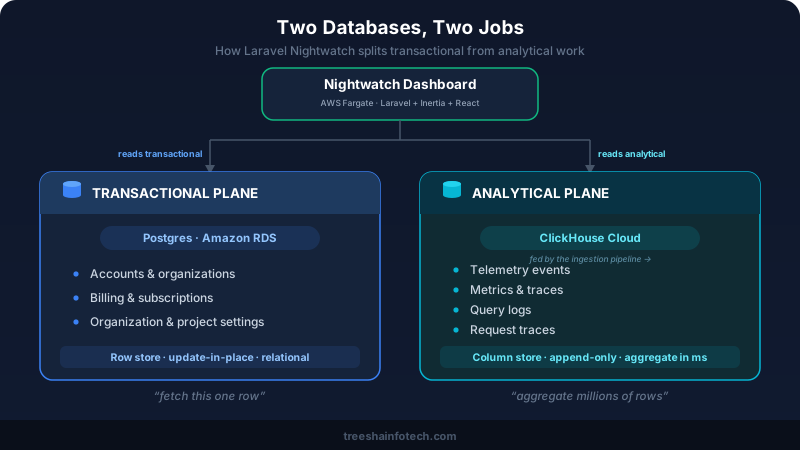
On the transactional side — user accounts, organizations, billing, project settings, the data that has to be correct and relational and updated in place — Nightwatch runs Postgres (on Amazon RDS). Boring, proven, exactly right. This is the data where you want foreign keys, unique constraints, and a single authoritative row you can update.
On the analytical side — the telemetry firehose, traces, metrics, query logs, request samples, the billions of immutable events that only ever get written once and read in aggregate — Nightwatch runs ClickHouse Cloud. This is the data where you never update a row, you only ever append, and every question you ask is an aggregation.
The split is the lesson. These two workloads have opposite access patterns, opposite consistency needs, and opposite scaling curves, and trying to serve both from one engine means doing both badly. Separating them lets each database be excellent.
In practice, this pattern shows up far beyond observability. We apply the same split whenever a client app grows a serious reporting requirement on top of a transactional core — an LMS that needs course-completion analytics across hundreds of thousands of learners, a marketplace that needs cohort and funnel reporting, a SaaS product whose customers want usage dashboards. The transactional system of record stays on the relational database your Laravel app already trusts. The analytical questions move to a store built for them, fed asynchronously. Nightwatch is just the most polished public example of an architecture decision a lot of mature Laravel apps eventually have to make.
From Your Laravel App to ClickHouse: The Streaming Pipeline
So how does an event that happens inside your Laravel app — a slow query, a failed job, a 500 response — end up queryable in Laravel's ClickHouse cluster milliseconds later, at a volume of millions of events per second across every customer? This is the part that's genuinely impressive, and Jess Archer walked through it in detail in Inside Nightwatch: Real-Time Analytics at Scale (Laracon India 2026, and again at Laravel Live Japan this past May).
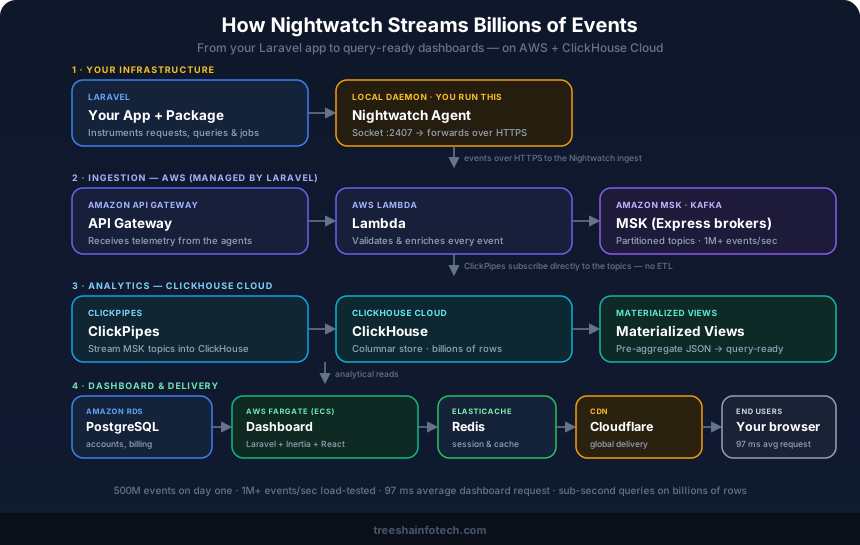
It helps to split the path into two halves: the part that runs on your infrastructure, and the managed cloud pipeline that runs on Nightwatch's.
On your side, there are two pieces, and this is the bit people miss:
- The package.
laravel/nightwatchlives inside your application and instruments it automatically — requests, queries, jobs, exceptions, scheduled tasks. Crucially, it does not call the cloud directly. It collects events and hands them to a local agent over a socket on127.0.0.1:2407, with sampling deciding which full traces to keep so the overhead stays negligible under load. - The agent. This is the part that surprises people the first time: Nightwatch runs a separate long-lived agent process alongside your app, started with
php artisan nightwatch:agent. It listens on that local socket, buffers what the package sends it, and forwards it to Nightwatch's ingest endpoint over HTTPS. Because it's a daemon, you keep it alive in production with Supervisor or systemd, exactly like a queue worker. It's the one operational thing you actually run — small, but real.
Once events leave the agent, they enter Nightwatch's managed pipeline, and you operate none of it:
- API Gateway + Lambda. The agent forwards to an API Gateway endpoint; Lambda validates each event and enriches it with derived fields before anything is trusted downstream. Bad or malformed events get rejected at the edge rather than poisoning the analytics.
- Amazon MSK (managed Kafka). Validated events are published to Kafka topics, partitioned so the firehose can scale horizontally — the buffer and backbone that absorbs spikes and decouples ingestion from storage. With MSK Express brokers, Nightwatch load-tested this at over one million events per second, and in production it processes more than a billion events per day at sub-second query latency.
- ClickPipes into ClickHouse. Rather than building and babysitting a custom ETL job, ClickHouse Cloud's ClickPipes subscribe directly to the MSK topics and pull events straight into ClickHouse. One less moving part.
- Materialized views. Inside ClickHouse, materialized views pre-aggregate the raw JSON into query-ready tables as events arrive. By the time you open a dashboard, the expensive aggregation has largely already happened — which is why the queries feel instant.
And the dashboard you actually look at sits on top of all this: per Laravel's engineering write-up with AWS, the Nightwatch UI is a Laravel + Inertia + React app running on AWS Fargate, with ElastiCache for Redis for sessions and caching and Cloudflare for global delivery — reading analytical data from ClickHouse and transactional data (your account, billing, settings) from Amazon RDS for Postgres. The result: 500 million events on day one, and a dashboard that still answers in about 97 ms while querying billions of rows.
From your codebase, getting on this pipeline is genuinely small — a package, two env vars, and an agent process to keep running:
1composer require laravel/nightwatch
2
3# .env — token from your Nightwatch dashboard, and route logs through Nightwatch
4NIGHTWATCH_TOKEN=your-nightwatch-token
5LOG_CHANNEL=nightwatch
6
7# run the agent — keep it alive with Supervisor or systemd in production,
8# the same way you already supervise your queue workers
9php artisan nightwatch:agent
In practice, here's the honest version of the pitch. Everything from API Gateway onward — the Kafka partitioning, the Lambda enrichment, the ClickHouse schema, the materialized views — is operated by Laravel, and that's an entire data-engineering team's worth of streaming infrastructure you don't have to build or run. What you do run is the local agent process: one more supervised daemon next to your queue workers. On the florist store that was a five-minute Supervisor config and then we never thought about it again — but it's worth knowing it exists, because "I installed the package and saw no data" is almost always "the agent isn't running."
Why ClickHouse Forces You to Think Differently
Here's where it gets interesting, and where the counter-intuitive truths live. ClickHouse is spectacular at analytics, but it earns that speed by throwing away conveniences you've taken for granted your entire relational career. If you ever reach for it directly — and not just through Nightwatch — these are the things that will bite you.
- IDs aren't unique. ClickHouse won't enforce uniqueness for you the way a primary key does. Deduplication is something you design for, not something the engine guarantees. The mental model of "this ID points at exactly one row" doesn't hold.
- Single-row inserts are an anti-pattern. ClickHouse wants data in large batches. Inserting one row at a time — the thing OLTP apps do constantly — is pathologically slow and creates fragmentation it then has to merge away. This is why the whole Kafka-batching pipeline exists: it's there to turn a firehose of individual events into the bulk inserts ClickHouse actually wants.
- Updates fight the engine. ClickHouse strongly prefers immutable, append-only data. Updating or deleting individual rows is possible but expensive and awkward, because the storage is optimized for "write once, read in aggregate forever." If your data needs frequent in-place updates, you've picked the wrong tool — which is precisely why account and billing data stays on Postgres.
- Schema follows queries, not normalization. In OLTP you normalize and let joins sort it out. In ClickHouse you design tables around the exact aggregations you'll run, often denormalizing aggressively, because the query patterns dictate the schema. It's the inverse of the instinct a decade of Eloquent has trained into you.
In practice, the lesson is "don't just bolt ClickHouse on." Every so often a client wants real-time analytics on event data and someone suggests "let's just add ClickHouse" as if it were a cache layer. It isn't a drop-in. It's a different data model with different rules, and the value Nightwatch delivers is partly that Laravel absorbed all of that complexity so you don't have to learn it the hard way. If you do build directly on an analytical store — for a custom usage-metering feature, an event-sourced reporting layer — budget real time for the modeling, because your relational instincts will actively mislead you for the first few weeks.
Pulse Versus Nightwatch: Don't Reach for the Firehose Too Early
This is the section I'd want a younger version of myself to read, because the most common mistake here isn't using the wrong tool — it's using the heavy tool too soon.
Laravel Pulse is the free, open-source monitoring tool that runs inside your application. It samples performance data — slow queries, slow jobs, cache hit rates, exceptions, usage — and stores it in your own existing database, MySQL or Redis. No extra infrastructure, no third-party service, no per-event cost. Jess Archer built Pulse too, and the engineering inside it is specifically about sampling and aggregating cleverly enough that monitoring your app doesn't meaningfully load your app.
Nightwatch is what Pulse becomes when that in-app model runs out of room — the managed streaming pipeline and ClickHouse cluster we just walked through. It exists because at a certain volume, storing and querying telemetry in your own database stops being viable, exactly the wall from the opening of this article.
The counter-intuitive take: most teams reach for the firehose far too early. It's tempting to stand up Kafka and ClickHouse on day one because it feels like the "serious" architecture. But you almost certainly don't have the volume to justify it yet, and you'll spend your time operating infrastructure instead of shipping features. Pulse running on the database you already have will carry you much further than your ambition wants to admit.
Here's a rough decision guide:
| Situation | Use Laravel Pulse | Use Nightwatch |
|---|---|---|
| Traffic volume | Low to moderate | High / telemetry hurts your app DB |
| Retention needed | Short (live dashboard) | Long (month-over-month trends) |
| Infrastructure appetite | Zero extra | Managed, paid, fine with that |
| Apps to monitor | One | Many, want one analytical view |
| Cost sensitivity | Free, self-hosted | Paid service, worth it at scale |
| Data model | In your existing DB | Streamed to ClickHouse |
In practice, our default is: start with Pulse, and only graduate when something concrete forces it — the telemetry writes start showing up in your own slow-query log, you genuinely need to answer "was this slow last month too?", or you're juggling five apps and want one place to look. Until one of those is true, the free in-app tool is not a compromise. It's the correct answer.
What This Means for Your Laravel Team
Step back from the architecture and here's what you actually get once the right tool is reading the right data the right way: the ability to ask questions your app database could never answer without melting. Slowest endpoints trended over weeks. Whether last Tuesday's deploy quietly regressed p95 latency. Exceptions clustered by type and frequency instead of scrolling a log. Queue and job throughput over time. The N+1 query that only shows up under real production load. These are analytical questions, and now there's a store built to answer them in milliseconds.
The deeper point is that this isn't really about one product. It's about a pattern every Laravel app eventually meets: the moment your transactional database is asked to do analytical work, you've outgrown a single database, and the fix is to split the workloads rather than to keep indexing your way uphill. Nightwatch is the polished, managed version of that decision. Knowing why it's built the way it is tells you when you've hit the same fork in your own app.
This is the work we do day to day. We instrument client Laravel applications — and Moodle LMS platforms running at real learner scale — with the right observability for their size: Pulse where it's enough, Nightwatch or a custom analytical store where the volume demands it, and the dual-database split when a transactional app grows a serious reporting requirement on top. The hard part is usually not installing the tool. It's reading the signals correctly and knowing which fork you're actually at. If your Laravel app has hit the wall where its own database can't answer the questions you need to ask of it, that's exactly the conversation we like to have.
A Thank-You to Jess Archer
Almost everything legible in this article we owe to Jess Archer's talks. As the engineer leading Nightwatch on the Laravel core team, she's spent the last two years explaining this architecture in public — Analyzing Analytical Databases at Laracon US 2024, Nightwatch Returns at Laracon EU 2025, and Inside Nightwatch: Real-Time Analytics at Scale at Laracon India 2026 and Laravel Live Japan this past May. What's rare is that she doesn't just demo the product; she teaches the constraints behind it — why row stores fall over, what ClickHouse makes you give up, where the naive approach breaks. That's a generous way to share hard-won engineering, and the Laravel community is better for it. Thank you, Jess.
Related Reading
- What's New in Laravel — May 2026: Autoscaling Queues, AI Agents Without Python & Laravel Moat
- AI Agents in Production: Architecture, Tools & Lessons Learned
- Legacy PHP to Modern Stack: A Practical Migration Playbook
- Laravel API Development: Best Practices for 2026
Frequently Asked Questions
Is Laravel Nightwatch free?
Do I need to know ClickHouse or Kafka to use Laravel Nightwatch?
How is Nightwatch different from Sentry, Datadog, or New Relic?
When should I use Laravel Pulse instead of Nightwatch?
Ready to start your project?
Tell us about your requirements and we'll get back with a clear plan within 24 hours. No sales pitch, just an honest conversation.

Co-founded Treesha Infotech and leads all technology decisions across the company. Full-stack architect with deep expertise in Laravel, Next.js, AI integrations, cloud infrastructure, and SaaS platform development. Ritesh drives engineering standards, code quality, and product innovation across every project the team delivers.