
Every training company we work with asks the same question within the first meeting: "Should we be using SCORM, xAPI, or LTI?" The honest answer is usually all three — but for different things.
These aren't competing standards. They solve different problems. SCORM packages and delivers your courses. xAPI tracks what learners actually do. LTI plugs external tools into your LMS. The confusion happens because vendors throw these acronyms around interchangeably, and most comparison articles describe what the standards are without telling you when to use each one.
After implementing all four major e-learning standards (including cmi5, the one most articles skip) across 50+ Moodle deployments at Treesha Infotech's e-learning practice, here's the practical guide I wish someone had given me five years ago.
In This Article
A 30-Second History
Understanding why four standards coexist requires about 30 seconds of context:
2001 — SCORM was created by the US Department of Defense's ADL Initiative. The military needed courses that could run on any LMS. SCORM solved that problem and became the universal e-learning packaging format.
2008 — LTI was developed by 1EdTech (formerly IMS Global). As learning tools moved to the web, LMS platforms needed a standard way to connect external applications with single sign-on and grade exchange.
2013 — xAPI (also called Tin Can API) emerged from a research project funded by ADL. SCORM could only track what happened inside an LMS. xAPI can track learning anywhere — mobile apps, simulations, VR, on-the-job.
2016 — cmi5 was born from collaboration between ADL and AICC. It's an xAPI profile that brings back the structured "course" concept from SCORM while using xAPI's tracking capabilities. The US DoD now promotes cmi5 as the official SCORM successor.
Each standard was a response to limitations in what came before. They're not duplicates — they're layers.
SCORM — Still the Backbone
SCORM (Sharable Content Object Reference Model) is the most widely adopted e-learning standard in the world. If you've ever uploaded a course ZIP file to an LMS, that was SCORM.
What SCORM Tracks
- Completion status — complete, incomplete, not attempted
- Score — raw, scaled, min, max
- Time spent — per session and cumulative
- Bookmarking — where the learner left off (suspend data)
- Pass/fail — based on score threshold
- Interactions — individual question responses (SCORM 2004)
SCORM 1.2 vs SCORM 2004
| Feature | SCORM 1.2 | SCORM 2004 |
|---|---|---|
| Adoption | Universal — works everywhere | High — most modern LMS support it |
| Sequencing | None — linear only | Sequencing & Navigation rules |
| Suspend data limit | 4,096 characters | 64,000 characters |
| Interaction tracking | Basic | Detailed per-question reporting |
| Our recommendation | Use for simple courses | Use for branched/complex courses |
The suspend_data limit in SCORM 1.2 is a real production issue I've hit multiple times. Complex courses store bookmarking and variable state in suspend data. At 4,096 characters, you get silent failures — learners lose their progress midway through a course with no error message. SCORM 2004 raises this to 64,000 characters, which solves the problem for all but the most extreme cases.
When SCORM Works Perfectly
- Structured, self-contained courses (compliance training, certifications, onboarding)
- Content that lives inside the LMS and doesn't need to track external activity
- Organizations that need a simple "did they complete it and what did they score?" answer
- Legacy content libraries — hundreds of existing packages that work and don't need rebuilding
When SCORM Breaks Down
- Mobile and offline learning — SCORM requires an active browser session connected to the LMS
- Tracking beyond the LMS — if learners do something valuable outside the course (workshops, on-the-job tasks, peer coaching), SCORM can't capture it
- Advanced analytics — you know they scored 85%, but you don't know which sections they struggled with, how many times they replayed a video, or which resources they downloaded
- Cross-platform tracking — SCORM is tied to one LMS instance
xAPI — Tracking Learning Everywhere
xAPI (Experience API, also called Tin Can API) fundamentally changes what "learning data" means. Instead of tracking only what happens inside a course, xAPI can track any learning experience, anywhere.
How xAPI Works
xAPI uses a simple structure: Actor + Verb + Object (with optional context and result).
1{
2  "actor": {
3    "name": "Sarah Chen",
4    "mbox": "mailto:sarah.chen@company.com"
5  },
6  "verb": {
7    "id": "http://adlnet.gov/expapi/verbs/completed",
8    "display": { "en-US": "completed" }
9  },
10  "object": {
11    "id": "https://training.company.com/courses/safety-2026",
12    "definition": {
13      "name": { "en-US": "Workplace Safety Refresher 2026" }
14    }
15  },
16  "result": {
17    "score": { "scaled": 0.92 },
18    "completion": true,
19    "duration": "PT45M"
20  }
21}
This statement says "Sarah completed the Safety Refresher course with a 92% score in 45 minutes." These statements are sent to a Learning Record Store (LRS) — a separate database designed to collect and query xAPI data.
What xAPI Can Track That SCORM Can't
- Mobile app interactions — "Sarah practiced the safety checklist on her phone during her commute"
- Video engagement — "Sarah watched the forklift safety video, skipped the intro, replayed the hazard section twice"
- Simulation performance — "Sarah completed the emergency drill simulation in 3 minutes with zero errors"
- On-the-job actions — "Sarah's supervisor confirmed she performed the safety check correctly on-site"
- Social learning — "Sarah answered 5 questions in the safety discussion forum"
- Cross-platform — all of the above, from different systems, flowing into one LRS
The Catch: What Nobody Tells You
xAPI is powerful but it's not simple to implement well:
1. You need an LRS. Unlike SCORM where the LMS handles everything, xAPI requires a separate Learning Record Store. Options range from open-source (Learning Locker) to commercial (Watershed, Veracity Learning, Yet Analytics). Budget for this — and for the infrastructure to host and maintain it.
2. Governance is mandatory. You must define which verbs, objects, and extensions your organization uses — and enforce consistency. Without governance, you'll get 15 different teams sending statements with 15 different verb definitions, and your analytics become useless.
3. Implementation cost is higher. SCORM is "upload a ZIP and it works." xAPI requires integration development — configuring statement generation, connecting to an LRS, building dashboards to make the data useful. Plan for 2-4x the implementation time compared to SCORM.
4. Not every LMS has native support. Moodle supports xAPI through plugins, but it's not as seamless as SCORM. You'll need the right plugins and configuration.
LTI — Connecting Tools, Not Tracking Content
LTI (Learning Tools Interoperability) solves a completely different problem than SCORM and xAPI. It's not about content or tracking — it's about connecting external tools to your LMS.
What LTI Does
When a learner clicks "Join Zoom Meeting" or "Open Turnitin" inside Moodle, that's LTI at work. It handles:
- Single sign-on (SSO) — the learner doesn't need a separate login for each tool
- Context passing — the tool knows which course, which user, and what role they have
- Grade passback — the tool can send scores back to the LMS gradebook
- Deep linking — instructors can browse and select specific resources from the tool provider
LTI 1.1 vs LTI 1.3 Advantage
| Feature | LTI 1.1 | LTI 1.3 Advantage |
|---|---|---|
| Security | OAuth 1.0a (shared secrets) | OpenID Connect + JWT (much stronger) |
| Grade passback | Basic — single score per link | Assignment & Grade Services — richer data |
| User provisioning | Manual | Names & Role Provisioning — automatic sync |
| Content selection | Static links | Deep Linking — browse and pick from tool |
| Our recommendation | Legacy — migrate away | Use this for all new integrations |
LTI 1.3 Advantage is a significant security and capability upgrade. If your integrations still run on LTI 1.1, plan a migration — the shared-secret model is increasingly considered insufficient.
Common LTI Use Cases
- Video conferencing — Zoom, BigBlueButton, Microsoft Teams
- Plagiarism detection — Turnitin, Copyleaks
- Interactive content — H5P, Genially, Nearpod
- Virtual labs — CloudShare, Appsembler
- Assessment platforms — ProctorU, Respondus
- Content libraries — LinkedIn Learning, Coursera for Business
A Gotcha: LTI Field Labels Differ Across Platforms
One frustration we've hit repeatedly: every LMS labels its LTI configuration fields slightly differently. Moodle says "Tool URL." Canvas says "Target Link URI." Blackboard says "Provider Domain." They mean the same thing, but it confuses everyone setting up integrations for the first time. Always refer to the tool provider's documentation for your specific LMS.
cmi5 — The SCORM Successor Nobody Talks About
Most comparison articles stop at SCORM, xAPI, and LTI. They miss cmi5 — and it's arguably the most important standard for training companies planning their next 5 years.
What cmi5 Is
cmi5 is an xAPI profile (not a separate standard) that brings back what training companies loved about SCORM — structured courses with defined launch rules — while using xAPI's tracking infrastructure under the hood.
Think of it this way:
- SCORM = content packaging + basic tracking, inside the LMS
- xAPI = powerful tracking anywhere, but no concept of "courses" or "launch"
- cmi5 = SCORM's course structure + xAPI's tracking power
Why It Matters
The US Department of Defense — the same organization that created SCORM — is promoting cmi5 as the official SCORM successor. When the DoD signals a direction, the industry follows.
What cmi5 fixes:
- Content can live anywhere — not just inside the LMS. A cmi5 course can be hosted on a CDN, a separate server, or a cloud service
- Mobile and offline support — unlike SCORM, cmi5 doesn't require an active LMS browser session
- Rich tracking via xAPI — all the detailed analytics xAPI provides, with the structured course framework SCORM users expect
- No suspend_data limits — state management is handled through the LRS, not character-limited LMS fields
Current Adoption
cmi5 adoption is growing but not universal. Authoring tools like Articulate Storyline and Adobe Captivate are adding cmi5 export options. Major LRS platforms support cmi5 natively. LMS support is emerging through plugins and middleware like SCORM Cloud Dispatch.
For Moodle, cmi5 content can be delivered via SCORM Cloud Dispatch (which creates SCORM proxy packages that launch cmi5 content) or dedicated cmi5 plugins. Native cmi5 support in Moodle core is expected as adoption reaches critical mass.
Head-to-Head Comparison
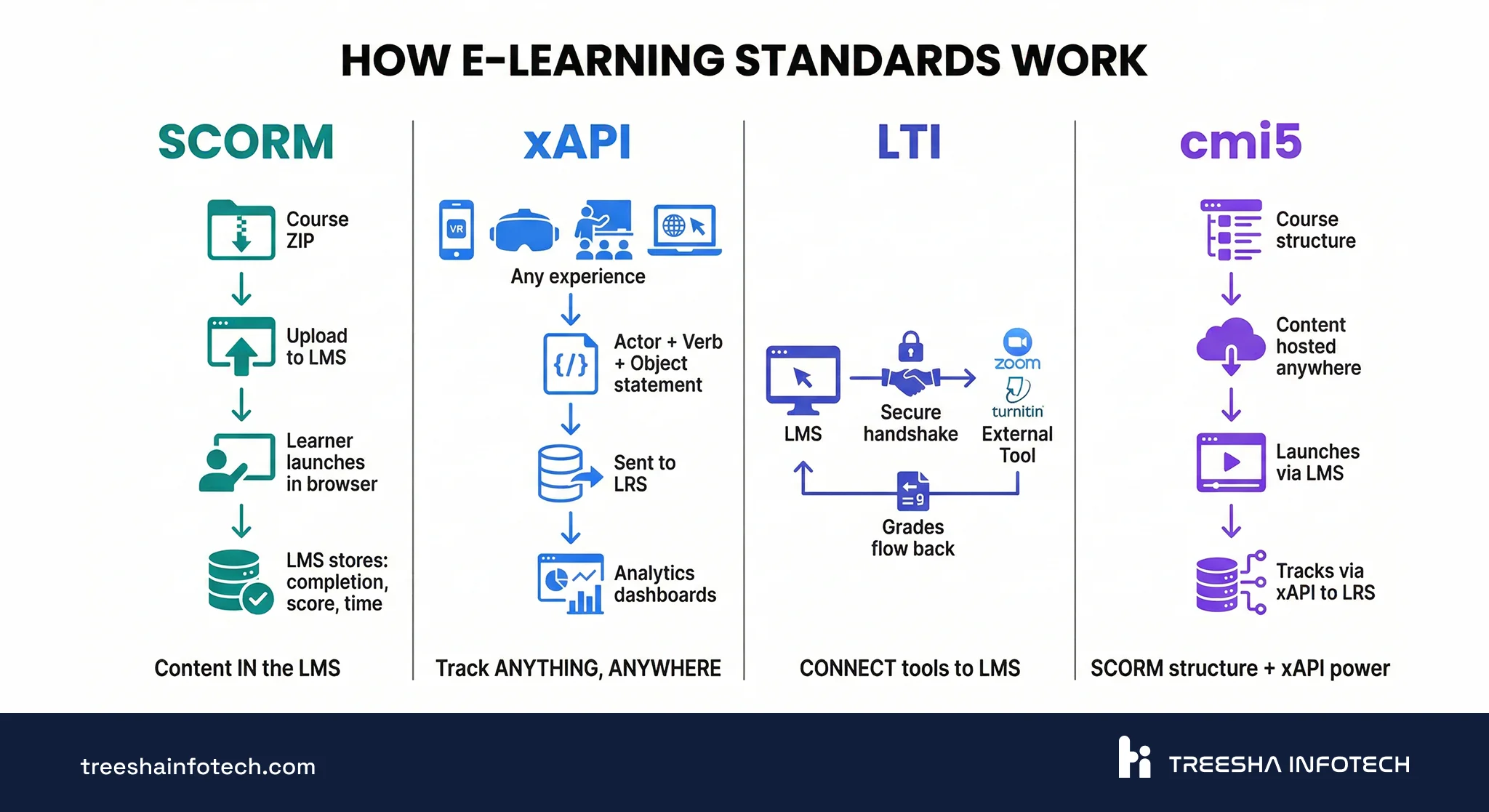
| Feature | SCORM 1.2 | SCORM 2004 | xAPI | cmi5 | LTI 1.3 |
|---|---|---|---|---|---|
| Primary purpose | Content packaging + basic tracking | + sequencing & navigation | Experience tracking anywhere | Content launch + xAPI tracking | Tool integration + SSO |
| Tracks completion | Yes | Yes | Yes | Yes | No (grade passback only) |
| Tracks beyond LMS | No | No | Yes | Yes | N/A |
| Needs LRS | No | No | Yes | Yes | No |
| Mobile / offline | No | No | Yes | Yes | Depends on the tool |
| Content hosting | Inside LMS only | Inside LMS only | Anywhere | Anywhere | Tool provider's servers |
| Analytics depth | Basic (score, time, completion) | Moderate (+ interactions) | Deep (any experience) | Deep (any experience) | Minimal (grade only) |
| Implementation effort | Low — upload ZIP | Low-Medium | High — LRS + governance | Medium — LRS + structured launch | Low-Medium — configure endpoints |
| Moodle support | Native | Native | Via plugins + LRS | Via plugins / SCORM Cloud | Native (External Tool) |
| Maturity | Universal — 25 years | Widespread — 22 years | Established — 13 years | Growing — 10 years | Established — 18 years |
Decision Framework: Which Standard for Which Scenario
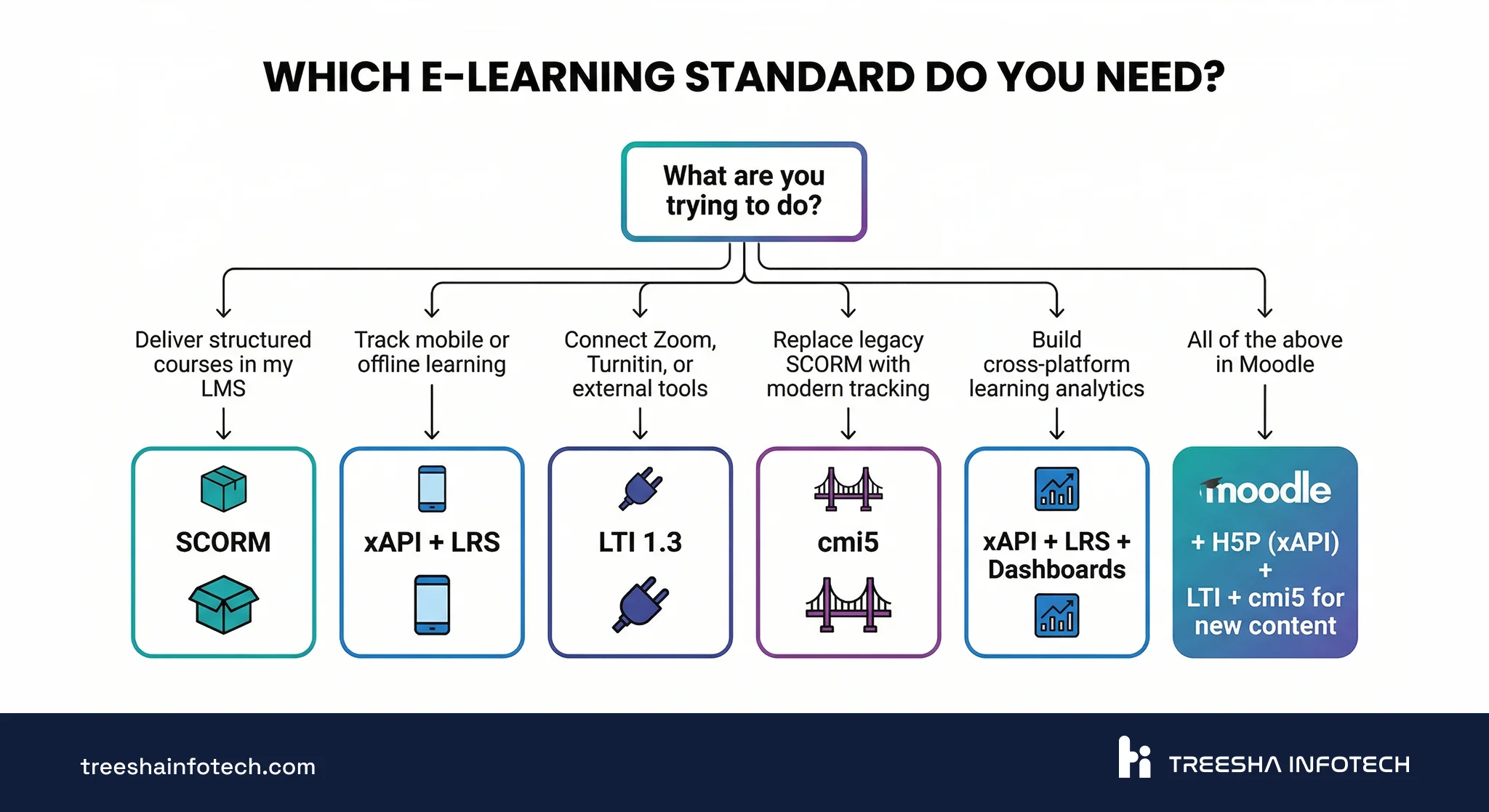
Instead of "use SCORM for basic, xAPI for advanced," here's what we actually recommend based on real scenarios:
Compliance training with certificates Use SCORM. You need "did they complete it and pass?" — SCORM does this perfectly. Don't over-engineer it.
Mobile workforce who train in the field Use xAPI + LRS. Field workers need offline access and you want to track on-the-job performance. SCORM's browser requirement disqualifies it.
Integrating Zoom, Turnitin, or other external tools Use LTI 1.3. This is exactly what LTI was built for. No custom integration needed.
Replacing legacy SCORM with modern tracking Use cmi5. You keep the familiar course structure while gaining xAPI's analytics. Smoothest migration path.
Advanced learning analytics across platforms Use xAPI + LRS + dashboards. If you need to answer "how does classroom training correlate with on-the-job performance?" — only xAPI can connect those data points.
New course content for a Moodle LMS
- Start with SCORM (or cmi5 if your authoring tool supports it)
- Add xAPI tracking for H5P interactive elements
- Use LTI for external tool integrations
- This combined approach covers 95% of training company needs
"We just need courses in Moodle and it needs to work" Use SCORM 1.2 or 2004. Upload the ZIP. It works. Add xAPI later when your analytics needs grow — not before.
Should You Upgrade Your SCORM Content?
The honest answer: probably not all of it.
Upgrade When
- Your learners need mobile or offline access and your current content is SCORM browser-only
- You need analytics that SCORM can't provide (video engagement, simulation performance, cross-platform)
- You're rebuilding content anyway for accuracy or compliance updates
- Your SCORM 1.2 courses are hitting
suspend_datalimits and learners lose progress
Leave SCORM Alone When
- The content works, learners complete it, and your reporting requirements are met
- The courses are short (under 30 minutes) and linear — SCORM handles these perfectly
- You'd be migrating hundreds of packages with no functional benefit
- Your team doesn't have the LRS infrastructure or governance processes in place for xAPI
Phased Migration Approach
For large SCORM libraries (100+ packages), we recommend:
1. Audit — categorize every package as "keep as SCORM," "rebuild in cmi5," or "retire" 2. Infrastructure first — set up your LRS and define xAPI governance before building content 3. New content in cmi5 — all newly authored content uses cmi5 from day one 4. Migrate by priority — start with courses that have the strongest case for xAPI tracking (mobile, analytics, interactivity) 5. Leave the rest — SCORM courses that work and meet requirements stay as SCORM indefinitely
Implementation in Moodle
Since the majority of our e-learning projects run on Moodle, here's how each standard works in practice.
The same SCORM, xAPI, and LTI concepts apply to Canvas, Blackboard, Docebo, and other major LMS platforms — the standards are platform-neutral by design. The specific plugins, activity modules, and configuration screens differ, but the decisions (which standard to use, when to add an LRS, how to structure content) are identical. Use this section as a reference for the kinds of questions you'll ask on whichever platform you run — the answers translate.
SCORM in Moodle
Native support. Add a SCORM activity to any course, upload the ZIP, configure completion tracking. Both SCORM 1.2 and 2004 work out of the box. The SCORM player handles launch, tracking, and bookmarking automatically.
Key settings to get right:
- Force completed — for compliance courses where you need a definitive "done" status
- Force new attempt — prevents learners from editing previous quiz answers
- Display type — "New window" works better than iframe for complex courses
xAPI in Moodle
Two paths:
H5P (built into Moodle 4+) — H5P interactive content generates xAPI statements natively. Interactive videos, quizzes, drag-and-drop, branching scenarios — all emit xAPI data without extra configuration. This is the easiest entry point for xAPI in Moodle.
Logstore xAPI plugin — forwards Moodle events (course views, quiz attempts, forum posts) to an external LRS as xAPI statements. Install the plugin, configure your LRS endpoint and credentials, and Moodle starts streaming data. Getting these plugins configured correctly requires familiarity with Moodle's open-source plugin architecture — the integration points are well-documented but need careful setup.
LTI in Moodle
Native support via the External Tool activity. Configure the tool URL, consumer key/secret (LTI 1.1) or registration URL (LTI 1.3), and Moodle handles SSO, context passing, and grade return.
For frequently used tools, Moodle admins can pre-configure tool providers site-wide so instructors just select from a dropdown instead of entering credentials every time.
cmi5 in Moodle
Currently via SCORM Cloud Dispatch (creates a SCORM 1.2 proxy package that launches cmi5 content and routes xAPI statements to your LRS) or dedicated cmi5 plugins. The setup is more involved than native SCORM but the tracking capabilities are significantly richer.
Common Mistakes Training Companies Make
After 50+ Moodle deployments, these are the mistakes I see most often:
1. Choosing xAPI when SCORM does the job. A training company spent three months setting up an LRS and xAPI governance for content that only needed completion tracking. SCORM would have been deployed in a day.
2. Ignoring LTI and building custom integrations. A client built a custom SSO bridge to connect their video platform to Moodle. LTI 1.3 would have done it in an afternoon.
3. No governance on xAPI verbs. Three different content developers used three different verbs for "completed a module." The analytics dashboard showed wildly inconsistent data. Define your xAPI vocabulary upfront and enforce it.
4. Running SCORM 1.2 when 2004 solves their problem. Complex branching courses that exceed the 4,096-character suspend data limit. Learners lose progress randomly. SCORM 2004 fixes this immediately.
5. Migrating everything at once. A "let's convert all 300 SCORM packages to xAPI" project that stalls at package 40 because the team burned out. Phased migration works. Big-bang doesn't.
6. Not testing SCORM packages across browsers. A package works in Chrome but fails in Safari because of a JavaScript compatibility issue. Test on every browser your learners use — and on mobile.
7. Forgetting about reporting before choosing a standard. The L&D team chose xAPI for "better data" but nobody built the dashboards. Raw xAPI statements in an LRS are useless without visualization. Plan your reporting needs first, then choose the standard that generates the data you actually need.
Need help implementing SCORM, xAPI, or LTI in your Moodle platform — or planning a migration from legacy content? Get a free quote or schedule a call with our e-learning team. We've been building Moodle solutions for over a decade.
Related reading:
- Corporate LMS Buyer's Guide: How to Choose the Right Platform
- How Moodle Powers Enterprise E-Learning at Scale
- Moodle Customization Guide: Themes, Plugins & Multi-Tenancy
Frequently Asked Questions
What is the difference between SCORM, xAPI, and LTI?
Does Moodle support xAPI and cmi5?
Should I upgrade my existing SCORM courses to xAPI?
What is an LRS and do I need one?
Ready to start your project?
Tell us about your requirements and we'll get back with a clear plan within 24 hours. No sales pitch, just an honest conversation.

Co-founded Treesha Infotech and leads operations for the company's Moodle and e-learning practice. Ashish manages project delivery, client communication, and quality assurance across all Moodle engagements, ensuring every platform ships on time, on budget, and beyond client expectations.